
MCP server · Gaming
One Piece TCG Oracle
by gregario
Let your AI look up One Piece cards, browse sets, and analyze your deck for you.
This is a small helper for the One Piece Trading Card Game. Once it is connected, your AI can search cards, browse sets, and look at your deck list. It is handy if you play the game and want quick answers without opening a card database in your browser.
What is an MCP server? The 30-second version
On its own, your AI can only chat with you. It cannot look up cards or check a deck list. An MCP server is a small helper program that gives your AI a new skill. This one connects your AI to a community card database for the One Piece Card Game, so it can look things up for you when you ask.
What this MCP server does
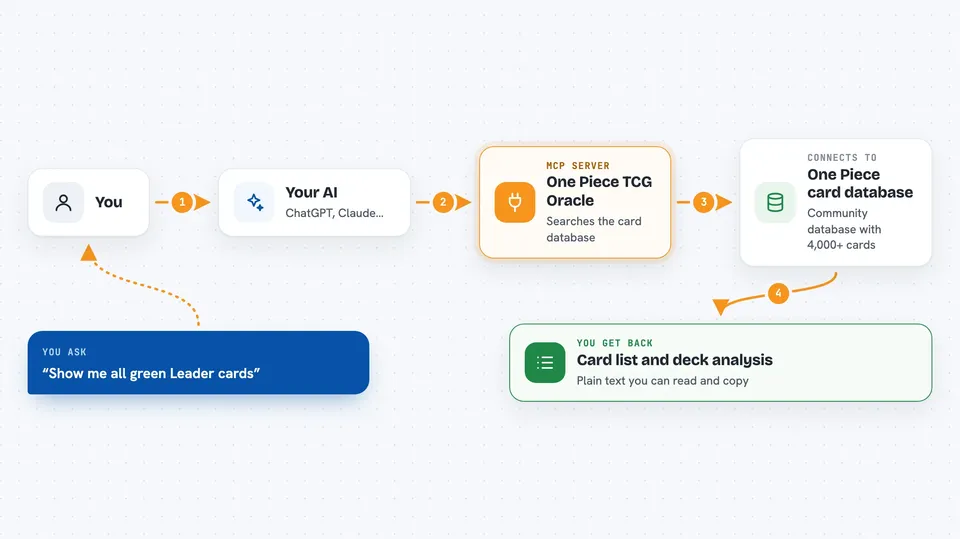
You ask your AI a question about One Piece cards, like which red cards cost 3 or less. Your AI passes that question to this helper. The helper searches a community card database with over 4,000 cards. Then your AI tells you the results in plain words, right in the chat.
 Click to zoom
What you can do with it
- Search cards by color, type, cost, power, rarity, attribute, character type, or set
- Browse all sets and see how many cards each one has
- List the cards inside a specific set
- See every printing of a card, including alternate art versions
- Browse Leader cards, filtered by color if you want
- Analyze a deck list and see its cost curve, colors, types, and counters
- Find cards with counter values to help build a defensive deck
Try asking your AI
- “Show me all green Leader cards”
- “Search for Luffy cards that cost 5 or less”
- “Here is my deck list, what does the cost curve look like”
- “Which cards in OP-05 have a counter of 2000”
What it gives back to you
You get answers in the chat, like a list of matching cards with their details. For a deck list, you get a summary of the cost distribution, colors, card types, and counters. Set browsing gives you set names with card counts, or the cards inside a set. Everything shows up as normal text you can read and copy.
Before you start
What you need
- The Claude desktop app or Claude Code
- Node.js installed on your computer
Good to know
Card data comes from community databases, so a card detail may be out of date or slightly off.
Install it with your AI
Add One Piece TCG Oracle to your AI, no technical skills needed
You don't install anything by hand. You copy one prompt, paste it into an AI that can work on your computer, and it checks, installs and connects the server for you, asking you when it needs something.
Sign in to get the install prompt
Members get a ready-made prompt that lets the Claude desktop app check One Piece TCG Oracle, install it and connect it for them, step by step. You don't need any technical skills: you copy, paste and answer a few questions. Your connected AI can also find and install any of the 4,361 MCP servers here for you.
Who it's for
One Piece Card Game players who want quick card lookups and deck checks without leaving their chat.





