
MCP server · Gaming
Steam MCP server
by Grinv
Ask your AI about Steam games, prices, deals, reviews, and your own library and achievements.
This is a small helper that connects your AI assistant to Steam. Once it is set up, you can just ask in normal words about game prices, discounts, reviews, Steam Deck compatibility, or your own games and playtime. It is handy if you shop on Steam, keep a wishlist, or like comparing what you and your friends play.
What is an MCP server? The 30-second version
On its own, your AI can only chat with you. An MCP server is a small helper program that gives your AI a new skill or a connection to an app or service. This one connects your AI to Steam, so it can look up store pages, prices, reviews, and player details for you when you ask. You stay in the chat; the helper does the looking up.
What this MCP server does
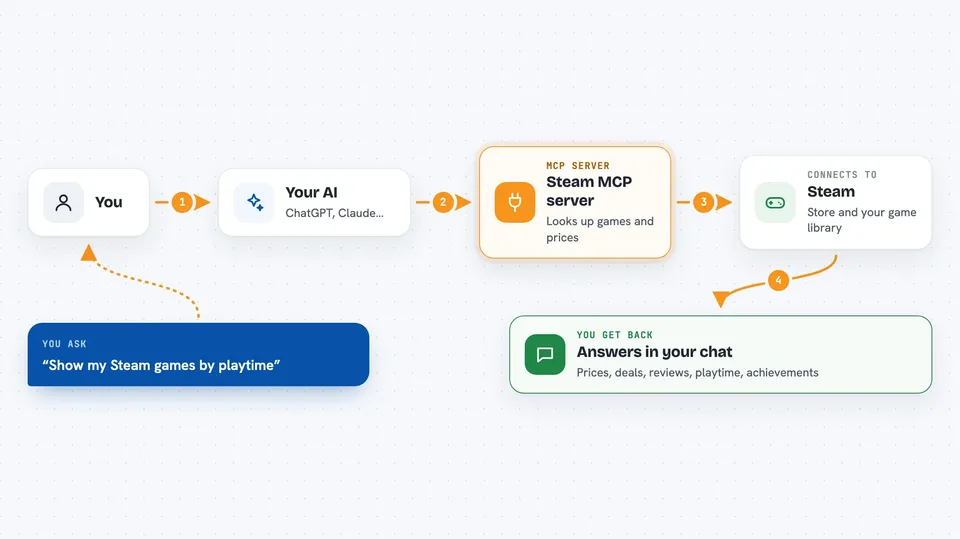
You ask your AI a question about Steam in plain words. The AI passes that request to this helper, which talks to Steam's own store pages and the official Steam Web API. Steam sends back the details, and the helper hands them to your AI. Your AI then writes the answer for you in the chat, like a price, a list of deals, or a review summary.
 Click to zoom
What you can do with it
- Look up a game's price, genres, age rating, and platforms
- Find games on sale by discount, rating, or tags
- Check Steam Deck, SteamOS, and other compatibility badges
- Read recent reviews and see how a game's reviews changed over time
- See how many people are playing a game right now
- List your own games by playtime and what you played recently
- Check achievement progress and how rare each achievement is
Try asking your AI
- “Find Hollow Knight and tell me its price, genres and age rating.”
- “Which games are more than 80% off right now with 90%+ positive reviews?”
- “Show my Steam profile and list my games by playtime.”
- “How far am I through Elden Ring's achievements?”
What it gives back to you
You get answers written out in the chat: prices, discount percentages, review summaries, lists of games, playtime numbers, and achievement progress. Lists can be short or long depending on what you ask. Nothing is changed on Steam; it only reads and reports back.
Before you start
What you need
- The Claude desktop app or another MCP client
- Node.js 20.11 or newer if you install it with npx
- A free Steam Web API key only if you want your profile, library, or achievements (the site gives you one for free)
- Your Steam ID or profile name, and a public profile, for your own player details
Good to know
It only reads from Steam and never buys, trades, or changes anything, but your player details need a public profile and a free API key that you should keep private.
Install it with your AI
Add Steam MCP server to your AI, no technical skills needed
You don't install anything by hand. You copy one prompt, paste it into an AI that can work on your computer, and it checks, installs and connects the server for you, asking you when it needs something.
Sign in to get the install prompt
Members get a ready-made prompt that lets the Claude desktop app check Steam MCP server, install it and connect it for them, step by step. You don't need any technical skills: you copy, paste and answer a few questions. Your connected AI can also find and install any of the 4,361 MCP servers here for you.
Who it's for
Steam shoppers, deal hunters, and players who want quick answers about prices, reviews, and their own library without opening a browser.





