MCP server · Developer tools
Standard Vocal MCP server
Build, test and check phone agents on Vapi, right from your AI chat.
This is a helper that lets your AI build and check phone agents on Vapi, a service that runs automated phone calls. It is made for people who set up phone receptionists or booking lines and want to test them without clicking around a dashboard. If you use Vapi and want your AI to do the boring parts, this is for you.
What is an MCP server? The 30-second version
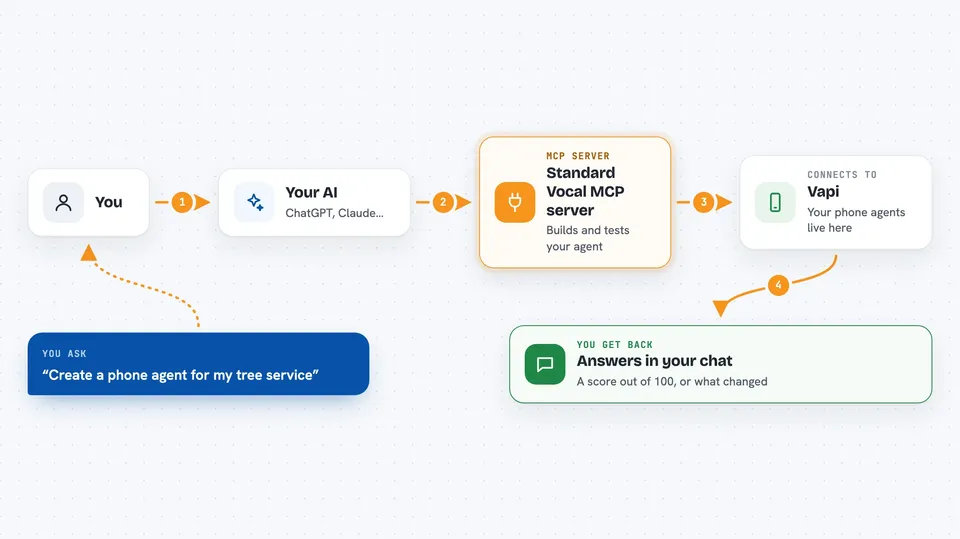
On its own, your AI can only chat. An MCP server is a small helper program that gives your AI a new skill or a connection to an app or service. This one connects your AI to Vapi, the service that runs your phone agents. Once it is connected, you can ask your AI to create an agent, test it, or check a call recording, and it will do it for you.
What this MCP server does
You ask your AI something like create a phone agent for a tree service. The AI uses this helper, which talks to Vapi and builds the whole agent for you: the script, the voice, the speech settings and the key words. You can then ask it to test the agent by running pretend phone calls and scoring how it behaved. If you want, it can also download a real call recording and look for where a noise came from. It keeps old versions of your agent script so you can compare them or go back.
 Click to zoom
What you can do with it
- List the phone agents already on your Vapi account
- Create a full phone agent from a ready-made template for a trade like tree service or plumbing
- Test an agent with pretend calls and get a score out of 100
- Download a call recording and find where a noise came from
- Save a copy of your agent script and compare two versions
- Put an old version of the script back if a change made things worse
- Block a script change if the test score dropped
Try asking your AI
- “Create a phone agent for my tree service company called L'Arbre en Nord, in Coutiches and Ramoniers”
- “Run the tests on my tree service agent and tell me the score”
- “Check the recording of my last call and tell me where the background noise comes from”
- “Compare the current script of my plumber agent with the last saved version”
What it gives back to you
You get back clear answers in the chat. A test run gives you a score out of 100 with PASS, WARN or FAIL, and a list of what the agent did right or wrong. A recording check tells you which part of the call the noise came from. A script comparison shows you what changed between two versions.
Before you start
What you need
- A Vapi account with a token (a kind of password for apps; Vapi gives you one in your account settings)
- An OpenAI key (also a kind of password; used to run the pretend calls during tests)
- Node.js installed on your computer (the free program that runs this helper)
- The Claude desktop app or Claude Code, to connect the helper to your AI
Good to know
It can create and change real phone agents on your Vapi account, and it uses your OpenAI key during tests, so those calls may cost you money.
Install it with your AI
Add Standard Vocal MCP server to your AI, no technical skills needed
You don't install anything by hand. You copy one prompt, paste it into an AI that can work on your computer, and it checks, installs and connects the server for you, asking you when it needs something.
Sign in to get the install prompt
Members get a ready-made prompt that lets the Claude desktop app check Standard Vocal MCP server, install it and connect it for them, step by step. You don't need any technical skills: you copy, paste and answer a few questions. Your connected AI can also find and install any of the 4,361 MCP servers here for you.
Who it's for
People who run or set up phone agents on Vapi, like small business owners, reception staff or assistants managing a booking line.