MCP server · Chat
Cloudflare Workers AI MCP server
by puspoaditya
Lets your AI run chat, text embeddings and image generation through Cloudflare's AI service.
This is a small helper that connects your AI assistant to Cloudflare Workers AI, a service that runs AI models for you. Once it is set up, you can ask your AI to chat with models like Llama or DeepSeek, turn text into embeddings, or make a picture. It is handy if you already use Cloudflare or want a free way to try different AI models without leaving your chat window.
What is an MCP server? The 30-second version
On its own, your AI can only chat with you using what it already knows. An MCP server is a small helper program that gives your AI a new skill or a connection to another service. This one connects your AI to Cloudflare Workers AI, so when you ask for a summary, an embedding or an image, the AI can actually send that request to Cloudflare and bring the result back to you.
What this MCP server does
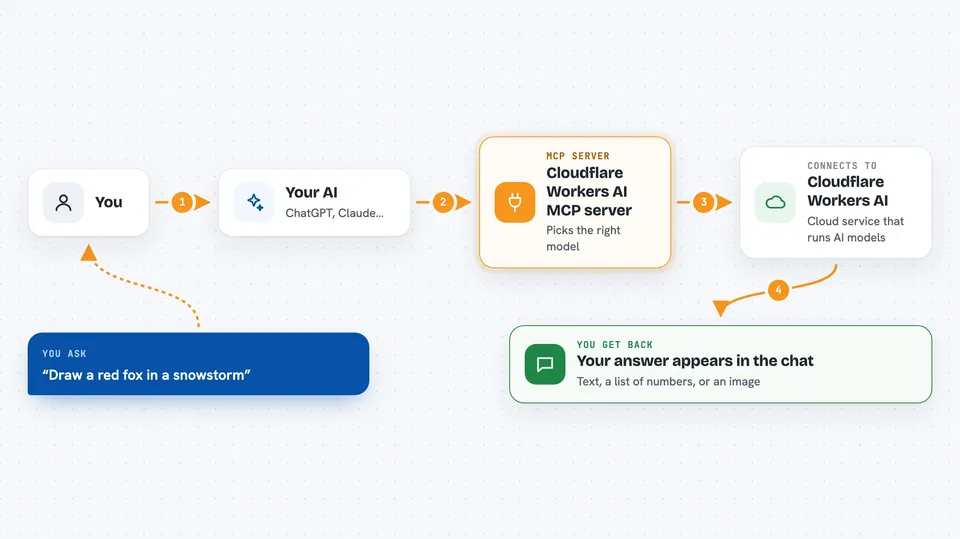
You type a request in your AI chat, like asking for a summary or a picture. Your AI passes that request to this helper program running on your computer. The helper talks to Cloudflare Workers AI using your account details, picks the right model, and sends your text or prompt over. Cloudflare runs the model and sends the answer back. The helper hands that answer to your AI, and you see it in the chat as text, a list of numbers or an image.
 Click to zoom
What you can do with it
- Ask a chat model like Llama 3.3 70B or DeepSeek R1 to answer or summarize something
- List which chat, embedding and image models are available
- Turn sentences into embeddings you can use for similarity search
- Generate an image from a text description with Flux 1 Schnell
- Pick a smaller model like Llama 3.1 8B when you want a quick answer
- Use Qwen Coder 32B for coding-style questions
Try asking your AI
- “Summarize this text using the Llama 3.3 70B model on Cloudflare Workers AI”
- “Generate an image of a red fox in a snowstorm”
- “Embed these 3 sentences for a similarity search”
- “Which chat models can I use through Cloudflare Workers AI”
What it gives back to you
You get the model's reply right in the chat: a written answer for chat requests, a list of numbers for embeddings, or an image file for image generation. If you ask for the model list, you get a simple list of names. Nothing is changed on your computer; the results are just shown to you.
Before you start
What you need
- A Cloudflare account (the free tier is enough to start)
- A Cloudflare API token with the Workers AI permission (a kind of password the Cloudflare site gives you)
- Your Cloudflare Account ID (shown in the Cloudflare dashboard sidebar)
- Node.js installed if you want to run the server yourself
Good to know
It uses your Cloudflare account, so requests may count against your free tier or any paid usage limits on that account.
Install it with your AI
Add Cloudflare Workers AI MCP server to your AI, no technical skills needed
You don't install anything by hand. You copy one prompt, paste it into an AI that can work on your computer, and it checks, installs and connects the server for you, asking you when it needs something.
Sign in to get the install prompt
Members get a ready-made prompt that lets the Claude desktop app check Cloudflare Workers AI MCP server, install it and connect it for them, step by step. You don't need any technical skills: you copy, paste and answer a few questions. Your connected AI can also find and install any of the 4,361 MCP servers here for you.
Who it's for
People who already use Cloudflare or want to try several AI models for chat, embeddings or images without leaving their AI assistant.