
MCP server · Finance and crypto
Haiku MCP server
Lets your AI look up crypto tokens, check wallet balances, find yields, and prepare trades across many blockchains.
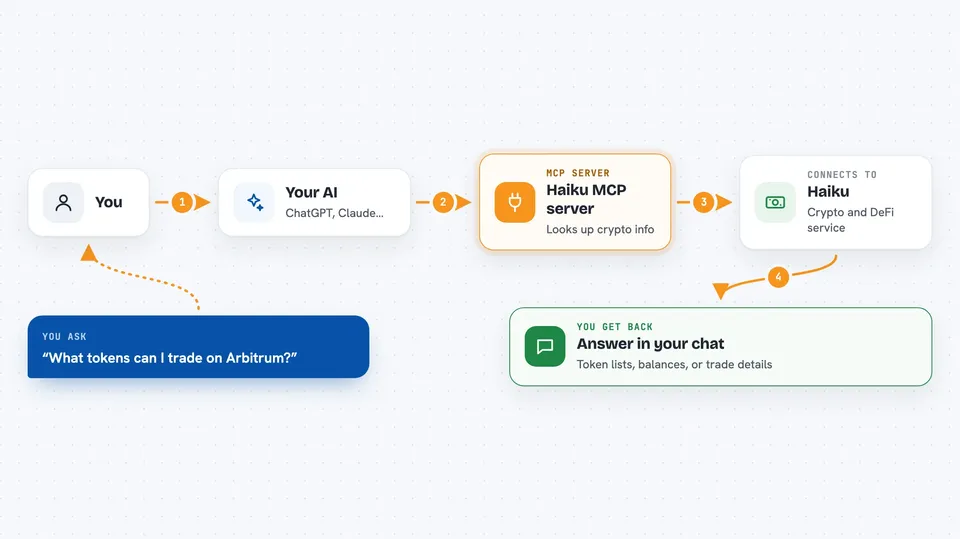
This is a helper that connects your AI assistant to Haiku, a service for crypto trading across many blockchains. Once connected, you can ask your AI in plain words about tokens, wallet balances, and yield opportunities, and it can prepare trades for you. It is handy for people who already use crypto wallets and want to explore or manage them through chat.
What is an MCP server? The 30-second version
On its own, your AI can only chat. An MCP server is a small helper program that gives your AI a new skill or a connection to an app or service. This one connects your AI to Haiku, a crypto trading service, so it can look up tokens and balances, find yield opportunities, and prepare trades when you ask. You do not need to understand how it works under the hood. You just talk to your AI like normal.
What this MCP server does
You ask your AI something like what tokens are available on Arbitrum or what is in this wallet. The AI sends that question to this helper, which talks to the Haiku service. Haiku replies with a list of tokens, balances, quotes, or yield options. The AI then shows you the answer in the chat in plain words. If you want to actually trade, the AI can prepare the transaction, and depending on your setup, either Haiku finishes it or your own wallet app does.
 Click to zoom
What you can do with it
- List supported tokens and DeFi assets across 21 blockchains
- Check token balances for a wallet address across chains
- Get a quote for a swap or a portfolio rebalance
- Find the highest-yielding DeFi opportunities filtered by APY or size
- Analyze a wallet's holdings and suggest yield options based on what it holds
- Prepare a transaction for your own wallet app to sign and send
- Execute a trade end to end if you provide a wallet private key
Try asking your AI
- “What tokens can I trade on Arbitrum?”
- “Show me the balances for wallet 0xd8dA6BF26964aF9D7eEd9e03E53415D37aA96045”
- “Find lending yields on Arbitrum with at least 1 million dollars in total value”
- “Analyze this wallet and tell me what yield options fit what it holds”
What it gives back to you
You get answers in the chat: lists of tokens, balances, quotes with amounts, or yield opportunities with rates. When you prepare a trade, it gives you a transaction ready for your wallet to sign, or a transaction hash if Haiku executed it for you. Portfolio analysis comes back as a summary of positions with suggestions. Everything shows up as normal text in the conversation.
Before you start
What you need
- The Claude desktop app or another AI tool that supports MCP servers
- Node.js installed on your computer (the free software that runs the helper)
- A crypto wallet address if you want to check balances or analyze a portfolio
- Optional: a Haiku API key from contact@haiku.trade for higher usage limits
Good to know
This server can prepare and, if you give it a private key, actually send real crypto transactions that move and can lose money, so only use it if you understand the risks and check every trade before it goes through.
Install it with your AI
Add Haiku MCP server to your AI, no technical skills needed
You don't install anything by hand. You copy one prompt, paste it into an AI that can work on your computer, and it checks, installs and connects the server for you, asking you when it needs something.
Sign in to get the install prompt
Members get a ready-made prompt that lets the Claude desktop app check Haiku MCP server, install it and connect it for them, step by step. You don't need any technical skills: you copy, paste and answer a few questions. Your connected AI can also find and install any of the 4,066 MCP servers here for you.
Who it's for
People who already use crypto wallets and want to explore tokens, balances, and yield options through chat instead of clicking around websites.




