
MCP server · Coding
Claude Code MCP bridge
by hampsterx
Lets your AI assistant ask Claude Code questions, run web searches, and get tidy structured answers.
This is a small helper that connects your AI assistant to Claude Code, the command-line version of Claude. Once it is set up, your assistant can hand tasks to Claude Code and bring the answers back into your chat. It is handy if you use tools like Cursor, Windsurf, or VS Code and want a second opinion from Claude without leaving your editor.
What is an MCP server? The 30-second version
On its own, your AI can only chat with you. An MCP server is a small helper program that gives your AI a new skill or a connection to another app. This one connects your AI to Claude Code, so when you ask a question, your AI can pass it along to Claude Code and bring the reply back. You do not need to learn any commands. Your AI does the talking for you.
What this MCP server does
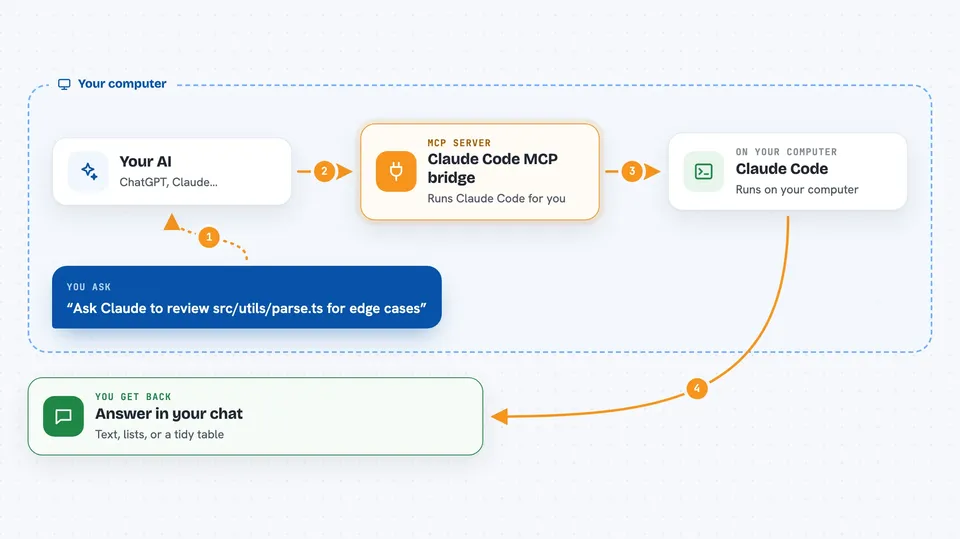
You type a request in your AI assistant, like asking Claude to look at a file or search the web. Your assistant passes that request to this bridge. The bridge runs Claude Code behind the scenes, with limits you set, like how long it can run or how much it can spend. Claude Code does the work, and the bridge sends the answer back to your assistant. You see the result in your normal chat window.
 Click to zoom
What you can do with it
- Ask Claude Code questions about files in a folder you choose
- Run a web search and get a written answer with source links
- Get answers in a strict format, like a filled-in form or a small table
- Continue a previous Claude Code conversation by reusing its session
- Check that Claude Code is installed and logged in
- See a list of active sessions with cost and turn counts
- Set a spending cap so a single request cannot run up a big bill
Try asking your AI
- “Ask Claude to review src/utils/parse.ts for edge cases”
- “Search the web for the latest Node.js release notes and summarize them”
- “Give me a JSON object with the fields title, author, and year for this book description”
- “Continue the previous session and explain the retry logic in this file”
What it gives back to you
You get back plain text answers, lists, or tidy JSON, depending on what you asked for. Search results come with source links. Every reply also carries small details like how long it took, which model was used, and how much it cost. You see all of this in your normal chat, no extra windows.
Before you start
What you need
- Claude Code CLI installed and available on your computer
- A Claude login (claude login) using your Pro or Max plan, or an Anthropic API key if you prefer to pay per use
- An MCP client that supports adding servers, like Cursor, Windsurf, VS Code, Codex CLI, or Gemini CLI
- Node.js installed so npx can run the bridge
Good to know
Claude Code can read files in folders you point it at, and if you widen its tool list it can also write or run commands, so only give it folders you are comfortable sharing.
Install it with your AI
Add Claude Code MCP bridge to your AI, no technical skills needed
You don't install anything by hand. You copy one prompt, paste it into an AI that can work on your computer, and it checks, installs and connects the server for you, asking you when it needs something.
Sign in to get the install prompt
Members get a ready-made prompt that lets the Claude desktop app check Claude Code MCP bridge, install it and connect it for them, step by step. You don't need any technical skills: you copy, paste and answer a few questions. Your connected AI can also find and install any of the 4,609 MCP servers here for you.
Who it's for
Developers and technical writers who already use an AI coding assistant and want Claude Code's help without switching apps.



