MCP server · Research
Amazon MCP server
by HasData
Lets your AI search Amazon, read product details, reviews, and seller info for you.
This is a small helper that connects your AI assistant to Amazon. Once it is set up, you can ask your AI things like what a product costs, what buyers say about it, or who is selling it, and it will go look it up for you. It is handy for anyone who researches products, compares prices, or checks sellers as part of their work.
What is an MCP server? The 30-second version
On its own, your AI can only chat with you using what it already knows. An MCP server is a small helper program that gives your AI a new skill or a connection to an outside service. This one connects your AI to Amazon, so when you ask about a product or a seller, the AI can go fetch the real, current information instead of guessing. You do not need to install anything complicated; it runs online and your AI talks to it for you.
What this MCP server does
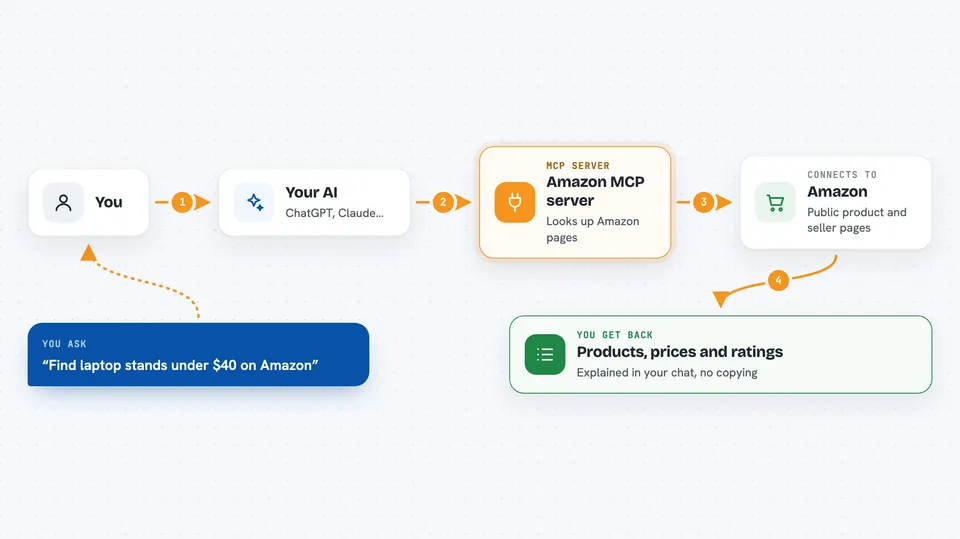
You ask your AI a question about Amazon, like the price of a product or the rating of a seller. Your AI sends that request to this helper, which looks up the public Amazon pages for you. The helper reads what a normal signed-out visitor would see and turns it into clean, structured information. Then your AI shows you the answer in the chat, in plain language. You never have to open Amazon yourself or copy anything by hand.
 Click to zoom
What you can do with it
- Search Amazon for products by keyword and see prices, ratings, and delivery info
- Look up full details for a single product using its ASIN (Amazon's product code)
- Read customer reviews for a product, including star ratings and verified purchase flags
- Check a seller's profile, including their feedback ratings over different time periods
- Browse everything a specific seller has listed, page by page
- Compare the same product across different Amazon country sites
- Find products that ship to a specific postal code or country
Try asking your AI
- “Find laptop stands under $40 on Amazon and sort them by average customer review”
- “What does ASIN B0DHJ7SBDR cost right now, and how many other sellers offer it”
- “Compare the price of this ASIN on amazon.com and amazon.de”
- “Who is the seller behind ASIN B0DHJ7SBDR, and what is their lifetime rating”
What it gives back to you
You get back clear answers in your chat: lists of products with prices and ratings, full details for one item, review summaries, or seller profiles. The information comes as neat text your AI can read and explain, not as a messy web page. If you asked for a comparison, you will see the numbers side by side. If something is not available, your AI will tell you that too.
Before you start
What you need
- An MCP client like Claude Desktop, Claude Code, Cursor, Windsurf, or VS Code
- A HasData API key from their dashboard (free to create, no card needed)
- For Claude Desktop config file: Node.js or Python installed, depending on which launcher you choose
Good to know
Each call uses credits from your HasData account, and asking for extra seller offers on a product doubles the cost of that call.
Install it with your AI
Add Amazon MCP server to your AI, no technical skills needed
You don't install anything by hand. You copy one prompt, paste it into an AI that can work on your computer, and it checks, installs and connects the server for you, asking you when it needs something.
Sign in to get the install prompt
Members get a ready-made prompt that lets the Claude desktop app check Amazon MCP server, install it and connect it for them, step by step. You don't need any technical skills: you copy, paste and answer a few questions. Your connected AI can also find and install any of the 4,361 MCP servers here for you.
Who it's for
Anyone who researches products, compares prices, or checks sellers on Amazon as part of their job, like e-commerce analysts, market researchers, or online sellers.