
MCP server · Finance and crypto
Hashlock Markets MCP server
Trade crypto over the counter with your AI, using safe swaps that settle together or refund together.
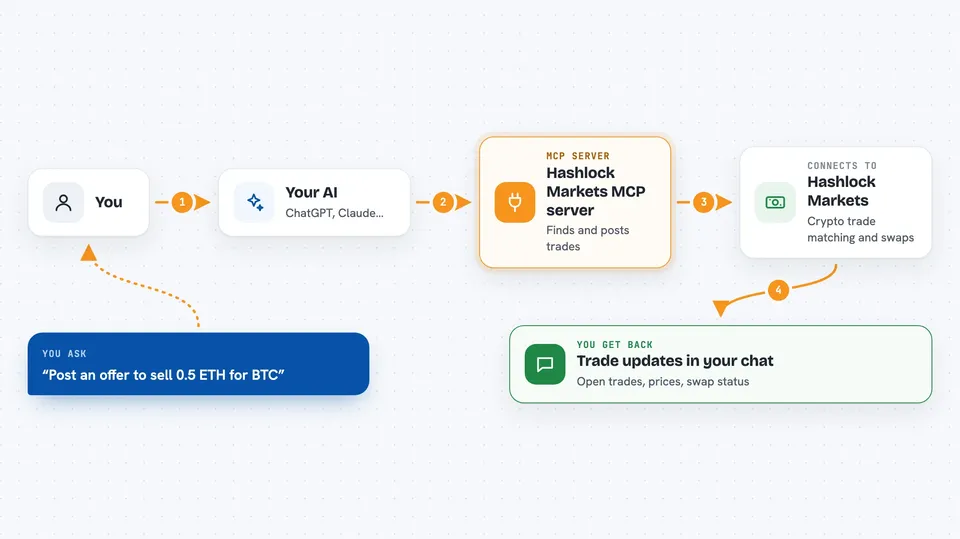
This is a helper for your AI that lets it trade crypto directly with other people, without a middleman holding your money. It is made for over-the-counter deals, meaning you agree on a price privately instead of using a public exchange. It is handy if you want your AI to handle the back and forth of a crypto trade for you.
What is an MCP server? The 30-second version
On its own, your AI can only chat. An MCP server is a small helper program that gives your AI a new skill or a connection to an app or service. This one connects your AI to Hashlock Markets, a place for trading crypto between two people. Once connected, your AI can look up trades, post offers, and help settle swaps for you when you ask.
What this MCP server does
You ask your AI to find or post a crypto trade. The AI uses this helper to talk to Hashlock Markets. The helper shows your AI the list of open trades or posts your own offer. When someone responds, your AI can negotiate the price back and forth. When you both agree, the helper sets up a swap that locks both sides of the trade so neither person can cheat. It then tracks who has paid and who has received, and tells you when the trade is done.
 Click to zoom
What you can do with it
- Browse available crypto assets and open trade requests
- Post your own public or private trade offer
- Respond to someone else's offer with your price
- Negotiate a price by sending messages or counter-offers
- Track the status of your trades and swaps
- Set the wallet address where you want to receive funds
- Fund and claim your side of a swap when it is time
Try asking your AI
- “Show me the open trade requests for Bitcoin.”
- “Post an offer to sell 0.5 ETH for BTC.”
- “What is the status of my trade with the other party?”
- “Accept the latest price proposal and start the swap.”
What it gives back to you
You get clear answers in the chat, like a list of open trades or the status of your own deal. When a swap is ready, the helper shows you the details, such as who has funded and what the transaction codes are. If you are running it in the safe hosted mode, it gives you unsigned transactions that you sign with your own wallet. It never holds your keys or your money.
Before you start
What you need
- A Hashlock Markets account (you can sign in with your crypto wallet)
- For the local version: a testnet crypto wallet key for the chains you want to trade on
- The Claude desktop app or another AI app that supports MCP servers
Good to know
This is for test networks only right now, so do not use real money, and remember that the local version can move funds using the keys you give it.
Install it with your AI
Add Hashlock Markets MCP server to your AI, no technical skills needed
You don't install anything by hand. You copy one prompt, paste it into an AI that can work on your computer, and it checks, installs and connects the server for you, asking you when it needs something.
Sign in to get the install prompt
Members get a ready-made prompt that lets the Claude desktop app check Hashlock Markets MCP server, install it and connect it for them, step by step. You don't need any technical skills: you copy, paste and answer a few questions. Your connected AI can also find and install any of the 4,361 MCP servers here for you.
Who it's for
People who trade crypto and want their AI to handle the back and forth of over-the-counter deals, especially those who value safety and no middlemen.




