MCP server · Health and learning
HealthChain FHIR MCP server
Lets your AI build, read, and check health records in the FHIR format, with proper medical codes.

HealthChain is a free tool that gives your AI a set of helpers for working with health data in the FHIR format. FHIR is the common standard hospitals and clinics use to store and share patient information. It is handy for people who work with clinical or research data and want their AI to handle it correctly instead of guessing.
What is an MCP server? The 30-second version
On its own, your AI can only chat with you. An MCP server is a small helper program that gives your AI a new skill or a connection to an app or service. This one connects your AI to FHIR health data, so it can look up, build, and check patient records for you when you ask. You run it on your own computer, and it works with a patient data file you point it at.
What this MCP server does
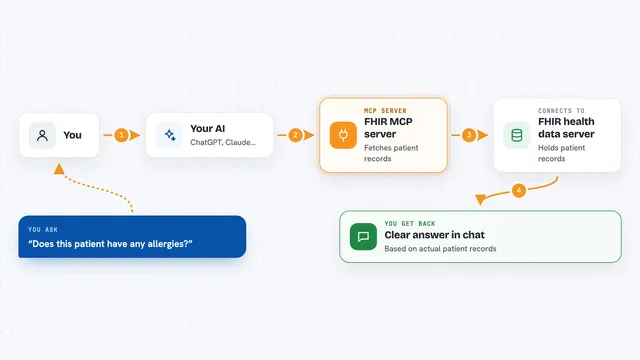
You ask your AI something about a patient record, like reading a value or building a new entry. Your AI passes that request to this helper, which knows the strict FHIR rules for health data. The helper reads or writes the record in the correct shape, looks up the right medical code, and checks the result for mistakes. Then it hands the answer or the corrected record back to your AI, which shows it to you in the chat.
 Click to zoom
What you can do with it
- Read details from a patient record file
- Build a new FHIR entry like a patient or observation
- Check a record for errors and get a report
- Look up the correct medical code for a term
- Validate that clinical codes are allowed by the standard
- Work with a patient bundle you already have
Try asking your AI
- “Read the patient bundle and tell me the patient's name and date of birth”
- “Build an observation for a blood pressure reading of 120 over 80”
- “Check this patient bundle for validation errors and list them”
- “What is the correct code for type 2 diabetes in this record”
What it gives back to you
You get back plain answers, lists of entries, or a short validation report that names any problems it found. If it built or changed a record, it shows you the corrected FHIR entry. Everything appears right in the chat, so you can read it or copy it out.
Before you start
What you need
- Python installed on your computer
- The healthchain package installed (pip install healthchain)
- A patient data file in FHIR format, if you want to read or check one
Good to know
It reads and can build health records, so only point it at data you are allowed to handle, and check anything it writes before using it in a real system.
Install it with your AI
Add HealthChain FHIR MCP server to your AI, no technical skills needed
You don't install anything by hand. You copy one prompt, paste it into an AI that can work on your computer, and it checks, installs and connects the server for you, asking you when it needs something.
Sign in to get the install prompt
Members get a ready-made prompt that lets the Claude desktop app check HealthChain FHIR MCP server, install it and connect it for them, step by step. You don't need any technical skills: you copy, paste and answer a few questions. Your connected AI can also find and install any of the 4,361 MCP servers here for you.
Who it's for
Healthcare developers, clinical data analysts, and researchers who work with patient records and want their AI to handle FHIR data correctly.