MCP server · Health and learning
FHIR MCP server
by the-momentum
Ask your AI about patient records in plain English and it fetches the answers from a FHIR health data server.
This is a helper that connects your AI assistant to a FHIR server, which is a standard way hospitals and clinics store health data. Once it is set up, you can ask questions about patients in normal words instead of clicking through a medical system. It is most useful for people who work with clinical or health records, like developers, analysts, and care teams.
What is an MCP server? The 30-second version
On its own, your AI can only chat with you using what it already knows. An MCP server is a small helper program that gives your AI a new skill or a connection to another system. This one connects your AI to a FHIR server, which is where health records live. So when you ask about a patient, your AI can actually go look it up instead of guessing.
What this MCP server does
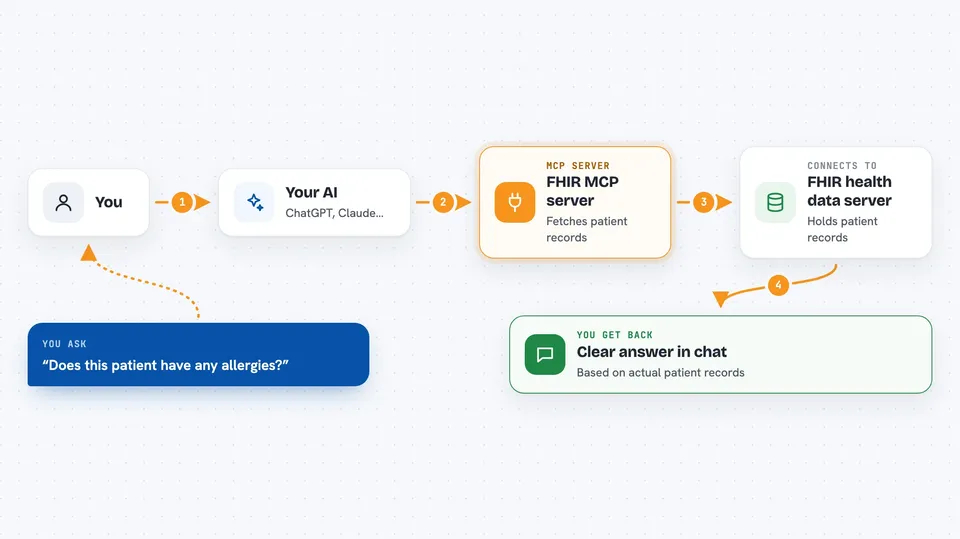
You ask your AI a question in plain words, like whether a patient has any allergies. Your AI decides which of this server's tools to use and sends the request through the helper. The helper talks to your FHIR server, which holds the patient data, and pulls back the matching records. Then your AI reads those records and gives you a clear answer in the chat. It can also add, update, or remove records when you ask it to.
 Click to zoom
What you can do with it
- Look up a patient's basic details like name, age, and contact info
- Check a patient's diagnoses, conditions, and past visits
- Review medications, vaccinations, and allergy records
- Search lab results and clinical measurements by name or code
- Look up family health history for a patient
- Add documents and search them by meaning, not just keywords
- Create, update, or delete records on the FHIR server
Try asking your AI
- “Does this patient have any allergies I should know about?”
- “Show me the medication history for patient 12345.”
- “Have they ever been treated for high blood pressure?”
- “What were the results of their most recent lipid panel?”
What it gives back to you
You get answers written in normal sentences, drawn from the actual records on the FHIR server. When you ask for a list, like all medications, your AI shows them in the chat, often as a short table or bullet points. If you ask it to add or change something, it tells you what it did. For document searches, it returns the most relevant passages it found.
Before you start
What you need
- Access to a FHIR server, such as a Medplum account, with a client ID and secret
- Docker (recommended) or uv installed on your computer
- A Pinecone API key if you want document search (free account available)
- A LOINC account if you want the latest medical codes (optional)
Good to know
These tools can create, change, and delete real patient records, so be careful with any request that writes or removes data.
Install it with your AI
Add FHIR MCP server to your AI, no technical skills needed
You don't install anything by hand. You copy one prompt, paste it into an AI that can work on your computer, and it checks, installs and connects the server for you, asking you when it needs something.
Sign in to get the install prompt
Members get a ready-made prompt that lets the Claude desktop app check FHIR MCP server, install it and connect it for them, step by step. You don't need any technical skills: you copy, paste and answer a few questions. Your connected AI can also find and install any of the 4,361 MCP servers here for you.
Who it's for
Health tech developers, clinical data analysts, and care teams who work with FHIR health records and want to query them in plain language.