MCP server · Health and learning
Apple Health MCP server
by the-momentum
Ask your AI questions about your exported Apple Health data and get plain answers.
This is a small helper that connects your exported Apple Health data to an AI assistant that supports MCP, like Claude. You can then ask questions in normal words instead of digging through the Health app or a giant export file. It is handy for anyone curious about their steps, workouts, sleep or heart rate over time.
What is an MCP server? The 30-second version
On its own, your AI can only chat with you. An MCP server is a small helper program that gives your AI a new skill or a connection to something, here to your exported Apple Health data. Once it is set up, the AI can look things up in that data and do simple analysis for you when you ask. You just type a question, and the helper quietly does the looking up behind the scenes.
What this MCP server does
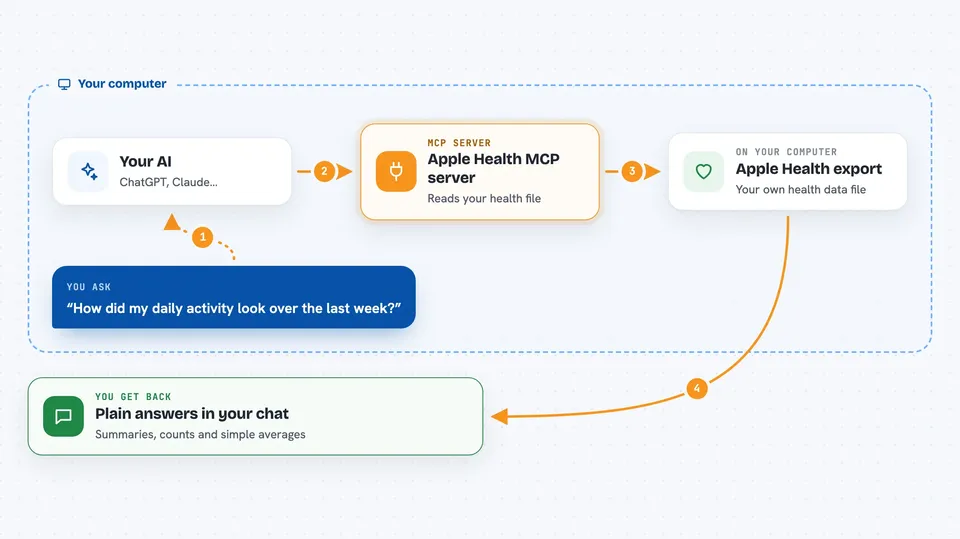
First you export your Apple Health data from your iPhone and give the file to this helper. The helper reads that export and stores it in a database it can search. When you ask your AI a question, the AI passes it to this helper, the helper searches the stored data, and sends the results back. Your AI then turns those results into a normal answer in the chat. You never have to write a query or know how the data is structured.
 Click to zoom
What you can do with it
- Ask what kinds of health data are in your export and how much there is
- Look up steps, heart rate, sleep or workouts for a date range
- Summarise your activity for last week or last month
- Compare two periods, like June and July
- Spot trends you would not notice by scrolling
- Filter records by type, date or value
Try asking your AI
- “What kinds of data are in my Apple Health export and how much of each?”
- “How did my daily activity look over the last week?”
- “Summarise my running workouts in June and July. Anything interesting?”
- “What was my average resting heart rate last month?”
What it gives back to you
You get normal chat answers: short summaries, lists of records, counts and simple statistics like averages or totals. For example, it might tell you how many workouts you logged in July or your average daily steps last week. It can also point out patterns it noticed in the numbers. Everything shows up as text in the conversation, not as a file you have to open.
Before you start
What you need
- An Apple Health export file from your iPhone (Health app, then Export All Health Data)
- An AI app that supports MCP, like the Claude desktop app
- Docker, or the tools listed in the setup guide, to run the helper on your computer
Good to know
Your health data is private, so only run this on a computer you trust and be careful about sharing the export file or the answers.
Install it with your AI
Add Apple Health MCP server to your AI, no technical skills needed
You don't install anything by hand. You copy one prompt, paste it into an AI that can work on your computer, and it checks, installs and connects the server for you, asking you when it needs something.
Sign in to get the install prompt
Members get a ready-made prompt that lets the Claude desktop app check Apple Health MCP server, install it and connect it for them, step by step. You don't need any technical skills: you copy, paste and answer a few questions. Your connected AI can also find and install any of the 4,361 MCP servers here for you.
Who it's for
People who track their health with an iPhone or Apple Watch and want easy answers about their own data without learning a query language.