MCP server · Health and learning
FHIR MCP server
by wso2
Lets your AI search, read, and update patient health records on a FHIR server.

This is a helper that connects your AI assistant to a FHIR server, which is the standard way hospitals and health apps store medical data. Once connected, you can ask your AI to look up a patient, check lab results, or add a new record. It is handy for people working with clinical data who want to use plain chat instead of clicking through a medical system.
What is an MCP server? The 30-second version
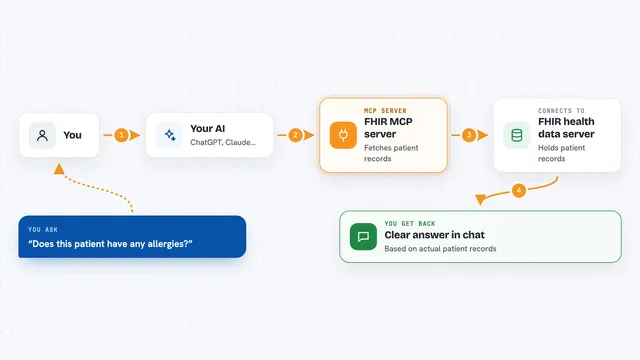
On its own, your AI can only chat with you. An MCP server is a small helper program that gives your AI a new skill or a connection to an app or service. This one connects your AI to a FHIR server, the place where health records live. So when you ask about a patient or a lab result, the AI can actually go look it up or make a change for you.
What this MCP server does
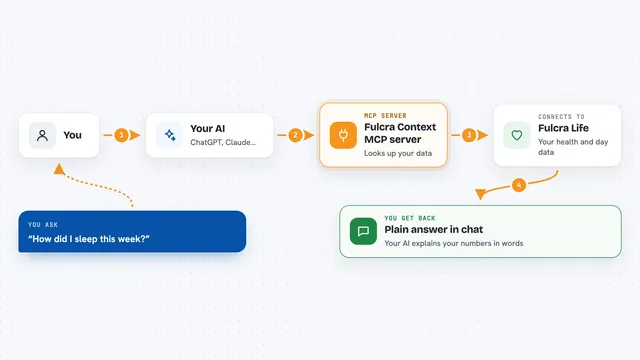
You ask your AI something like 'find patient Jane Doe' or 'show me her recent lab results'. The AI passes that request to this helper. The helper talks to your FHIR server, which holds the medical records. The server sends back the matching information, and the AI shows it to you in the chat. If you ask it to create or update a record, the helper sends that change to the FHIR server too.
 Click to zoom
What you can do with it
- Search for patients by name or other details
- Read a patient's full record or specific parts of it
- Look up lab results, medications, and conditions
- Create new clinical records on the FHIR server
- Update existing records with new information
- Filter results to show only the fields you need
- Check who is logged in when using secure login
Try asking your AI
- “Find the patient with the name Jane Doe and show me her basic details”
- “What are the most recent lab results for patient 12345”
- “Add a new observation for patient 12345 with a blood pressure of 120 over 80”
- “List all medications for patient 12345”
What it gives back to you
You get back lists, single records, or summaries shown right in your chat. For example, a search might return a list of matching patients with their names and IDs. A read might show you the full details of one patient or one lab result. If you asked it to create or update something, it tells you whether the change went through.
Before you start
What you need
- Python 3.8 or newer
- The uv tool installed (a helper for running Python programs)
- A FHIR server address (a web address that points to the health data)
- Login details for that FHIR server if it is not public (client ID, secret, and scopes)
Good to know
This helper can create and update records on your FHIR server, so be careful with changes and make sure you are allowed to modify that data.
Install it with your AI
Add FHIR MCP server to your AI, no technical skills needed
You don't install anything by hand. You copy one prompt, paste it into an AI that can work on your computer, and it checks, installs and connects the server for you, asking you when it needs something.
Sign in to get the install prompt
Members get a ready-made prompt that lets the Claude desktop app check FHIR MCP server, install it and connect it for them, step by step. You don't need any technical skills: you copy, paste and answer a few questions. Your connected AI can also find and install any of the 4,361 MCP servers here for you.
Who it's for
Healthcare developers, clinical data analysts, and anyone who works with FHIR health records and wants to query them through an AI chat.