
MCP server · Finance and crypto
Actual Budget MCP server
by henfrydls
Ask your AI about your Actual Budget money: spending, trends, and budget vs actual, in plain words.
This is a small helper that connects your Actual Budget app to an AI assistant like Claude. Once it is set up, you can just ask questions about your money in normal words instead of clicking around the app. It is handy for anyone who keeps their budget in Actual and wants quick answers without doing the math themselves.
What is an MCP server? The 30-second version
On its own, your AI can only chat. It cannot see your Actual Budget data or change anything there. An MCP server is a small helper program that gives your AI a new skill, in this case a connection to your Actual Budget server. When you ask a question, the AI uses this helper to look things up or make changes in your budget, then tells you the answer.
What this MCP server does
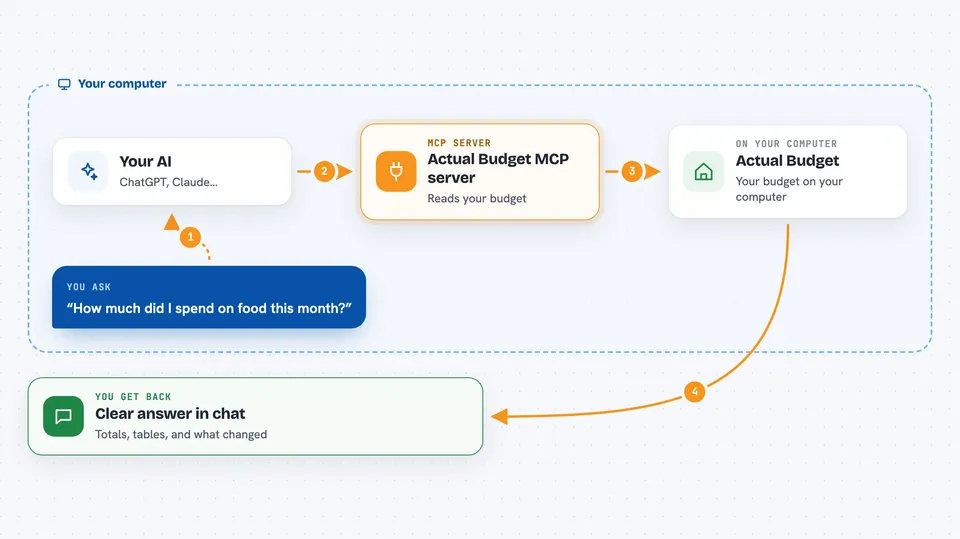
You ask your AI something about your budget, like how much you spent on food this month. The AI passes that request to this helper program. The helper talks to your Actual Budget server, pulls the numbers it needs, and does the analysis. Then it hands the results back to the AI, which explains them to you in the chat. If you ask it to add or change something, it does that too, but deletes always show you what will be removed first and wait for your yes.
 Click to zoom
What you can do with it
- Ask how much you spent in a category this month or last month
- Check whether you are over budget on anything
- See spending trends and projections for a category
- Compare what you budgeted against what you actually spent
- Add expenses, transfers, and edits without opening the app
- Manage categories, payees, and rules by name instead of ID
- Run it in read-only mode so the AI cannot change anything
Try asking your AI
- “How much did I spend on food this month?”
- “Am I over budget on anything?”
- “Show me my spending trend for transport over the last 3 months”
- “Add a 25 euro expense to Groceries yesterday for the supermarket”
What it gives back to you
You get back clear answers in the chat, like totals, comparisons, and short summaries. Spending breakdowns and budget vs actual come as neat aligned tables rather than raw data. If you asked it to add or change something, it tells you what it did. Deletes first show you a preview of what will be removed and wait for your confirmation.
Before you start
What you need
- An Actual Budget server running (local or remote)
- Your Actual Budget server URL, password, and budget Sync ID
- Node.js 22 or newer, unless you use the Claude Desktop extension
- A client that can run a local MCP server, like Claude Desktop, Claude Code, Cursor, or VS Code
Good to know
It can add, edit, and delete things in your real budget, so turn on read-only mode (ACTUAL_READ_ONLY=1) if you only want it to look, and always read the delete preview before confirming.
Install it with your AI
Add Actual Budget MCP server to your AI, no technical skills needed
You don't install anything by hand. You copy one prompt, paste it into an AI that can work on your computer, and it checks, installs and connects the server for you, asking you when it needs something.
Sign in to get the install prompt
Members get a ready-made prompt that lets the Claude desktop app check Actual Budget MCP server, install it and connect it for them, step by step. You don't need any technical skills: you copy, paste and answer a few questions. Your connected AI can also find and install any of the 4,609 MCP servers here for you.
Who it's for
People who keep their budget in Actual Budget and want quick plain-language answers about their spending and budget without digging through the app.



