MCP server · Gaming
OpenDota MCP server
by hkaanengin
Lets your AI look up Dota 2 player stats, hero info and match details for you in plain chat.
This is a small helper that connects your AI assistant to OpenDota, a free website full of Dota 2 statistics. Once it is set up, you can just ask questions in normal words and your AI will fetch the numbers for you. It is handy if you follow Dota 2, track your own games, or want to look up a player or hero without clicking around a stats site.
What is an MCP server? The 30-second version
On its own, your AI can only chat with you using what it already knows. An MCP server is a small helper program that gives your AI a new skill or a connection to an app or service. This one connects your AI to OpenDota, the Dota 2 stats service. So when you ask about a player or a hero, your AI can go and look it up there and bring the answer back to you.
What this MCP server does
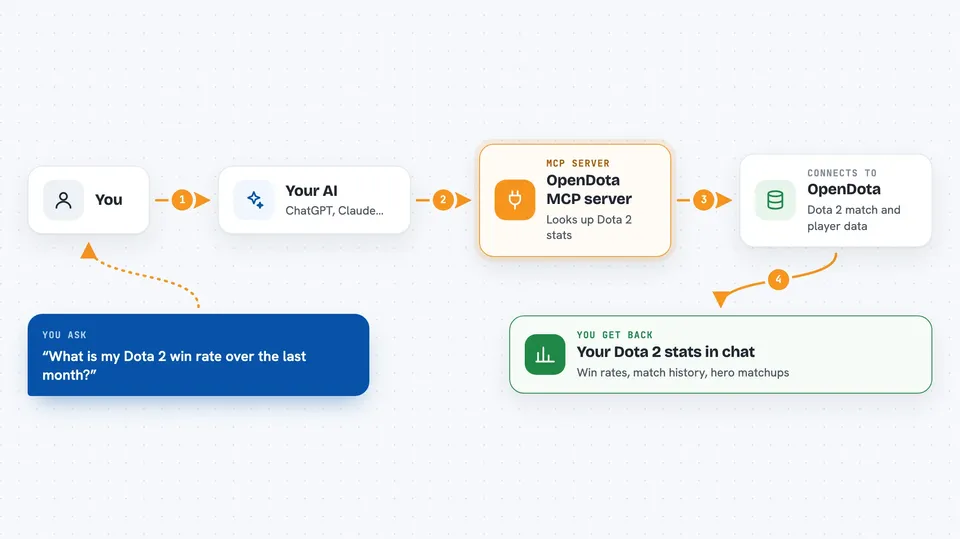
You ask your AI a question about Dota 2, like how a player has been doing lately. Your AI passes that request to this helper program. The helper talks to the OpenDota service, which holds the match and player data. OpenDota sends the numbers back, and your AI turns them into a normal answer in your chat. You never have to visit the OpenDota website yourself or copy numbers around.
 Click to zoom
What you can do with it
- Look up a Dota 2 player's profile, win rate and favourite heroes
- Check win and loss records with filters like time period or game mode
- See how a hero does against other heroes in matchups
- Find popular item builds for a hero at different stages of a game
- Pull up details of a specific match, including parsed data
- Search for a player by name when you only remember part of it
- Fix hero names you misspelled so the lookup still works
Try asking your AI
- “What is my Dota 2 win rate over the last month?”
- “Show me the recent matches for player 12345678.”
- “Which heroes does Anti-Mage struggle against the most?”
- “What items do people usually build on Juggernaut in the mid game?”
What it gives back to you
You get answers in plain chat, like a short summary of a player's record, a list of recent matches, or a table of hero matchups with win rates. If you ask for a specific match, your AI can lay out the key numbers from that game. Everything comes back as text you can read, not as files you have to open.
Before you start
What you need
- Python 3.10 or newer if you install it yourself
- The Claude desktop app or another AI tool that supports MCP servers
- An OpenDota API key is optional but gives you higher request limits (you get one free by signing in with Steam at opendota.com/api-keys)
Good to know
It only reads public Dota 2 data, so there is nothing private to worry about, but without an OpenDota API key you are limited to about 60 requests per minute.
Install it with your AI
Add OpenDota MCP server to your AI, no technical skills needed
You don't install anything by hand. You copy one prompt, paste it into an AI that can work on your computer, and it checks, installs and connects the server for you, asking you when it needs something.
Sign in to get the install prompt
Members get a ready-made prompt that lets the Claude desktop app check OpenDota MCP server, install it and connect it for them, step by step. You don't need any technical skills: you copy, paste and answer a few questions. Your connected AI can also find and install any of the 4,361 MCP servers here for you.
Who it's for
Dota 2 players and fans who want quick stats and match answers without browsing a stats website by hand.