MCP server · Gaming
OP.GG MCP server
by opgginc
Lets your AI look up live League of Legends, TFT and Valorant stats, builds and esports schedules from OP.GG.
This is a small helper that connects your AI assistant to OP.GG, the popular gaming stats site. Once it is connected, you can just ask your AI about champions, players, builds or match schedules and it will pull the latest numbers for you. It is handy if you play League of Legends, Teamfight Tactics or Valorant and want quick answers without opening a browser and clicking around.
What is an MCP server? The 30-second version
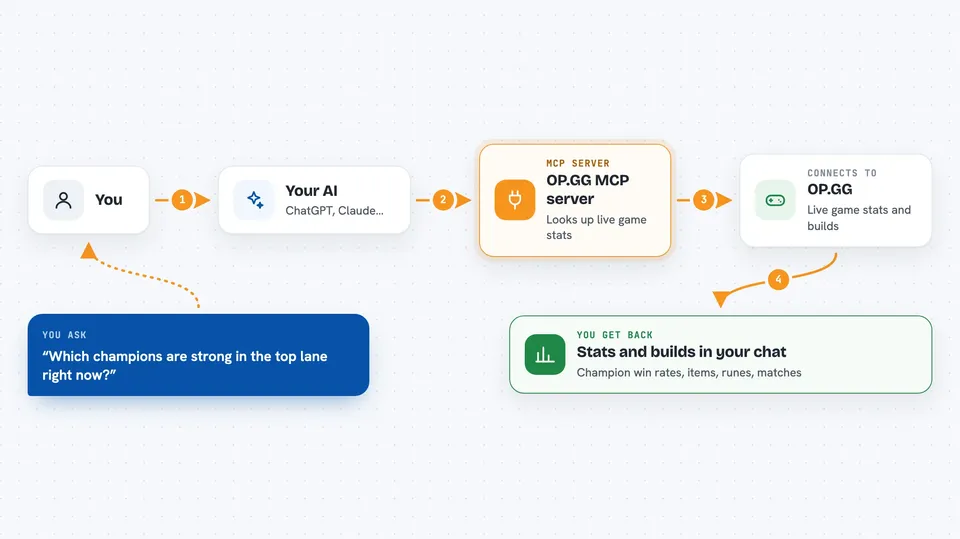
On its own, your AI can only chat with you using what it already knows. An MCP server is a small helper program that gives your AI a new skill or a connection to an app or service. This one connects your AI to OP.GG, so it can look up real game data for you. When you ask a question, your AI quietly asks this helper, and the helper fetches the answer from OP.GG.
What this MCP server does
You ask your AI something like which champions are strong in a lane right now, or what a player's recent matches look like. Your AI sends that request to this OP.GG helper. The helper talks to OP.GG's live data and comes back with the numbers, builds, or schedules. Your AI then reads that back to you in normal chat. You never have to visit the OP.GG website yourself.
 Click to zoom
What you can do with it
- Check champion win, pick and ban rates for League of Legends
- See recommended item, rune and skill builds for a champion
- Look up a summoner's rank, tier, LP and recent matches
- Find counter matchups and lane guides for a champion
- Browse current meta decks and item recipes in Teamfight Tactics
- See agent stats, map compositions and leaderboards in Valorant
- Check upcoming League of Legends esports schedules and team standings
Try asking your AI
- “What are the best items and runes for Ahri in mid lane right now?”
- “Show me the recent match history for the summoner Faker#KR1”
- “Which champions have the highest win rate in the top lane this patch?”
- “What are the current meta decks in Teamfight Tactics?”
- “When is the next League of Legends esports match and who is playing?”
What it gives back to you
You get back plain answers in the chat: lists of champions with their win rates, build suggestions with item and rune names, a player's rank and recent game results, or a schedule of upcoming matches. Numbers and names come straight from OP.GG, so they reflect the current patch and meta. Sometimes it will be a short table or a bulleted list, depending on what you asked.
Before you start
What you need
- An AI app that supports MCP servers, like the Claude desktop app
- An internet connection
Good to know
Most tools need you to say which fields you want back, so if an answer looks empty or odd, ask your AI to request more fields. It only reads public game data, so nothing private is at risk.
Install it with your AI
Add OP.GG MCP server to your AI, no technical skills needed
You don't install anything by hand. You copy one prompt, paste it into an AI that can work on your computer, and it checks, installs and connects the server for you, asking you when it needs something.
Sign in to get the install prompt
Members get a ready-made prompt that lets the Claude desktop app check OP.GG MCP server, install it and connect it for them, step by step. You don't need any technical skills: you copy, paste and answer a few questions. Your connected AI can also find and install any of the 4,361 MCP servers here for you.
Who it's for
Gamers and esports fans who play League of Legends, Teamfight Tactics or Valorant and want fast stats and answers without leaving their chat.