
MCP server · Finance and crypto
PowerSun TRON Energy MCP server
by Hovsteder
Lets your AI buy TRON energy, check prices, and swap tokens on SunSwap for you.
This is a helper that connects your AI to PowerSun.vip, a marketplace for TRON network resources and a token swap service. It is handy if you send USDT or other tokens on the TRON network and want to pay less in fees, or if you want your AI to handle swaps for you. You do not install anything; it runs online.
What is an MCP server? The 30-second version
On its own, your AI can only chat. An MCP server is a small helper program that gives your AI a new skill or a connection to an app or service. This one connects your AI to PowerSun.vip, a TRON energy marketplace and token swap service. Once connected, your AI can look up prices, buy energy, and swap tokens there when you ask.
What this MCP server does
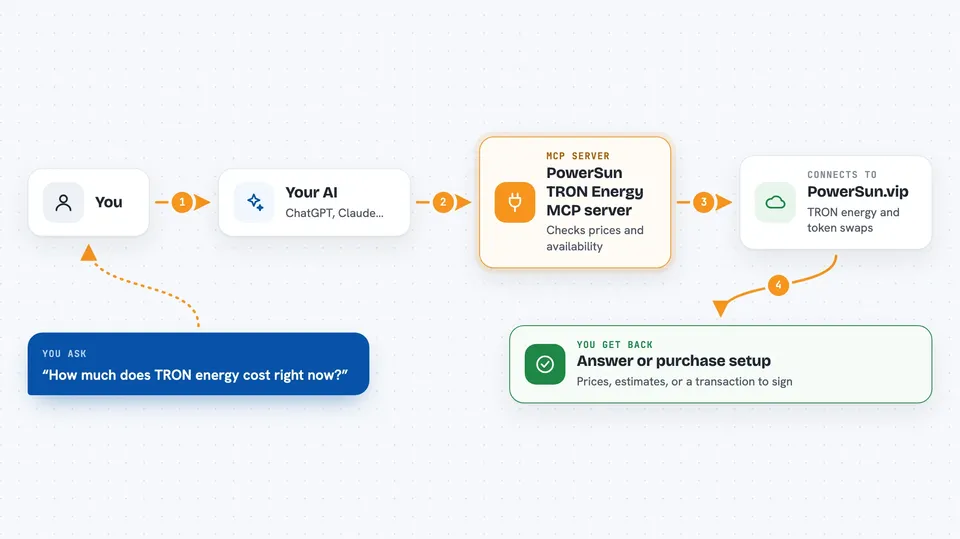
You ask your AI something like how much energy costs right now, or to buy energy for your wallet. Your AI sends that request to this helper, which talks to PowerSun.vip. PowerSun checks the current prices and availability, then either gives back the numbers or sets up the purchase. You get the answer or the result right in your chat, and for purchases you sign the transaction with your own wallet.
 Click to zoom
What you can do with it
- Check current TRON energy and bandwidth prices
- Estimate the cost for a specific amount of energy and duration
- Buy energy for any TRON address
- Get a swap quote for any TRC-20 token pair on SunSwap
- Swap tokens like TRX, USDT, or USDC
- Register a wallet and check your balance and orders
- Register a selling pool and track earnings
Try asking your AI
- “What is the current price of TRON energy for 1 hour?”
- “Estimate the cost to buy 65000 energy for 1 day”
- “Get me a swap quote for 100 TRX to USDT”
- “Show my recent PowerSun orders”
What it gives back to you
You get clear answers in the chat: price lists, cost estimates, order statuses, and swap quotes with expected output and fees. For purchases and swaps, it gives you an unsigned transaction to sign with your own wallet, then confirms the result. You can also see your balance, earnings, and order history if you are signed in.
Before you start
What you need
- A TRON wallet address (and its private key if you want to sign transactions)
- An API key from PowerSun.vip for balance, orders, selling, and swaps (you can register through the AI itself)
- TRX or USDC to pay for energy or swaps
Good to know
This server can spend your money and move tokens, so only connect it if you are comfortable letting your AI prepare transactions, and always check what you are signing in your wallet.
Install it with your AI
Add PowerSun TRON Energy MCP server to your AI, no technical skills needed
You don't install anything by hand. You copy one prompt, paste it into an AI that can work on your computer, and it checks, installs and connects the server for you, asking you when it needs something.
Sign in to get the install prompt
Members get a ready-made prompt that lets the Claude desktop app check PowerSun TRON Energy MCP server, install it and connect it for them, step by step. You don't need any technical skills: you copy, paste and answer a few questions. Your connected AI can also find and install any of the 4,609 MCP servers here for you.
Who it's for
People who send tokens on the TRON network and want to save on fees, plus anyone curious about letting their AI handle energy purchases or token swaps.



