
MCP server · Finance and crypto · official
MainBook MCP server
by human-beyond · official
Turn PDF bank statements into checked Excel, CSV or JSON files from your AI chat.
This is a helper that lets your AI read a PDF bank statement and give you back a tidy spreadsheet. You point it at a statement file you already have, and it pulls out every transaction, checks the numbers add up, and saves the result. It is handy if you deal with statements by hand and want the typing done for you.
What is an MCP server? The 30-second version
On its own, your AI can only chat. An MCP server is a small helper program that gives your AI one new skill. This helper connects your AI to MainBook, a service that reads bank statement PDFs. So when you ask your AI to convert a statement, it passes the file to MainBook and brings the finished result back to you.
What this MCP server does
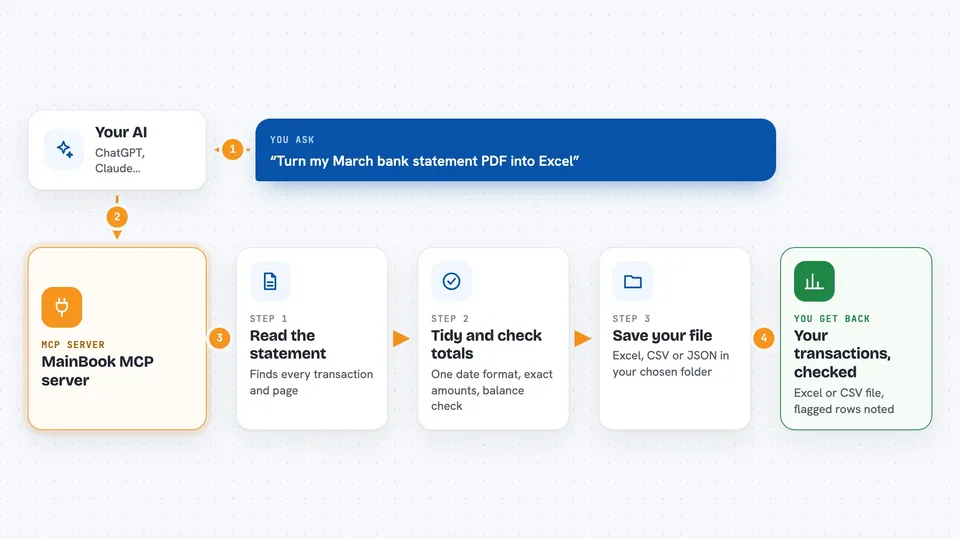
You ask your AI to convert a PDF bank statement. Your AI hands the file to this helper, which sends it to MainBook. MainBook reads every transaction, tidies the dates into one format, keeps the amounts exact, and checks that the opening balance plus credits minus debits matches the closing balance. Rows that do not fit get flagged instead of being quietly passed on. You then get the result as JSON in the chat, or as an Excel or CSV file saved to your computer.
 Click to zoom
What you can do with it
- Convert a PDF bank statement into Excel, CSV or JSON
- Check that the statement's totals add up before you use the numbers
- See which rows were flagged as not matching the balance
- Look up an earlier conversion job if one timed out
- List your past conversion jobs
- Check how many page credits you have left
- Choose which folder your converted files are saved into
Try asking your AI
- “Convert ~/Downloads/march-statement.pdf and save the Excel next to it”
- “Turn this bank statement into a CSV and tell me if anything was flagged”
- “How many page credits do I have left?”
- “Show me my recent conversions”
What it gives back to you
You get the transactions back, either as JSON shown right in the chat or as an Excel or CSV file saved to a folder you choose. It also tells you how many transactions and pages it found, and whether the totals matched the statement. If any rows did not fit the balance, they are flagged so you can look at them. Every saved file comes with its full path so you know where it went.
Before you start
What you need
- A MainBook account
- Python 3.11 or newer if you run it on your own computer
- The uv tool (installed once) if you use the uvx command
- Page credits in your MainBook account, since each conversion spends them
Good to know
Each conversion spends page credits from your MainBook account, so keep an eye on your balance, and remember the server can only read and write inside the folders you allow.
Install it with your AI
Add MainBook MCP server to your AI, no technical skills needed
You don't install anything by hand. You copy one prompt, paste it into an AI that can work on your computer, and it checks, installs and connects the server for you, asking you when it needs something.
Sign in to get the install prompt
Members get a ready-made prompt that lets the Claude desktop app check MainBook MCP server, install it and connect it for them, step by step. You don't need any technical skills: you copy, paste and answer a few questions. Your connected AI can also find and install any of the 4,361 MCP servers here for you.
Who it's for
Anyone who handles bank statements by hand, like bookkeepers, small business owners, accountants and office staff who want the numbers in a spreadsheet.




