
MCP server · Finance and crypto
SignalFuse MCP server
Lets your AI pull crypto trading signals, sentiment, macro regime, web search and sandboxed code runs.
SignalFuse is a helper for your AI that gives it crypto trading signals, market mood, macro regime, web search and a small code sandbox. It is made for people who want their AI to look up market data and run quick checks without leaving the chat. It is paid per use, but you get 5 free credits to try it.
What is an MCP server? The 30-second version
On its own, your AI can only chat with you using what it already knows. An MCP server is a small helper program that gives your AI a new skill or a connection to a service. This one connects your AI to SignalFuse, a paid data service for crypto signals and related tools. Once connected, you can ask your AI for a Bitcoin signal or a sentiment read, and it will fetch that from SignalFuse for you.
What this MCP server does
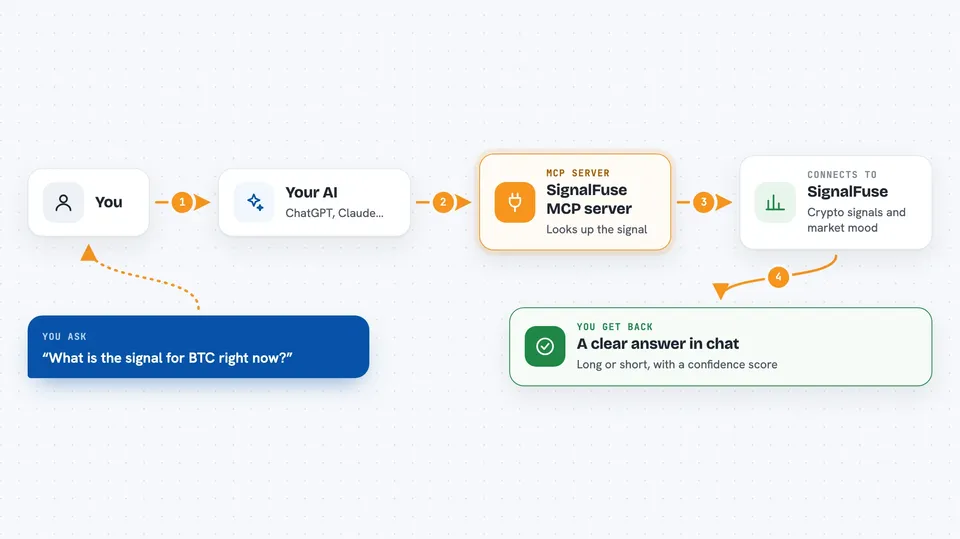
You ask your AI something like "what is the signal for BTC right now?" Your AI passes that request to this helper, which calls the SignalFuse service. SignalFuse runs its math on sentiment, macro and market data and sends back a direction, a strength score and a confidence number. Your AI then shows you the answer in plain words in the chat. Some calls cost a small amount of credit, and the free ones like the leaderboard and pricing do not.
 Click to zoom
What you can do with it
- Get a long, short or neutral signal for a crypto asset like BTC or ETH
- See sentiment scores for a coin from social and news data
- Check whether the market mood is risk-on, risk-off or neutral
- Compare four AI trading strategies on a live leaderboard
- Run a web search through Brave or Tavily and get the results back
- Run small Python or JavaScript snippets in a safe sandbox
- Check your remaining credits and see current prices
Try asking your AI
- “What is the current SignalFuse signal for ETH?”
- “Give me the sentiment score for SOL right now.”
- “Is the macro regime risk-on or risk-off today?”
- “Show me the Strategy Arena leaderboard.”
What it gives back to you
You get short, structured answers in the chat: a direction like long or short, a strength number, a confidence number, and sometimes entry, take-profit and stop-loss levels. Sentiment comes back as a score and a label like bullish or bearish. The regime comes back as one word: risk_on, risk_off or neutral. Search results and code output come back as text you can read right away.
Before you start
What you need
- The Claude desktop app or another tool that supports MCP servers
- Node.js installed on your computer (the helper runs through npx)
- A free SignalFuse trial token, which you get by sending your Ethereum wallet address to their trial endpoint
- A small amount of USDC on Base if you want to keep using it after the free credits run out
Good to know
Each call costs a small amount of credit and the signals are not financial advice, so treat them as one input among many and never trade more than you can afford to lose.
Install it with your AI
Add SignalFuse MCP server to your AI, no technical skills needed
You don't install anything by hand. You copy one prompt, paste it into an AI that can work on your computer, and it checks, installs and connects the server for you, asking you when it needs something.
Sign in to get the install prompt
Members get a ready-made prompt that lets the Claude desktop app check SignalFuse MCP server, install it and connect it for them, step by step. You don't need any technical skills: you copy, paste and answer a few questions. Your connected AI can also find and install any of the 4,609 MCP servers here for you.
Who it's for
People who follow crypto markets and want their AI to fetch signals, sentiment and macro reads for them without opening several websites.



