
MCP server · Finance and crypto
Perp CLI MCP server
by hypurrquant
Lets your AI check crypto perpetual futures prices, funding rates, and your balances across four exchanges.
This is a helper for people who trade perpetual futures on crypto exchanges like Hyperliquid, Pacifica, Lighter, and Aster. It connects your AI assistant to those exchanges so you can ask questions about prices, funding rates, and your account in plain language. It is handy if you already trade these markets and want a faster way to look things up or place orders.
What is an MCP server? The 30-second version
On its own, your AI can only chat. An MCP server is a small helper program that gives your AI a new skill or a connection to an app or service. This one connects your AI to four crypto futures exchanges, so it can look up prices, funding rates, and your positions for you when you ask. You do not need to know how it works under the hood. You just talk to your AI like normal.
What this MCP server does
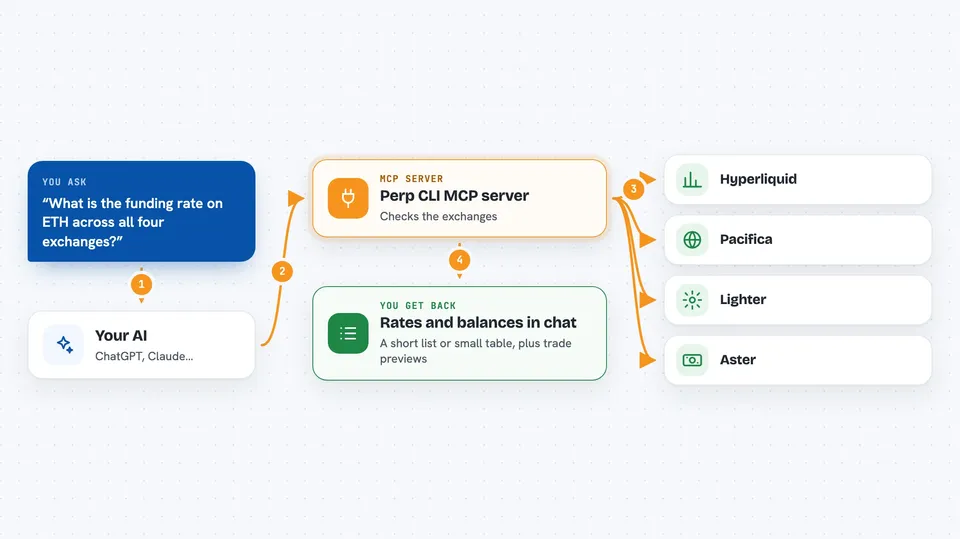
You ask your AI something like what is the funding rate on ETH right now. Your AI passes that question to this helper. The helper talks to the exchange you picked, like Hyperliquid or Pacifica, and fetches the answer. Then your AI shows you the result in the chat, usually as a short list or a small table. If you have added your exchange keys, it can also look up your balances and positions, and even place trades for you.
 Click to zoom
What you can do with it
- Check current prices and order books for perpetual futures
- Compare funding rates across Hyperliquid, Pacifica, Lighter, and Aster
- Scan for funding rate arbitrage opportunities between exchanges
- See your balances and open positions across all connected exchanges
- Preview a trade before you place it, so you can check the details
- Place, close, or reduce a trade on an exchange you have connected
- Look up your profit and loss and funding payment history
Try asking your AI
- “What is the funding rate on ETH across all four exchanges right now?”
- “Show me my portfolio across Hyperliquid and Pacifica.”
- “Are there any funding rate arbitrage opportunities above 10 percent?”
- “Preview a market buy of 0.01 BTC on Hyperliquid, do not place it yet.”
What it gives back to you
You get back short answers, lists, or small tables in the chat. For example, a list of funding rates by exchange, or a summary of your balances and positions. If you ask for a trade preview, it shows you the details without placing the order. If you ask it to place a trade, it tells you whether the order went through.
Before you start
What you need
- The Claude desktop app or another app that supports MCP servers
- Node.js installed on your computer (the free software that runs the helper)
- Exchange API keys only if you want to see your account or place trades (market data works without them)
Good to know
If you add your exchange keys, this helper can place real trades and move real money, so always use the preview or dry-run option first and double-check the details before confirming.
Install it with your AI
Add Perp CLI MCP server to your AI, no technical skills needed
You don't install anything by hand. You copy one prompt, paste it into an AI that can work on your computer, and it checks, installs and connects the server for you, asking you when it needs something.
Sign in to get the install prompt
Members get a ready-made prompt that lets the Claude desktop app check Perp CLI MCP server, install it and connect it for them, step by step. You don't need any technical skills: you copy, paste and answer a few questions. Your connected AI can also find and install any of the 4,609 MCP servers here for you.
Who it's for
Crypto traders who already use perpetual futures on Hyperliquid, Pacifica, Lighter, or Aster and want a quicker way to check markets and manage positions.



