
MCP server · Finance and crypto
Copilot Money MCP server
Ask your AI about your Copilot Money transactions, budgets, accounts, and investments.
This is a small helper that connects your AI assistant to your Copilot Money data on your Mac. Once it is set up, you can ask plain questions about your spending, accounts, budgets, and investments and get answers in the chat. It is handy for anyone who uses Copilot Money and wants to skip the manual digging.
What is an MCP server? The 30-second version
On its own, your AI can only chat with you. An MCP server is a small helper program that gives your AI a new skill or a connection to an app, and here it connects to Copilot Money. When you ask a question, the AI uses this helper to look up your Copilot Money data and then answers you. You do not need to understand how it works under the hood, just that it lets your AI see your finances.
What this MCP server does
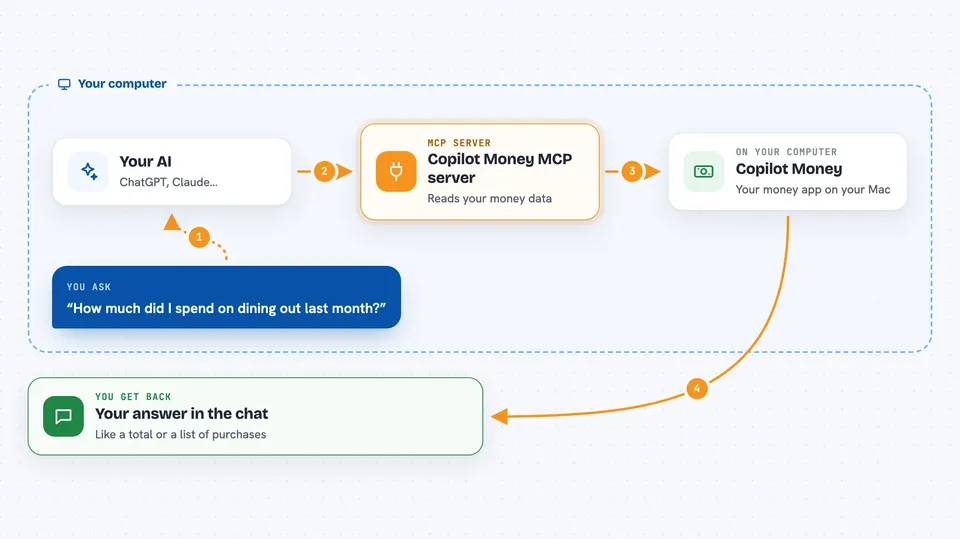
You ask your AI a question about your money, like how much you spent on groceries last month. The AI sends that request to this helper, which reads your Copilot Money data from your Mac. By default it only reads the local copy, so nothing leaves your computer except the answer the AI gives you. If you turn on extra modes, it can also fetch fresh data or make changes like categorizing transactions. Then you get a clear answer or a list back in the chat.
 Click to zoom
What you can do with it
- Ask how much you spent in a category last month
- Check your net worth across all accounts
- See your current investment holdings and returns
- Find out which subscriptions you are paying for
- Review whether you are on track with your budgets
- Look up upcoming recurring charges
- Search for specific purchases by name or date
Try asking your AI
- “How much did I spend on dining out last month?”
- “What is my net worth across all accounts?”
- “Show me all my Amazon purchases in the last 30 days”
- “Am I on track with my budgets this month?”
What it gives back to you
You get answers in plain language, like a total amount, a list of transactions, or a short summary. For example, it might say you spent 320 dollars on dining out last month and list the top five places. If you ask about investments, it can show your holdings and their current values. Everything appears right in your chat window.
Before you start
What you need
- A Mac with the Copilot Money app installed
- Node.js 18 or newer (often already on your Mac if you use Claude Desktop)
- Claude Desktop, Cursor, or another AI app that supports MCP
- For live reads or writes: a browser logged in to app.copilot.money
Good to know
If you turn on write mode, the AI can change your Copilot Money data, and your financial information will be sent to whichever AI provider you use, so only use it if you are comfortable with that.
Install it with your AI
Add Copilot Money MCP server to your AI, no technical skills needed
You don't install anything by hand. You copy one prompt, paste it into an AI that can work on your computer, and it checks, installs and connects the server for you, asking you when it needs something.
Sign in to get the install prompt
Members get a ready-made prompt that lets the Claude desktop app check Copilot Money MCP server, install it and connect it for them, step by step. You don't need any technical skills: you copy, paste and answer a few questions. Your connected AI can also find and install any of the 4,609 MCP servers here for you.
Who it's for
Anyone who uses Copilot Money on a Mac and wants quick answers about their spending, budgets, or investments without clicking around.



