MCP server · Security
VulnFeed MCP server
by infai-tech
Lets your AI check your project's dependencies for known security holes and suggest safer versions.
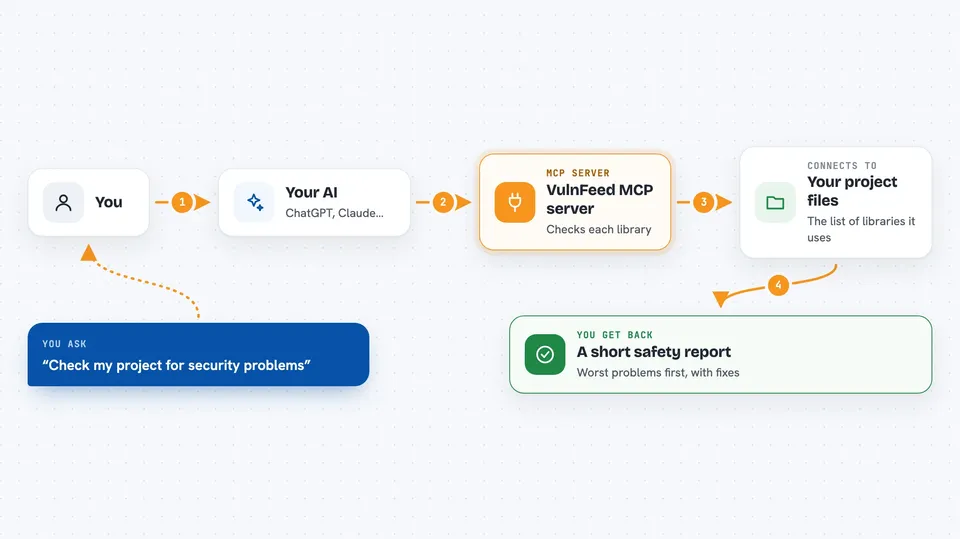
VulnFeed is a helper that checks the software libraries your project depends on for known security problems. You connect it to your AI assistant, and then you can just ask things like "are my dependencies safe?" It is handy for developers and anyone who maintains a code project and wants a quick safety check without digging through security websites.
What is an MCP server? The 30-second version
On its own, your AI can only chat with you. An MCP server is a small helper program that gives your AI a new skill or a connection to another service. This one connects your AI to VulnFeed, a service that keeps track of known security problems in software libraries. Once it is connected, your AI can look up your project's dependencies and tell you what is risky, without you leaving the chat.
What this MCP server does
You ask your AI to check your project for security problems. The AI passes that request to this helper, which reads your project's lockfile, a file that lists every library your project uses and the exact version. The helper then asks a public security database (OSV.dev) about each library and adds a score for how likely each problem is to actually be exploited. It sorts the results so the most dangerous ones come first, and tells you which version to upgrade to. You get a short, readable answer in your chat instead of a giant list of scary warnings.
 Click to zoom
What you can do with it
- Scan all your project's dependency files at once for known vulnerabilities
- Check a single library by name to see if it has any known problems
- Look up details about a specific security issue, including how likely it is to be exploited
- Get a suggested safe version to upgrade each affected library to
- Register a project so it can be watched for new problems over time
- See only the new vulnerabilities that appeared since your last check
- Stop watching a project when you no longer need it
Try asking your AI
- “Scan my project for vulnerable dependencies”
- “Is the express package version 4.18.2 safe?”
- “What new security issues appeared in my project since last week?”
- “Tell me everything about CVE-2024-1234 and what version fixes it”
What it gives back to you
You get back a short list of the vulnerable libraries in your project, each with the problem's name, how serious it is, how likely it is to be exploited, and which version to upgrade to. The most urgent ones appear first. If nothing is wrong, it tells you that too. For a single library or a single security issue, you get a more detailed explanation.
Before you start
What you need
- Python installed on your computer (the tool runs with a command called uvx)
- The Claude desktop app or Claude Code, with its settings file open so you can add the server
- A license key from vulnfeed.novadyne.ai if you want more than 10 scans a day, more than one watched project, or webhook alerts
Good to know
It only reads your dependency files and reports what it finds, so it does not change anything on its own, but the paid features and webhook alerts cost money.
Install it with your AI
Add VulnFeed MCP server to your AI, no technical skills needed
You don't install anything by hand. You copy one prompt, paste it into an AI that can work on your computer, and it checks, installs and connects the server for you, asking you when it needs something.
Sign in to get the install prompt
Members get a ready-made prompt that lets the Claude desktop app check VulnFeed MCP server, install it and connect it for them, step by step. You don't need any technical skills: you copy, paste and answer a few questions. Your connected AI can also find and install any of the 4,609 MCP servers here for you.
Who it's for
Developers, IT admins, and anyone who maintains a software project and wants a quick, plain-language security check on its dependencies.