MCP server · No-code · official
Make MCP server
by integromat · official
Let your AI run your Make scenarios, so it can start your automations for you.
This is a small helper that connects your AI assistant to your Make account. Once it is set up, your AI can see your on-demand scenarios and run them when you ask. It is handy if you already build automations in Make and want to trigger them by just typing a request.
What is an MCP server? The 30-second version
On its own, your AI can only chat with you. An MCP server is a small helper program that gives your AI a new skill or a connection to an app. This one connects your AI to Make, so it can look up your scenarios and run them for you. You stay in the chat, and the helper does the talking to Make behind the scenes.
What this MCP server does
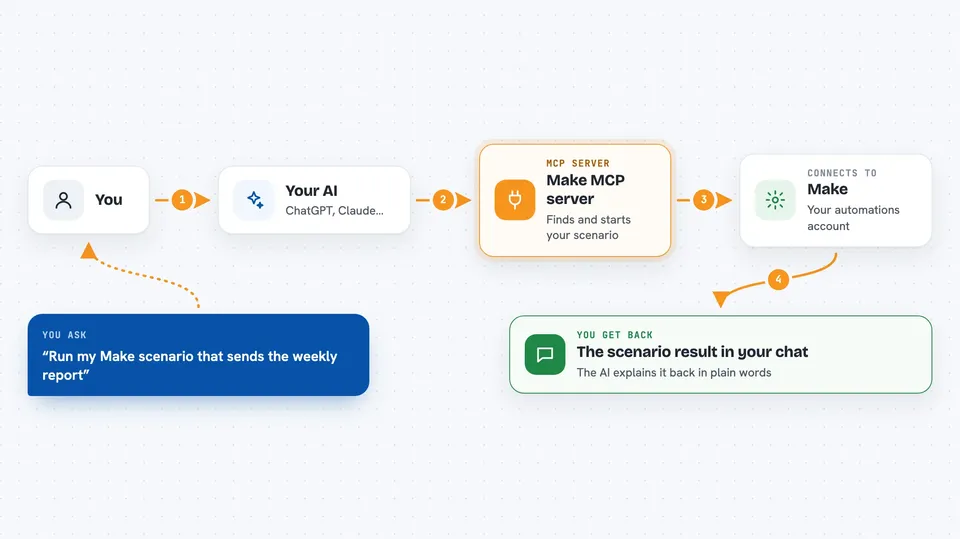
You ask your AI to run one of your Make scenarios. The AI uses this helper to talk to your Make account. The helper finds the scenarios you set to run on demand and works out what details each one needs. It passes your details along and starts the scenario. When the scenario finishes, the helper brings the result back into the chat so you can read it.
 Click to zoom
What you can do with it
- List the Make scenarios you have set to run on demand
- See what details a scenario needs before it runs
- Start a Make scenario with the details you give
- Get the result of a scenario back in the chat
- Trigger your automations without opening Make
Try asking your AI
- “Run my Make scenario that sends the weekly report”
- “What on-demand scenarios do I have in Make?”
- “Start the scenario that adds a new row to my spreadsheet, with name Anna and email anna@example.com”
- “Run my invoice scenario for client number 42 and show me what it returned”
What it gives back to you
You get the result of the scenario as structured information, shown in the chat. That might be a list of your scenarios, the details a scenario needs, or the output the scenario produced. The AI reads it and explains it back to you in plain words.
Before you start
What you need
- Node.js installed on your computer
- An MCP client, like the Claude desktop app
- A Make API key with scenarios:read and scenarios:run permissions
- Your Make zone and team ID
Good to know
It can start your real Make scenarios, so anything those scenarios do, like sending emails or changing data, will actually happen.
Install it with your AI
Add Make MCP server to your AI, no technical skills needed
You don't install anything by hand. You copy one prompt, paste it into an AI that can work on your computer, and it checks, installs and connects the server for you, asking you when it needs something.
Sign in to get the install prompt
Members get a ready-made prompt that lets the Claude desktop app check Make MCP server, install it and connect it for them, step by step. You don't need any technical skills: you copy, paste and answer a few questions. Your connected AI can also find and install any of the 4,361 MCP servers here for you.
Who it's for
People who already build automations in Make and want to start them by asking their AI instead of clicking around.