MCP server · No-code
WebsitePublisher.ai MCP server
by megberts
Build and publish websites by chatting with your AI: pages, images, forms, and domains.
WebsitePublisher.ai is a service that lets you build and publish real websites just by talking to your AI assistant. Once you connect it, your AI can create pages, upload images, set up forms, and put your site live on a web address. It is handy for anyone who needs a simple website but does not want to touch code or a website builder.
What is an MCP server? The 30-second version
On its own, your AI can only chat with you. An MCP server is a small helper that gives your AI a new skill or a connection to another service. This one connects your AI to WebsitePublisher.ai, so it can actually create and change your website for you. You just ask in plain words, and the helper does the work behind the scenes.
What this MCP server does
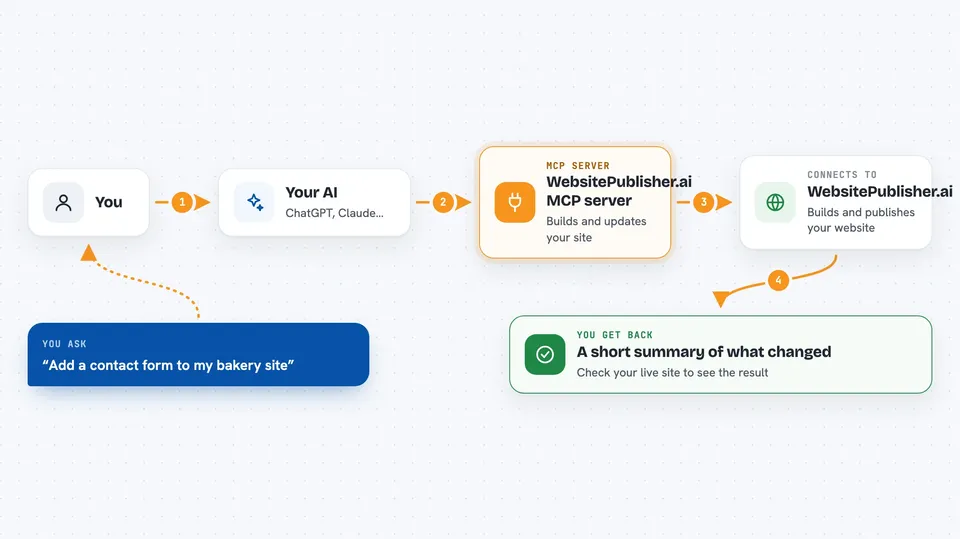
You tell your AI what you want, like a new page or a change to an existing one. Your AI uses this helper to talk to WebsitePublisher.ai. WebsitePublisher then creates the page, uploads the file, or updates the data on your site. When it is done, your AI tells you what changed, and you can look at your live site to see the result.
 Click to zoom
What you can do with it
- Create new web pages and edit existing ones
- Upload images, stylesheets, and other files
- Set up reusable pieces like headers and footers
- Build simple forms to collect names and emails
- Store and manage lists of data, like products or contacts
- Connect services for email, payments, and more
- Publish your site to a custom domain name
- Check visitor numbers and where they came from
Try asking your AI
- “Create a simple one-page website for my bakery with our address and opening hours.”
- “Add a contact form to my site that sends me an email when someone fills it in.”
- “Change the headline on my homepage to say 'Fresh bread every morning'.”
- “Upload this logo image and use it at the top of every page.”
- “How many people visited my site last week, and which pages did they look at?”
What it gives back to you
Your AI replies in the chat with a short summary of what it did, like 'I created a new page called About and added it to your site'. For questions, it gives you the numbers or lists you asked for, such as visitor counts or your page names. You can also ask it to show you the current content of a page. Nothing appears on your live site until the change is saved, and you can always check the result yourself.
Before you start
What you need
- A WebsitePublisher.ai account (there is a free plan)
- An AI assistant that supports MCP connections, like Claude, ChatGPT, or Cursor
- A web browser to log in when you first connect
Good to know
This tool can change or delete parts of your live website, so review important changes before you confirm them.
Install it with your AI
Add WebsitePublisher.ai MCP server to your AI, no technical skills needed
You don't install anything by hand. You copy one prompt, paste it into an AI that can work on your computer, and it checks, installs and connects the server for you, asking you when it needs something.
Sign in to get the install prompt
Members get a ready-made prompt that lets the Claude desktop app check WebsitePublisher.ai MCP server, install it and connect it for them, step by step. You don't need any technical skills: you copy, paste and answer a few questions. Your connected AI can also find and install any of the 4,361 MCP servers here for you.
Who it's for
Small business owners, freelancers, and office workers who need a simple website without hiring a developer.