MCP server · No-code
Directus MCP server
by staminna
Lets your AI read and change content, files, users and automations inside your Directus site.

This is a helper that connects your AI assistant to Directus, the system many teams use to store and manage their website content. Once it is set up, you can ask your AI in plain words to look things up or make changes in Directus for you. It is handy if you already work with Directus and would rather not click through its admin screens all day.
What is an MCP server? The 30-second version
On its own, your AI can only chat with you. An MCP server is a small helper program that gives your AI a new skill or a connection to another app. This one connects your AI to your Directus instance, so it can look up your content, files, users and automations, and make changes there when you ask. You set it up once, and after that your AI just uses it quietly in the background.
What this MCP server does
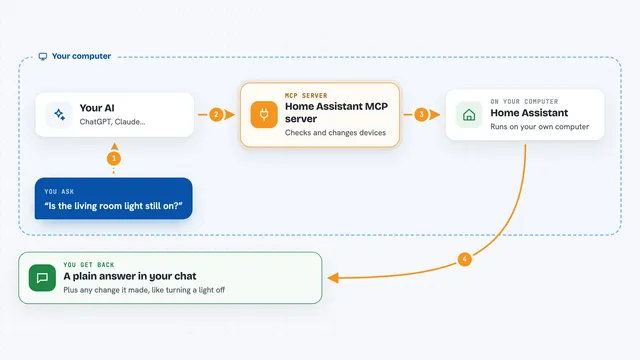
You ask your AI something about your Directus content, like listing your collections or finding published products. Your AI passes that request to this helper, which talks to your Directus instance using a token you gave it. Directus sends back the data, and the helper hands it to your AI, which explains it to you in the chat. If you ask for a change, like creating an item or a new field, the helper makes that change in Directus and tells you it is done. You never touch Directus yourself unless you want to check.
 Click to zoom
What you can do with it
- List your collections and see the fields inside each one
- Read items from a collection, with filters like status or date
- Create, update or delete items in a collection
- Create new collections and add fields to them
- Upload and manage files, and import CSV or JSON data
- Create and trigger automation flows
- Look up users and check their roles
- Inspect and compare your data model to spot changes
Try asking your AI
- “List all collections in my Directus instance”
- “Show me all products where status is published”
- “Create a new collection called blog_posts with title, content and published fields”
- “Analyze the schema of the users collection including relationships”
What it gives back to you
You get answers in plain chat text: lists of collections, items, users or files, and short summaries of what your data looks like. When it changes something, like creating an item or a field, it tells you what it did. For schema work you can get a snapshot or a comparison of your data model. Everything shows up as a normal reply from your AI, not as a separate screen.
Before you start
What you need
- A Directus instance, either on your own computer or online
- Its web address, for example http://localhost:8065
- A Directus access token, which is a kind of password you create in Directus under User Settings, Token
- An AI app that supports MCP, like Claude Desktop, Claude Code, Cursor or Windsurf
Good to know
This helper can change and delete things in your Directus site, so use a token with only the permissions you are comfortable giving, and check before letting it delete or overwrite data.
Install it with your AI
Add Directus MCP server to your AI, no technical skills needed
You don't install anything by hand. You copy one prompt, paste it into an AI that can work on your computer, and it checks, installs and connects the server for you, asking you when it needs something.
Sign in to get the install prompt
Members get a ready-made prompt that lets the Claude desktop app check Directus MCP server, install it and connect it for them, step by step. You don't need any technical skills: you copy, paste and answer a few questions. Your connected AI can also find and install any of the 4,361 MCP servers here for you.
Who it's for
People who already use Directus for their website or app content and want to manage it by chatting instead of clicking through admin screens.