
MCP server · Research
AllMCPs MCP server
Lets your AI search a directory of MCP servers and pull install instructions for any of them.
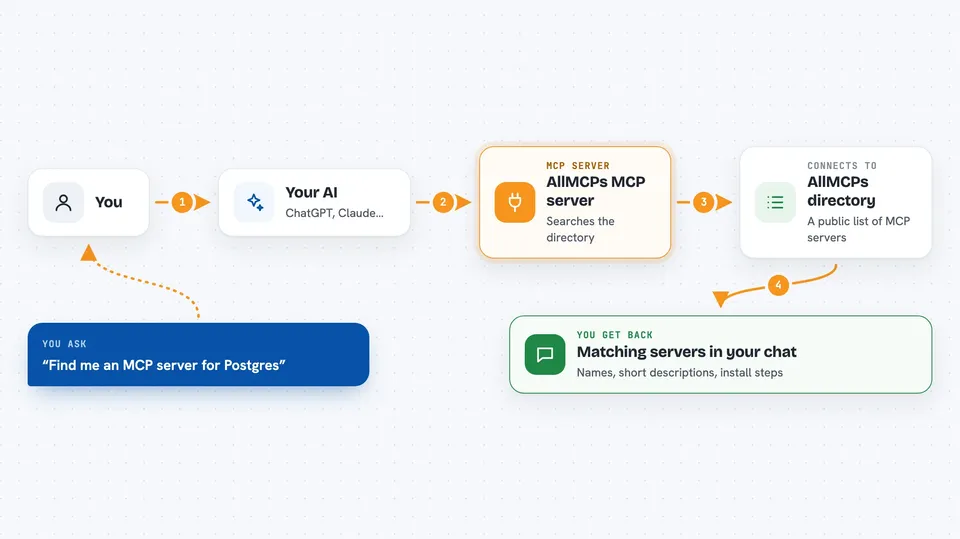
This is a helper that connects your AI to AllMCPs.com, a website that keeps a list of MCP servers. Once it is connected, you can ask your AI to look up servers in that list, show you how to install one, or even add a new one. It is handy if you keep hearing about MCP servers and want an easy way to find and compare them without browsing the site yourself.
What is an MCP server? The 30-second version
On its own, your AI can only chat with you using what it already knows. An MCP server is a small helper program that gives your AI a new skill or a connection to an app or website. This one connects your AI to AllMCPs.com, the directory of MCP servers. So when you ask about a server, your AI can actually go look it up there and bring the answer back to you.
What this MCP server does
You ask your AI something like find me an MCP server for databases. Your AI passes that request to this helper, and the helper talks to the AllMCPs.com directory. The directory sends back matching servers, and your AI shows them to you in the chat. You can then ask for the install instructions for one of them, and the helper fetches that too. It can also send in a brand new server listing for review if you want to add one.
 Click to zoom
What you can do with it
- Search the AllMCPs directory by keyword or category
- Get the install config snippet for a specific server
- List all categories with how many servers each one has
- Check the pricing for boosting or featuring a listing
- Start a boost order for a listing and get a checkout link
- Submit a new MCP server to the directory
- Verify and claim a listing you own
Try asking your AI
- “Search the AllMCPs directory for MCP servers related to Postgres”
- “Show me the install config for that server”
- “What categories are in the AllMCPs directory?”
- “Submit my MCP server to AllMCPs with this name, URL and email”
What it gives back to you
You get answers in plain chat text: lists of matching servers with their names and short descriptions, category lists with counts, or a ready-to-paste install snippet for one server. If you submit a new server, you get back a pending status, a claim link, and a badge snippet you can add to your project page. Boost requests return a checkout link and an invoice reference.
Before you start
What you need
- Node.js 18 or newer on your computer
- An MCP client such as Claude Desktop or Cursor
- An email address if you want to submit a new server listing
Good to know
The submit and boost tools send real information to AllMCPs.com, and boosting can lead to a paid checkout, so check the details before you confirm.
Install it with your AI
Add AllMCPs MCP server to your AI, no technical skills needed
You don't install anything by hand. You copy one prompt, paste it into an AI that can work on your computer, and it checks, installs and connects the server for you, asking you when it needs something.
Sign in to get the install prompt
Members get a ready-made prompt that lets the Claude desktop app check AllMCPs MCP server, install it and connect it for them, step by step. You don't need any technical skills: you copy, paste and answer a few questions. Your connected AI can also find and install any of the 4,609 MCP servers here for you.
Who it's for
People who want to find, compare, or publish MCP servers without browsing the AllMCPs website by hand.


