
MCP server · Developer tools
MCP Factory
by jaimenbell
Turn a simple settings file into ready-made MCP servers and run them all through one hub.
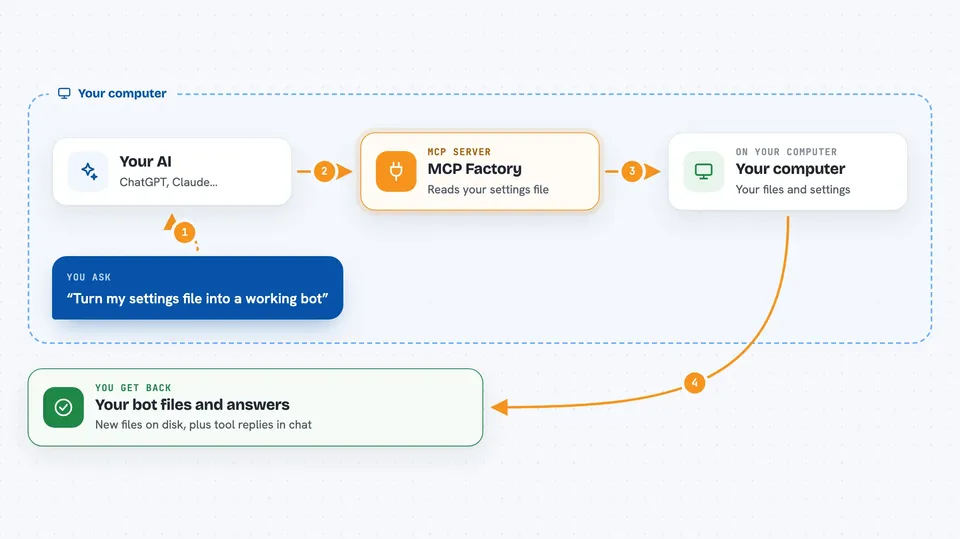
MCP Factory is a helper tool for people who build or manage AI assistants that connect to other apps. It reads a short settings file you write (called a manifest) and creates the starter code for a new MCP server, or registers an existing one. It is handy if you have several small bots and want them all reachable through one connection instead of setting each up by hand.
What is an MCP server? The 30-second version
On its own, your AI can only chat with you. An MCP server is a small helper program that gives your AI a new skill or a connection to an app or service. This tool, MCP Factory, is a helper that builds and runs those helper programs for you. You describe what you want in a plain settings file, and it creates the starter server and serves all your bots' tools through one shared connection.
What this MCP server does
You write a short settings file (mcp.yaml) describing a bot: its name, what tools it should offer, and how to run it. You run MCP Factory with that file, and it generates the starter server code and the entry that tells Claude about it. You can also point it at a folder full of these settings files, and it finds them all, checks them, and adds them in one go. Then you start the hub, and it serves every bot's tools through a single connection. When you ask your AI to use one of those tools, the hub passes the request along to the right bot and brings the answer back.
 Click to zoom
What you can do with it
- Generate a starter MCP server from a short settings file
- Register an existing MCP server without writing any code
- Scan a folder and add all your bots at once
- Preview changes before anything is written
- Run one hub that serves every bot's tools together
- Check your settings file for common mistakes before generating
- List which bots are registered and whether they are running
Try asking your AI
- “Generate a new MCP server from my my_bot/mcp.yaml file”
- “Scan my projects folder and show me what would change before applying”
- “Start the hub and list all the bots you can see”
- “Run the settings check on examples/fleet_health.yaml in strict mode”
What it gives back to you
You get files written to disk: the generated starter server code and an updated entry in your Claude settings file. In the chat, the hub can list your registered bots and their running status. When you call a tool through the hub, you get that tool's answer back, or a clear error message if the bot behind it is not running.
Before you start
What you need
- Python installed on your computer
- The jaimenbell-mcp-factory package installed (pip install jaimenbell-mcp-factory)
- A settings file (mcp.yaml) describing your bot, or a folder containing them
Good to know
When you use the scan-and-apply option, it writes to your Claude settings file, so make a backup first or use the preview mode to see what will change.
Install it with your AI
Add MCP Factory to your AI, no technical skills needed
You don't install anything by hand. You copy one prompt, paste it into an AI that can work on your computer, and it checks, installs and connects the server for you, asking you when it needs something.
Sign in to get the install prompt
Members get a ready-made prompt that lets the Claude desktop app check MCP Factory, install it and connect it for them, step by step. You don't need any technical skills: you copy, paste and answer a few questions. Your connected AI can also find and install any of the 4,609 MCP servers here for you.
Who it's for
Developers and technical tinkerers who manage several small AI-connected bots and want to set them up and run them without repeating the same work each time.




