MCP server · Security
Lazaretto MCP server
Check your project's lockfile and packages for known malicious software before you install them.
Lazaretto is a helper that checks the packages your project depends on against lists of known bad software, so you can spot trouble before you install anything. It works with the lockfiles that npm, Yarn and pnpm already create, and it can also scan a package or an MCP server for suspicious behavior. It is handy for anyone who installs packages from the internet and wants a quick safety check.
What is an MCP server? The 30-second version
On its own, your AI can only chat with you. An MCP server is a small helper program that gives your AI a new skill or a connection to an app or service, and here it connects your AI to Lazaretto. Once connected, your AI can ask Lazaretto to check a lockfile or scan a package for you, and then tell you what it found. You do not need to understand how it works under the hood; you just ask in plain words.
What this MCP server does
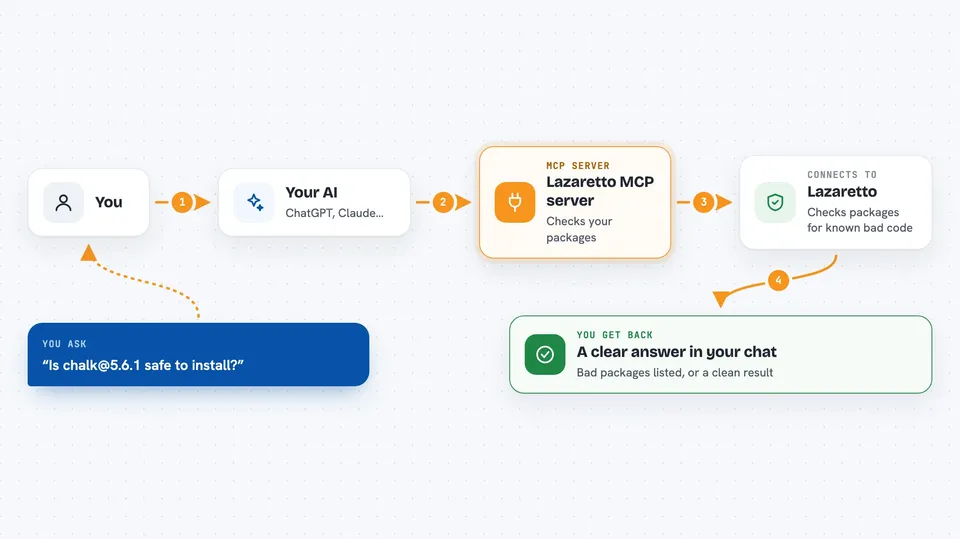
You ask your AI to check your project's lockfile or a specific package. The AI sends that request to the Lazaretto helper. The helper talks to the Lazaretto service, which compares your packages against published lists of known malicious packages or scans the code for suspicious behavior. Then the AI tells you what it found, like a list of bad packages or a clean result. Some checks are free and some need paid credits.
 Click to zoom
What you can do with it
- Check every pinned package in your lockfile against known malicious-package advisories
- Look up whether a file hash is on a known-bad list
- Find and verify signed scan reports for a package or MCP server
- Scan a package, GitHub repo, or raw URL for credential theft, exfiltration, obfuscation, prompt injection and droppers
- Deep-scan the code of up to 25 pinned packages in your lockfile
- Check an MCP server's tool list for hidden instructions or secret-stealing parameters
Try asking your AI
- “Check my package-lock.json for any known malicious packages”
- “Is chalk@5.6.1 safe to install?”
- “Scan this MCP server at https://example.com/mcp before I connect to it”
- “Look up this file hash to see if it is known bad: abc123...”
What it gives back to you
You get back a clear answer in the chat. For a lockfile check, it lists any malicious packages it found and any it could not verify. For a scan, it gives a verdict like malicious, flagged, clear or error, along with evidence. For attestation checks, it confirms whether a signed report exists and whether it is still valid.
Before you start
What you need
- An MCP client that supports remote servers (for the hosted version) or Node.js 18+ (for the local version)
- No account or key for the free tools
- Prepaid credits and an API key for the paid scans (buy at https://lazaretto.dev/buy)
Good to know
The paid scans cost credits, so keep an eye on your balance. A clear result means no known-bad match and no rule fired, but it is not a guarantee that a package is safe.
Install it with your AI
Add Lazaretto MCP server to your AI, no technical skills needed
You don't install anything by hand. You copy one prompt, paste it into an AI that can work on your computer, and it checks, installs and connects the server for you, asking you when it needs something.
Sign in to get the install prompt
Members get a ready-made prompt that lets the Claude desktop app check Lazaretto MCP server, install it and connect it for them, step by step. You don't need any technical skills: you copy, paste and answer a few questions. Your connected AI can also find and install any of the 4,609 MCP servers here for you.
Who it's for
Developers, security-minded engineers, and anyone who installs npm packages or connects to MCP servers and wants a quick safety check.