
MCP server · Gaming
Chess MCP server
by jiayao
Play chess against your AI, see the board, and get help finding positions in chess games.
This is a small helper that lets your AI play chess with you. You make moves in plain chess words, and it keeps track of the board and shows you a picture of it. It is handy if you like chess and want to play or study games with your AI.
What is an MCP server? The 30-second version
On its own, your AI can only chat. An MCP server is a small helper program that gives your AI a new skill or a connection to an app. This one connects your AI to a chess game, so it can set up a board, make moves, and show you the position. You just ask in normal words, and the helper does the chess part.
What this MCP server does
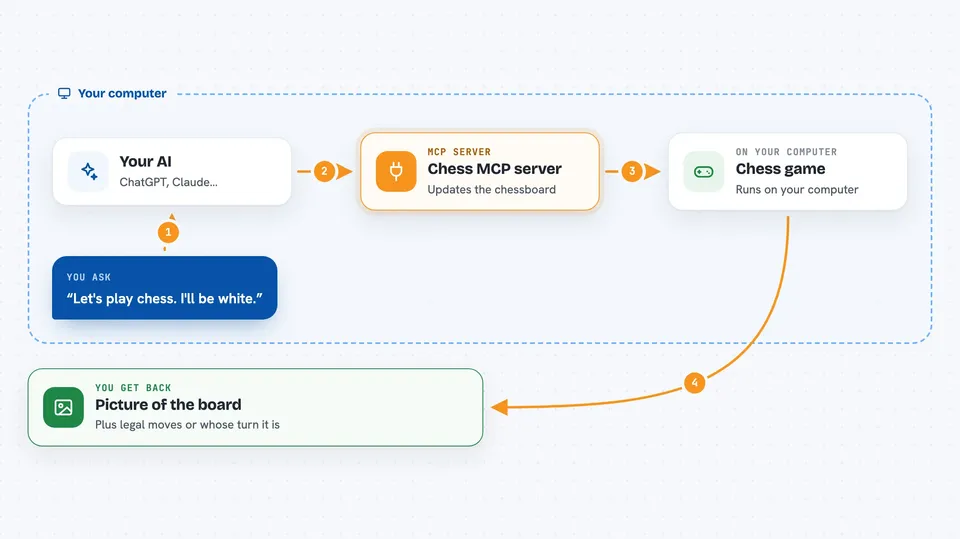
You ask your AI to start a chess game or make a move. The AI uses this helper to update the chessboard and check the rules. The helper keeps track of whose turn it is and what moves are allowed. Then it sends back a picture of the board and tells you what happened. You can also give it a chess game record and ask it to find a specific position.
 Click to zoom
What you can do with it
- Start a new chess game as white or black
- Make chess moves using normal chess notation like e4 or Nf3
- See a picture of the current board
- Ask whose turn it is
- Get a list of all legal moves
- Find a position in a chess game record, like a bishop on a3
Try asking your AI
- “Let's play chess. Start a new game and I'll be white.”
- “Make the move e4 for me.”
- “Show me the board.”
- “What are my legal moves right now?”
- “In this game record, find the position where there is a bishop on a3.”
What it gives back to you
You get a picture of the chessboard, a list of legal moves, or a simple answer like whose turn it is. When you make a move, it tells you the move in two chess notations and the new board position. If you ask it to find a position in a game record, it sends back an image of that board.
Before you start
What you need
- The Claude desktop app or another AI tool that supports MCP servers
- The uvx tool installed (it comes with Python tools; the README shows the exact setup)
Good to know
It can change the board state when you make moves, so if you are in the middle of a game, be careful not to start a new one by accident.
Install it with your AI
Add Chess MCP server to your AI, no technical skills needed
You don't install anything by hand. You copy one prompt, paste it into an AI that can work on your computer, and it checks, installs and connects the server for you, asking you when it needs something.
Sign in to get the install prompt
Members get a ready-made prompt that lets the Claude desktop app check Chess MCP server, install it and connect it for them, step by step. You don't need any technical skills: you copy, paste and answer a few questions. Your connected AI can also find and install any of the 4,361 MCP servers here for you.
Who it's for
Chess fans and anyone who wants to play or study chess with their AI.





