
MCP server · Gaming
Steam MCP server
by jkiley129
Ask your AI about your Steam games, playtime, and recent activity in plain words.
This is a small helper that connects Claude to your Steam library. Once it is set up, you can just ask questions about your games and get answers in the chat. It is handy if you have a big pile of games and want to know what you have been playing or what to try next.
What is an MCP server? The 30-second version
On its own, your AI can only chat with you. An MCP server is a small helper program that gives your AI a new skill or a connection to an app or service. This one connects your AI to Steam, so it can look up your games and playtime for you. You ask a question, and the AI uses this helper to fetch the answer from Steam.
What this MCP server does
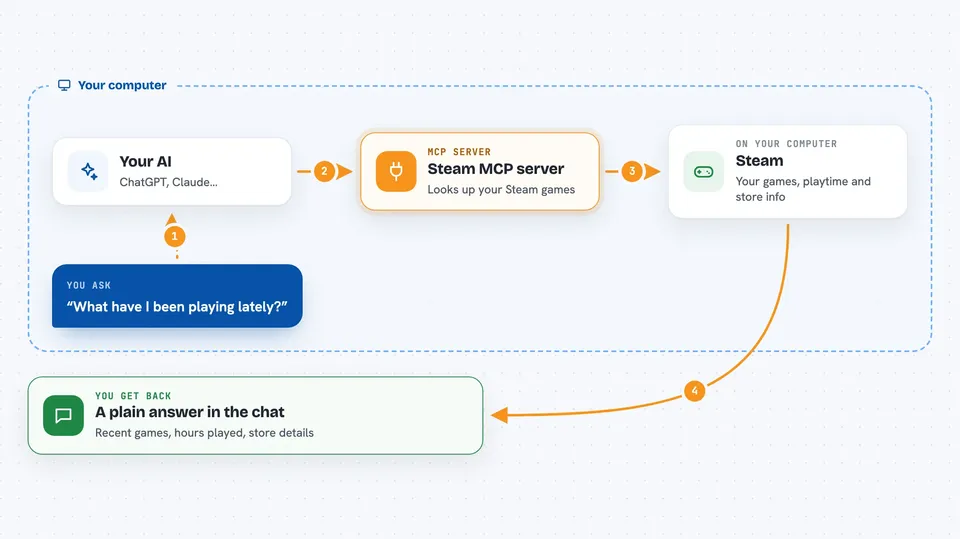
You type a question about your Steam games into Claude, like what you played lately. Claude passes that request to this helper program running on your computer. The helper talks to Steam's public web service using your own account details. Steam sends back your library, playtime, and store information. Claude then turns that into a normal answer in the chat.
 Click to zoom
What you can do with it
- See your whole Steam library with playtime and last played dates
- Find games you played in the last two weeks
- Search your library by name, playtime, or unplayed status
- Get store details for a game like genres, tags, and Metacritic score
- Refresh the cached data after you buy new games
- Ask which games in your backlog you have never touched
Try asking your AI
- “What have I been playing lately?”
- “Suggest something from my backlog I haven't touched yet.”
- “How many hours have I put into RPGs?”
- “Tell me about Elden Ring.”
What it gives back to you
You get answers written in normal sentences, like a short summary of your recent games or a list of titles with hours played. For store details, it gives you things like genres, tags, price, and Metacritic score. It can also show a filtered list of games matching what you asked for. Everything appears right in the chat, no extra files to open.
Before you start
What you need
- Node.js 18 or newer installed on your computer
- A Steam account with your profile and game details set to Public
- A free Steam Web API key from steamcommunity.com/dev/apikey
- Your Steam ID or vanity username from your profile URL
Good to know
It only reads your Steam library and store info, and it needs your profile set to Public, so anyone can see your game list while that setting is on.
Install it with your AI
Add Steam MCP server to your AI, no technical skills needed
You don't install anything by hand. You copy one prompt, paste it into an AI that can work on your computer, and it checks, installs and connects the server for you, asking you when it needs something.
Sign in to get the install prompt
Members get a ready-made prompt that lets the Claude desktop app check Steam MCP server, install it and connect it for them, step by step. You don't need any technical skills: you copy, paste and answer a few questions. Your connected AI can also find and install any of the 4,361 MCP servers here for you.
Who it's for
Steam players who use Claude and want quick answers about their own game library without digging through the Steam client.





