MCP server · Research
Secondhand MCP server
by jlsookiki
Lets your AI search Facebook Marketplace, eBay, Depop and Poshmark for secondhand items and show you the listings.
This is a small helper you add to an AI assistant like Claude Desktop or Claude Code. Once it is connected, you can ask your AI to hunt for used clothes, furniture, sneakers or anything else across four secondhand sites at once. It is handy if you shop secondhand often and want one place to look instead of opening four tabs.
What is an MCP server? The 30-second version
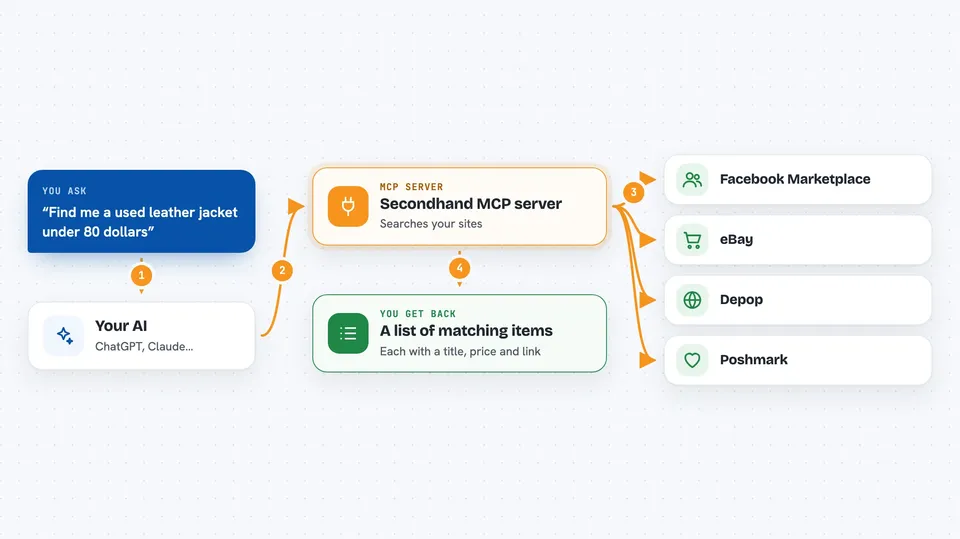
On its own, your AI can only chat with you. It cannot open websites or look things up on its own. An MCP server is a small helper program that gives your AI a new skill, and this one gives it the skill of searching secondhand marketplaces. You ask your AI a question, the AI passes it to this helper, and the helper goes off to Facebook Marketplace, eBay, Depop and Poshmark to find matches for you.
What this MCP server does
You type a request like find me a used leather jacket under 80 dollars. Your AI sends that to this helper program running on your computer. The helper searches the marketplaces you have turned on, using your filters for price, size, color and condition. It collects the matching listings and hands them back to your AI. Your AI then shows you a tidy list with titles, prices and links so you can pick what to look at.
 Click to zoom
What you can do with it
- Search Facebook Marketplace, eBay, Depop and Poshmark in one go
- Filter by price range, condition, size, color, brand and category
- Search Facebook Marketplace by city and radius in miles
- Sort results by newest, most popular or price
- Open a specific listing to see the full description, all photos and seller info
- Check which marketplaces are currently switched on
- Run a broad search across every enabled marketplace at once
Try asking your AI
- “Find me a used Herman Miller Aeron chair under 400 dollars near San Francisco”
- “Search eBay and Poshmark for a size M vintage Levi's denim jacket under 60 dollars”
- “Show me black leather boots in US size 9 on Depop sorted by lowest price”
- “Pull up the full details and photos for that first listing you found”
What it gives back to you
You get a list of matching listings in the chat, each with a title, price and a link. Facebook and eBay results also show the city, and eBay shows the condition. If you ask for a specific listing, you get the full description, all the photos and the seller's name or username. Nothing is bought or changed for you, it is only searching and reading.
Before you start
What you need
- The Claude desktop app, Claude Code, or Cursor on your computer
- Node.js installed (the helper runs through npx)
- Google Chrome or Chromium if you want Depop and Poshmark results
- A free eBay developer account for eBay results (you get a Client ID and Client Secret)
Good to know
It only reads listings and never buys anything, but Depop and Poshmark work by quietly opening Chrome in the background, so on the first search your computer may ask permission for Node.js to control Chrome.
Install it with your AI
Add Secondhand MCP server to your AI, no technical skills needed
You don't install anything by hand. You copy one prompt, paste it into an AI that can work on your computer, and it checks, installs and connects the server for you, asking you when it needs something.
Sign in to get the install prompt
Members get a ready-made prompt that lets the Claude desktop app check Secondhand MCP server, install it and connect it for them, step by step. You don't need any technical skills: you copy, paste and answer a few questions. Your connected AI can also find and install any of the 4,609 MCP servers here for you.
Who it's for
People who shop secondhand a lot, like thrifters, resellers, vintage collectors and anyone hunting for a specific used item across several sites at once.