MCP server · Developer tools
Dynadot MCP server
Ask your AI to check, register, renew, and set up your Dynadot domains and DNS for you.
This is a small helper that connects your AI assistant to Dynadot, the place where you buy and manage web addresses. Once it is set up, you can talk to your AI in normal words about your domains instead of clicking around the Dynadot website. It is handy for anyone who owns a few domains and finds the registrar dashboard fiddly.
What is an MCP server? The 30-second version
On its own, your AI can only chat. An MCP server is a small helper program that gives your AI a new skill or a connection to an app or service. This one connects your AI to Dynadot, so it can look up your domains, change DNS settings, or check renewals for you when you ask. You stay in the chat, and the helper does the clicking behind the scenes.
What this MCP server does
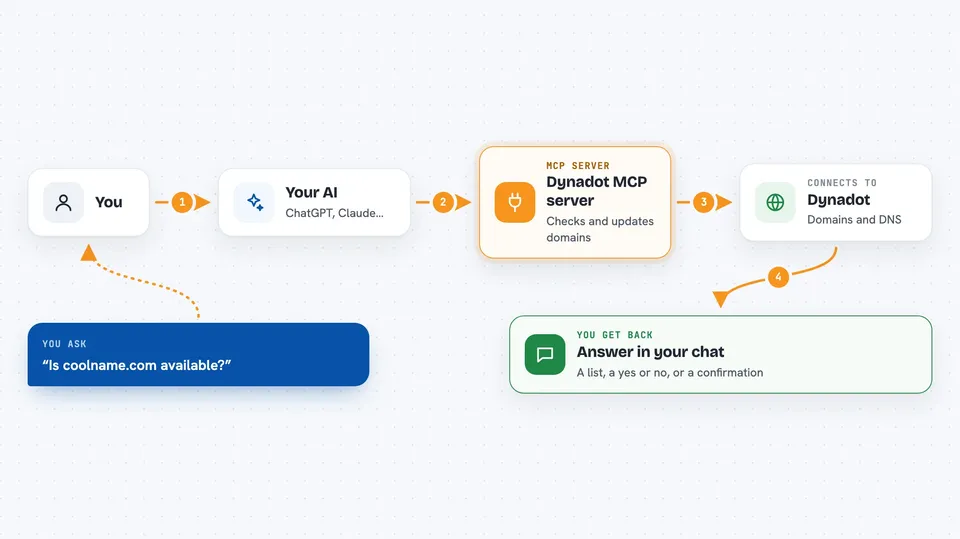
You type a request in plain words, like checking if a name is free or listing what expires soon. Your AI picks the right action from this helper and sends it to Dynadot. The helper talks to Dynadot's system, handles the messy details, and brings the answer back. You see the result in the chat as a list, a summary, or a confirmation that something changed. The helper groups many small Dynadot actions into a smaller set of tools, so your AI stays focused.
 Click to zoom
What you can do with it
- Check whether a domain name is available and see similar suggestions
- Register, renew, lock, or delete domains in your account
- Read and update DNS records, forwarding, and email settings
- List and assign nameservers for your domains
- Start a transfer and check its status
- Find domains expiring soon and group them by urgency
- Manage WHOIS contact records and aftermarket listings
Try asking your AI
- “List my domains that expire in the next 60 days.”
- “Check whether example.com is available and show similar names.”
- “Add an A record for example.com and point it to 203.0.113.10.”
- “Show the current nameservers and WHOIS contacts for example.com.”
What it gives back to you
You get answers right in the chat. That might be a list of domains with expiry dates, a yes or no on availability, the current DNS records, or a short note saying a change was made. Errors come back in plain words so you can see what went wrong.
Before you start
What you need
- A Dynadot account with at least one domain
- A Dynadot API key (a kind of password for apps; you get it free from your Dynadot account settings)
- Node.js 18 or newer installed on your computer
- An MCP client such as Claude Desktop, Cursor, or Zed
Good to know
Some actions cost money or change things for good, like registering, renewing, deleting, or transferring a domain, so check what your AI is about to do before you say yes.
Install it with your AI
Add Dynadot MCP server to your AI, no technical skills needed
You don't install anything by hand. You copy one prompt, paste it into an AI that can work on your computer, and it checks, installs and connects the server for you, asking you when it needs something.
Sign in to get the install prompt
Members get a ready-made prompt that lets the Claude desktop app check Dynadot MCP server, install it and connect it for them, step by step. You don't need any technical skills: you copy, paste and answer a few questions. Your connected AI can also find and install any of the 4,066 MCP servers here for you.
Who it's for
People who own or manage domains, like small business owners, web freelancers, and anyone handling a domain portfolio.