
MCP server · Finance and crypto
Personal Finance MCP server
by JosueM1109
Ask your AI about your own bank, card, loan and brokerage accounts, in plain English.
This is a small helper program you run yourself that connects your real bank, credit card, loan and brokerage accounts to an AI assistant like Claude. Once it is set up, you can just ask questions in normal words and get answers about your own money. It is handy if you want to look at your finances without handing your logins to a budgeting app you do not control.
What is an MCP server? The 30-second version
On its own, your AI can only chat with you. An MCP server is a small helper program that gives your AI a new skill or a connection to an app or service. This one connects your AI to your own bank, card, loan and brokerage accounts through a service called Plaid, which is the same plumbing many finance apps use behind the scenes. So when you ask about your spending, the AI can actually look it up instead of guessing.
What this MCP server does
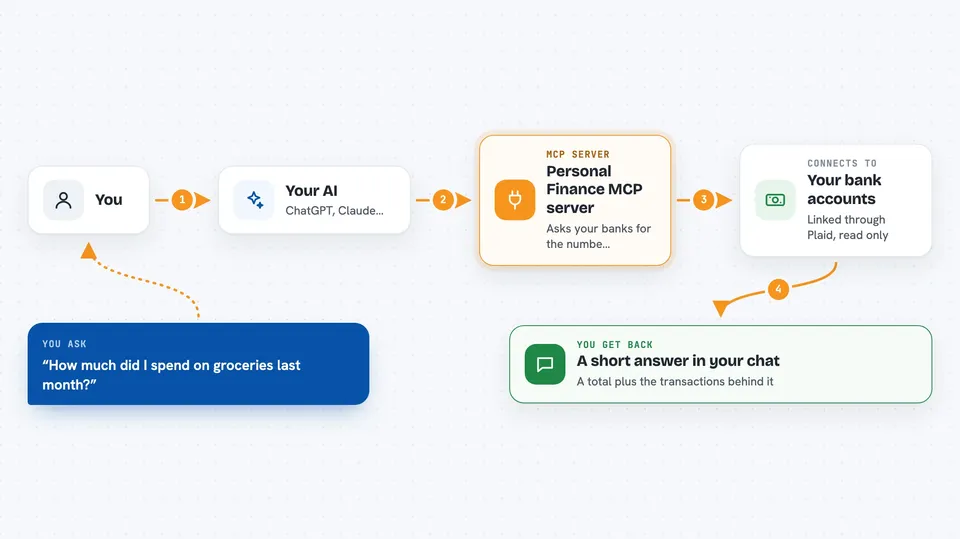
You ask your AI a question about your money, like what you spent on groceries last month. The AI passes that request to this helper program running on your own computer or server. The helper then asks Plaid, which talks to your linked banks and accounts, and brings back the numbers. The AI reads the answer and explains it to you in the chat, often with a short summary and a list of the transactions behind it. Everything is read-only, so nothing is ever changed or moved.
 Click to zoom
What you can do with it
- See every account you have linked, with balances
- Look up transactions in a date range, up to two years back
- Search transactions by merchant or name
- Find subscriptions and other recurring charges you are still paying
- Check credit card, student loan and mortgage details like interest rates
- See what is in your brokerage accounts and what was bought or sold
- Check whether any bank needs you to log in again
Try asking your AI
- “What is my total balance across all accounts?”
- “Show me transactions over 100 dollars in the last 30 days.”
- “Which subscriptions am I still paying for?”
- “How much did I spend on groceries last month?”
What it gives back to you
You get answers in the chat, usually a short summary plus a list. For example, a total spent, the number of transactions, and the top merchants, or a list of recurring charges with amounts. It can also return account lists with balances, holdings with ticker symbols, and loan details with interest rates. If one bank has a problem, the answer still comes back and just mentions the issue.
Before you start
What you need
- A Plaid account on the free Trial plan
- Your Plaid client id and secret from the Plaid dashboard
- Python 3.11 or newer on the computer where you run it
- An MCP client such as Claude Code
Good to know
It can read all the financial accounts you link, so keep it on your own machine or behind a login gate, and never share one deployment between people.
Install it with your AI
Add Personal Finance MCP server to your AI, no technical skills needed
You don't install anything by hand. You copy one prompt, paste it into an AI that can work on your computer, and it checks, installs and connects the server for you, asking you when it needs something.
Sign in to get the install prompt
Members get a ready-made prompt that lets the Claude desktop app check Personal Finance MCP server, install it and connect it for them, step by step. You don't need any technical skills: you copy, paste and answer a few questions. Your connected AI can also find and install any of the 4,609 MCP servers here for you.
Who it's for
People who want to ask an AI about their own money without using a third-party budgeting app, and who are comfortable following a setup guide once.



