
MCP server · Developer tools
TestAtlas MCP server
by Karzone
Lets your AI look up existing test steps, scenarios and code in your .NET test project so it stops writing duplicates.
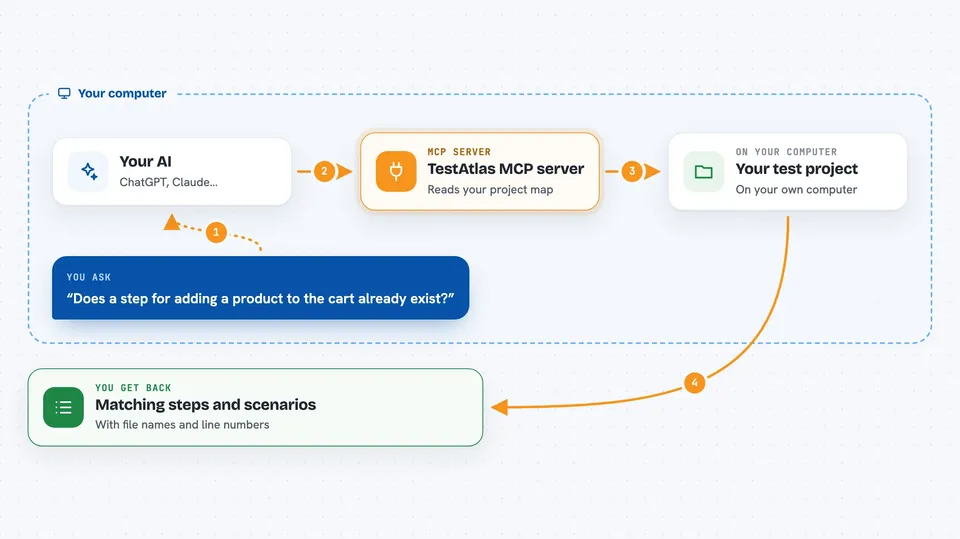
TestAtlas reads your .NET test project once and writes a small map file. That map holds every feature, scenario, step and helper class in your test suite. It is handy if you work with Reqnroll or SpecFlow tests and want your AI to reuse what already exists instead of inventing new steps.
What is an MCP server? The 30-second version
On its own, your AI can only chat. It cannot see the files in your test project unless you paste them in. An MCP server is a small helper program that gives your AI a new skill. This one connects your AI to your TestAtlas map file, so when you ask about a step or a scenario, the AI can look it up in the map and answer you.
What this MCP server does
You first run a command that scans your test project and writes a map file. Then you connect this helper to your AI and point it at that map file. When you ask something like whether a step already exists, your AI sends the question to the helper. The helper reads the map file and sends back the exact steps, scenarios or classes that match. You see the answer right in your chat, with file names and line numbers.
 Click to zoom
What you can do with it
- Check whether a step you are about to write already exists
- See which scenarios would break if you change a class or method
- Search your step definitions and scenarios by keyword
- List all tags used in your test suite with counts
- List the HTTP endpoints your tests call
- See which projects depend on which other projects
- Get a summary of how many projects, classes and steps you have
Try asking your AI
- “Does a step for adding a product to the cart already exist?”
- “What scenarios would be affected if I change the ProductsApiClient class?”
- “Show me the full detail of the scenario called User logs in successfully”
- “Which projects depend on the Core project?”
What it gives back to you
You get short, structured answers in the chat. For a step question, you get the exact step text, its keyword, and the file and line where it lives, or a list of close matches if nothing fits. For an impact question, you get the list of scenarios that would be affected. For a summary question, you get counts of projects, classes, methods and steps.
Before you start
What you need
- The .NET SDK 8.0 or newer installed on your computer
- The TestAtlas command line tool installed
- The TestAtlas MCP helper installed
- A map file built from your test project (one command creates it)
Good to know
The map is only as fresh as your last index run, so re-index after you change your test project or the answers will be out of date.
Install it with your AI
Add TestAtlas MCP server to your AI, no technical skills needed
You don't install anything by hand. You copy one prompt, paste it into an AI that can work on your computer, and it checks, installs and connects the server for you, asking you when it needs something.
Sign in to get the install prompt
Members get a ready-made prompt that lets the Claude desktop app check TestAtlas MCP server, install it and connect it for them, step by step. You don't need any technical skills: you copy, paste and answer a few questions. Your connected AI can also find and install any of the 4,609 MCP servers here for you.
Who it's for
Test automation engineers and developers who work on .NET Reqnroll or SpecFlow test suites and want their AI to stop duplicating steps.




