
MCP server · Finance and crypto
Keel MCP server
by keel-trade
Let your AI build and test crypto trading strategies on Hyperliquid, then show you the results.
Keel is a helper for building and testing trading strategies on Hyperliquid, a crypto trading platform. This MCP server connects your AI assistant to Keel, so you can describe a strategy in plain words and get back a full test report. It is handy for people who want to explore trading ideas without writing code by hand.
What is an MCP server? The 30-second version
On its own, your AI can only chat. An MCP server is a small helper program that gives your AI a new skill or a connection to an app or service. This one connects your AI to Keel, which builds and tests Hyperliquid trading strategies. Once it is set up, your AI can look things up and run tests in Keel for you when you ask.
What this MCP server does
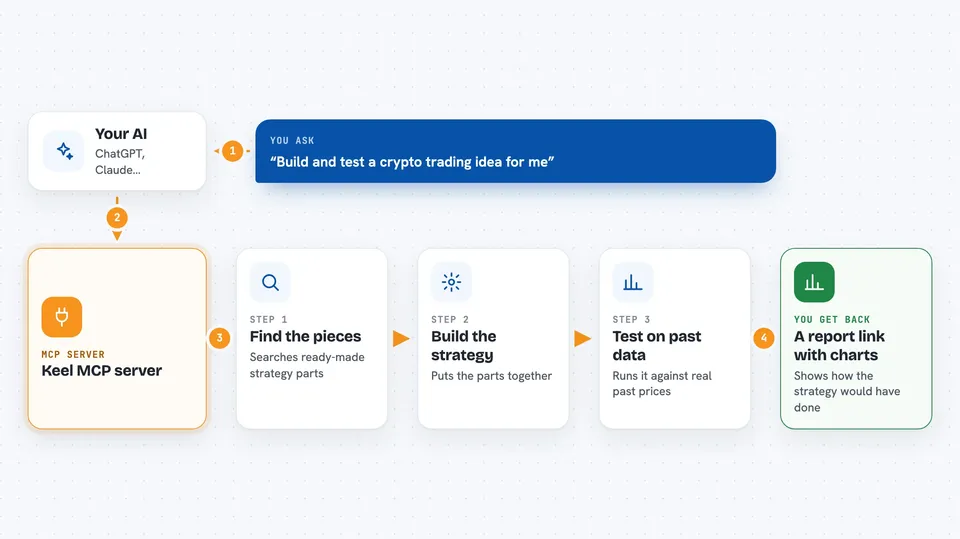
You describe the trading idea you want to explore in your own words. Your AI uses this helper to search Keel's library of ready-made strategy parts. It puts those parts together into a strategy and sends it to Keel's test engine, which runs it against real past Hyperliquid data. When the test finishes, you get a link to a report showing how the strategy would have done.
 Click to zoom
What you can do with it
- Search for strategy building blocks like momentum or funding signals
- Put building blocks together into a full trading strategy
- Run a backtest on past Hyperliquid data and get a report
- Check a strategy's details and history
- Sign in to Keel through your browser without typing terminal commands
- Share a backtest result with a link
- Monitor a live strategy in read-only mode
Try asking your AI
- “Connect to Keel.”
- “Find me momentum signals for Hyperliquid top-30 perps and compose a backtest from 2024-08-15 to today.”
- “Show me the details and log for strategy str_abc123.”
- “Run a backtest for that strategy and give me the share link.”
What it gives back to you
You get back answers in the chat, like a list of matching strategy parts or a confirmation that a strategy was built. For a backtest, you get a share link to a full report with charts and numbers such as the equity curve, Sharpe ratio, and maximum drawdown. For a strategy lookup, you get its details and history in text form.
Before you start
What you need
- Python 3.11 or newer
- A Keel account (you sign in through your browser when your AI asks you to)
- An MCP-capable app like Claude Desktop, Claude Code, Cursor, or Codex
Good to know
The live trading tools can place real trades on your Hyperliquid account, so only turn them on when you are ready and have reviewed the strategy carefully.
Install it with your AI
Add Keel MCP server to your AI, no technical skills needed
You don't install anything by hand. You copy one prompt, paste it into an AI that can work on your computer, and it checks, installs and connects the server for you, asking you when it needs something.
Sign in to get the install prompt
Members get a ready-made prompt that lets the Claude desktop app check Keel MCP server, install it and connect it for them, step by step. You don't need any technical skills: you copy, paste and answer a few questions. Your connected AI can also find and install any of the 4,609 MCP servers here for you.
Who it's for
People curious about crypto trading strategies who want to test ideas with AI help, without writing code themselves.



