MCP server · Finance and crypto
x402 Micro Tollgate MCP server
Lets your AI pay tiny crypto amounts to call paid web tools and APIs, so you can use services that charge per request.
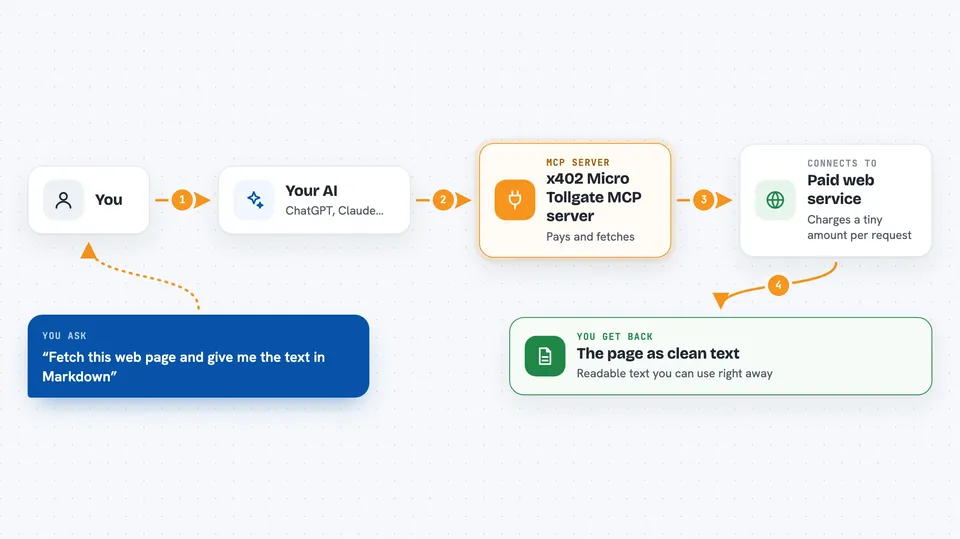
This is a small helper program that sits in front of a paid web service and handles the payment for you. When your AI wants to use that service, the tollgate asks for a tiny amount of USDC (a digital dollar coin) and passes the request through once it is paid. It is handy for people who want their AI to use paid tools without setting up a monthly subscription or a billing account.
What is an MCP server? The 30-second version
On its own, your AI can only chat. An MCP server is a small helper program that gives your AI a new skill or a connection to an outside service. This one connects your AI to a payment tollgate that sits in front of paid APIs and tools. When your AI needs something from a paid service, it asks this helper, the helper handles the small crypto payment, and then the service answers.
What this MCP server does
You ask your AI to fetch something from a paid web service, like turning a web page into readable text. Your AI sends that request to this tollgate helper. The tollgate replies with a price tag instead of a hard no. Your AI pays a tiny amount of USDC on the Base network through Coinbase's payment system. Once the payment clears, the tollgate passes the request to the real service and brings the answer back to you.
 Click to zoom
What you can do with it
- Fetch a web page and turn it into clean Markdown text
- Call paid API routes that charge per request
- Pay small USDC amounts automatically when a service asks for payment
- Check the current price for a paid route before calling it
- Discover which paid tools and routes are available
- Set spending limits so your AI never pays more than you allow
Try asking your AI
- “Fetch this web page and give me the text in Markdown: https://example.com/article”
- “What is the current price for the quote route?”
- “Show me which paid tools are available on this tollgate”
- “Call the paid quote endpoint and tell me what it returns”
What it gives back to you
You get back whatever the paid service sends, usually as text in the chat. For the Markdown fetch tool, that means the readable text of a web page. For other routes, it could be numbers, a short answer, or a small data list. If a payment is still clearing, the tollgate may tell you it is pending and will retry.
Before you start
What you need
- Node.js 22 or newer installed on your computer
- A Coinbase CDP API key and secret (free to create on the Coinbase developer site)
- A crypto wallet address to receive the USDC payments
- A small amount of USDC on Base if you want your AI to pay for calls (about 5 to 10 dollars is plenty)
Good to know
This server can spend real USDC from your wallet, so keep only a small amount (5 to 10 dollars) on the signing key and set spending limits.
Install it with your AI
Add x402 Micro Tollgate MCP server to your AI, no technical skills needed
You don't install anything by hand. You copy one prompt, paste it into an AI that can work on your computer, and it checks, installs and connects the server for you, asking you when it needs something.
Sign in to get the install prompt
Members get a ready-made prompt that lets the Claude desktop app check x402 Micro Tollgate MCP server, install it and connect it for them, step by step. You don't need any technical skills: you copy, paste and answer a few questions. Your connected AI can also find and install any of the 4,609 MCP servers here for you.
Who it's for
People who run or use paid web APIs and want their AI to pay per call without a monthly subscription, especially API sellers and tool builders.