MCP server · Finance and crypto
SwiftNodes MCP server
by swiftnodes
Lets your AI look up blockchain networks, RPC pricing, and test blockchain endpoints for you.
This is a small helper that connects your AI assistant to SwiftNodes, a service that gives you access to many blockchain networks through one account. Once it is set up, you can ask your AI plain questions about chains, prices, and which technical calls work where, and it will look up real answers instead of guessing. It is handy if you work with blockchain data and want quick facts without digging through docs.
What is an MCP server? The 30-second version
On its own, your AI can only chat with you using what it already knows. An MCP server is a small helper program you run alongside your AI that gives it a new skill or a connection to an outside service. This one connects your AI to SwiftNodes, so when you ask about a blockchain network or an endpoint, the AI can actually go and check. You stay in the chat, and the helper does the fetching behind the scenes.
What this MCP server does
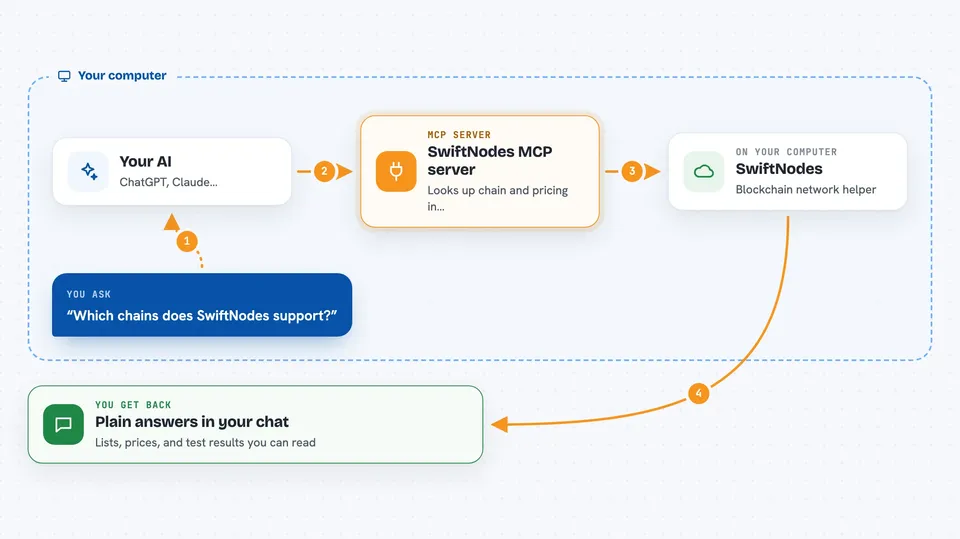
You ask your AI something like which chains SwiftNodes supports or what a plan costs. The AI passes that question to this helper program running on your computer. The helper then reads SwiftNodes' chain list, fetches live pricing, or checks its method support data, and sometimes pings a blockchain endpoint to see if it responds. It hands the result back to your AI, which explains it to you in the chat. You never have to open a browser or read a technical page yourself.
 Click to zoom
What you can do with it
- List every blockchain network SwiftNodes supports, with names and IDs
- Look up details for one chain, like block time and endpoint addresses
- Check current flat-rate pricing plans and their limits
- Find out which technical calls work on which chain
- Test any blockchain endpoint to see if it is alive and how fast it is
- Run a specific call against an endpoint and see the raw answer
Try asking your AI
- “Which chains does SwiftNodes support, and can you show me just the Ethereum ones?”
- “What are the current pricing plans and what rate limits do they include?”
- “Does the eth_getLogs method work on Polygon through SwiftNodes?”
- “Can you probe this endpoint and tell me its chain ID, block height, and latency?”
What it gives back to you
You get back plain answers in the chat: lists of chains, a single chain's details, pricing tables, or a yes/no on whether a method works. When you probe an endpoint, you get its chain identity, current block height, whether it keeps full history, and how fast it responded. If you run a specific call, you see the raw result it sent back. Everything shows up as text you can read or copy.
Before you start
What you need
- Node.js version 18 or newer installed on your computer
- The SwiftNodes MCP server files (cloned from GitHub or run through npx)
- An MCP client like Claude Desktop or Cursor to connect it to
Good to know
The probe tool will contact any web address you give it, so only point it at endpoints you are allowed to test, and keep it to one quick check rather than a stress test.
Install it with your AI
Add SwiftNodes MCP server to your AI, no technical skills needed
You don't install anything by hand. You copy one prompt, paste it into an AI that can work on your computer, and it checks, installs and connects the server for you, asking you when it needs something.
Sign in to get the install prompt
Members get a ready-made prompt that lets the Claude desktop app check SwiftNodes MCP server, install it and connect it for them, step by step. You don't need any technical skills: you copy, paste and answer a few questions. Your connected AI can also find and install any of the 4,609 MCP servers here for you.
Who it's for
People who work with blockchain data, like developers, analysts, or support staff, and want quick factual answers without leaving their AI chat.