MCP server · Finance and crypto
Toss Securities API Docs MCP server
Ask your AI about the Toss Securities Open API and get plain answers plus ready-made code samples.
This is a small helper that lets your AI answer questions about the Toss Securities Open API (the Korean stock trading platform's public developer documentation). It is handy if you are building something that talks to Toss Securities and want quick, accurate answers instead of digging through docs. It only reads and explains the documentation, it does not trade or touch any account.
What is an MCP server? The 30-second version
On its own, your AI can only chat with you using what it already knows. An MCP server is a small helper program you connect to your AI that gives it one new skill. This particular helper has the Toss Securities Open API documentation built in, so your AI can look things up there when you ask. You connect it once, and then you can just ask questions in normal words.
What this MCP server does
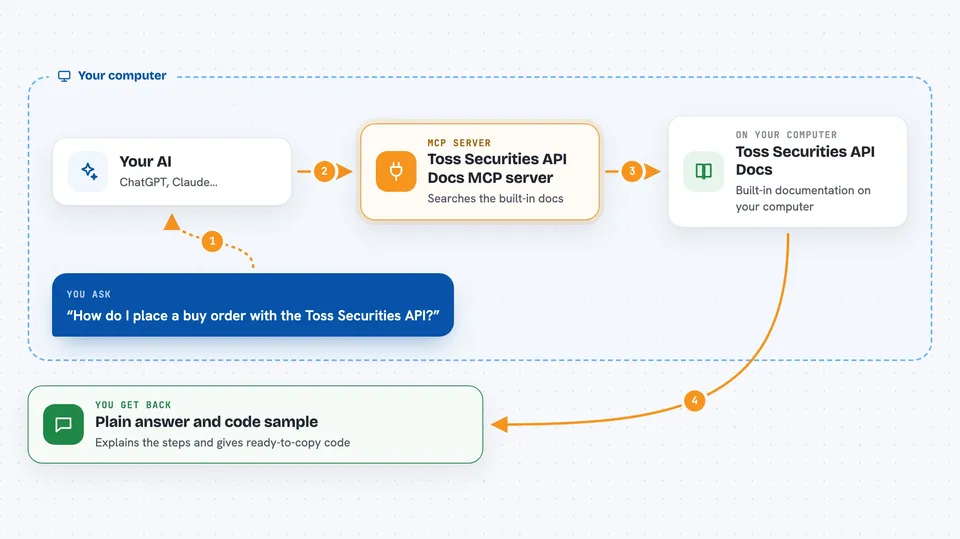
You ask your AI something like how to place an order with the Toss Securities API. Your AI uses this helper to look through the built-in API documentation. The helper finds the right endpoints, the request and response details, and any related guide. Then it hands that back to your AI, which explains it to you and can even write a code sample in curl, TypeScript, or Python.
 Click to zoom
What you can do with it
- Browse all endpoints and categories in the Toss Securities Open API
- Look up the request and response details for a specific endpoint
- Search the documentation by keyword
- Read step-by-step guides for common tasks like authentication or orders
- See the fields inside a data model
- Generate curl, TypeScript, or Python code samples for an endpoint
Try asking your AI
- “How do I place a buy order with the Toss Securities API?”
- “Show me the endpoints for market data and stock info.”
- “What does the response for the account endpoint look like?”
- “Write me a Python example that fetches the current price of a stock.”
What it gives back to you
You get answers in plain language in the chat, based on the official documentation. It can show lists of endpoints, details of a single endpoint, field descriptions, and short guides. It can also hand you a ready-to-copy code sample in curl, TypeScript, or Python.
Before you start
What you need
- Node.js 18 or newer installed on your computer
- An MCP-compatible app like Claude Desktop, Claude Code, Cursor, or Codex CLI
Good to know
This is an unofficial tool that only explains the public documentation, so always check the official Toss Securities developer docs before you use anything in a real trading setup.
Install it with your AI
Add Toss Securities API Docs MCP server to your AI, no technical skills needed
You don't install anything by hand. You copy one prompt, paste it into an AI that can work on your computer, and it checks, installs and connects the server for you, asking you when it needs something.
Sign in to get the install prompt
Members get a ready-made prompt that lets the Claude desktop app check Toss Securities API Docs MCP server, install it and connect it for them, step by step. You don't need any technical skills: you copy, paste and answer a few questions. Your connected AI can also find and install any of the 4,609 MCP servers here for you.
Who it's for
Developers and technically curious people who are building or exploring an integration with the Toss Securities Open API.