MCP server · Music
Spotify Bulk Actions MCP server
by khglynn
Let your AI build playlists in bulk, export your Spotify library, and clean up playlists for you.
This is a helper that connects your AI assistant to your own Spotify account, but with a focus on doing things in bulk. Instead of adding one song at a time, you can hand it a whole list and let it work through the pile. It is handy if you keep big playlists, follow lots of artists, or want to turn a podcast's song list into a playlist.
What is an MCP server? The 30-second version
On its own, your AI can only chat. An MCP server is a small helper program that gives your AI a new skill or a connection to an app or service. This one connects your AI to Spotify, using your own Spotify account, so it can look things up and make changes there when you ask. You stay in charge: you ask in plain words, and the helper does the clicking.
What this MCP server does
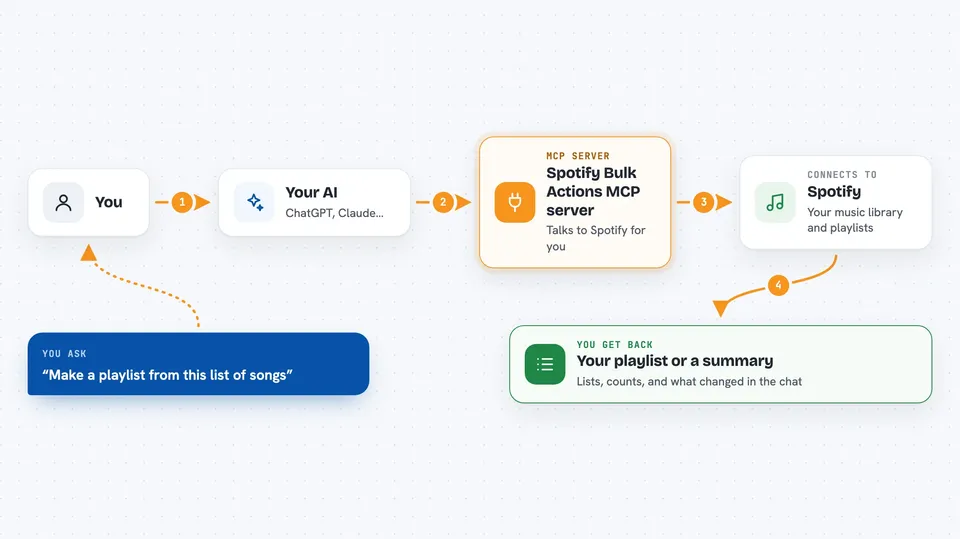
You ask your AI something like "make a playlist from this list of songs." The AI passes your request to this helper. The helper talks to Spotify on your behalf, searching for each song and checking how sure it is about the match. Then it creates the playlist, exports files, or makes the changes you asked for, and tells you what it did.
 Click to zoom
What you can do with it
- Create a playlist from a CSV file of song titles and artists
- Search many songs at once and see which matches are sure and which are not
- Export your whole library summary, including followed artists and liked songs
- Find albums where you have saved several songs (handy for vinyl shopping)
- Find and remove duplicate tracks in a playlist
- Compare two playlists to see shared and unique songs
- Follow or unfollow artists in bulk, and save or unsave tracks in bulk
Try asking your AI
- “What artists do I have the most saved songs from?”
- “Find albums where I have 6 or more saved songs”
- “Create a playlist called My Mix from this CSV: title,artist then the rows”
- “Find and remove duplicate tracks in my playlist called Road Trip”
What it gives back to you
You get answers in the chat: lists of artists, albums, or songs, counts, and short summaries of what changed. For big jobs it can export a CSV file you can open in a spreadsheet, for example a list of uncertain song matches to review. When it creates or edits a playlist, it tells you what it added, removed, or reordered.
Before you start
What you need
- A Spotify account
- Spotify Developer credentials (a Client ID and Client Secret from the Spotify developer dashboard, which is like a username and password for apps)
- Python 3.10 or newer on your computer
- A one-time login in your browser to connect your Spotify account
Good to know
It can change your Spotify account, so it may create playlists, follow or unfollow artists, and add or remove saved songs, and you should check before letting it run big bulk changes.
Install it with your AI
Add Spotify Bulk Actions MCP server to your AI, no technical skills needed
You don't install anything by hand. You copy one prompt, paste it into an AI that can work on your computer, and it checks, installs and connects the server for you, asking you when it needs something.
Sign in to get the install prompt
Members get a ready-made prompt that lets the Claude desktop app check Spotify Bulk Actions MCP server, install it and connect it for them, step by step. You don't need any technical skills: you copy, paste and answer a few questions. Your connected AI can also find and install any of the 4,066 MCP servers here for you.
Who it's for
People who keep large Spotify libraries or playlists, podcast listeners who want to turn song lists into playlists, and anyone who likes to review and tidy up their music in bulk.