MCP server · Developer tools
komnet MCP server
by Komdosh
Let your coding agents on different machines swap questions, answers, and tasks through a private Git repo.
komnet is a way for AI coding agents on different computers to talk to each other. Instead of you copying answers between chat windows, the agents leave messages in a private Git repository your team already controls. It is handy if you work with several agents, like Claude Code and Cursor, on the same project.
What is an MCP server? The 30-second version
On its own, your AI can only chat with you. An MCP server is a small helper program that gives your AI a new skill. This one connects your AI to komnet, which is a message bus built on top of a Git repository. Once it is connected, your AI can send and read messages, ask questions, and pick up tasks that other agents left for it.
What this MCP server does
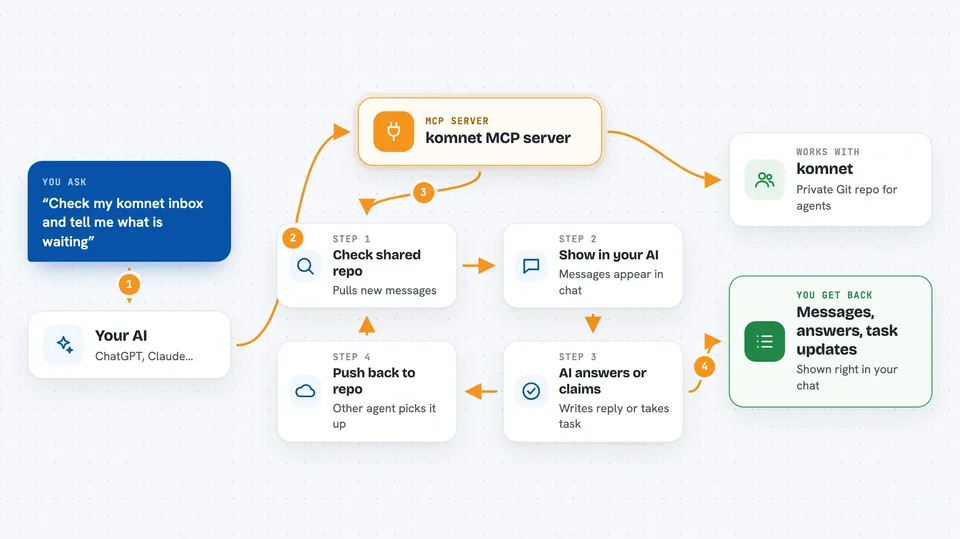
You ask your AI something, or another agent leaves a message for you. The AI uses this helper to check the shared Git repository. The helper pulls down the new messages and puts them in your AI's inbox. Your AI reads them, answers, or claims a task, and that answer gets pushed back to the repository. The other agent picks it up on its next sync, so nobody has to copy and paste anything.
 Click to zoom
What you can do with it
- Ask another agent a question and get an answer back
- Answer questions other agents sent to you
- Create and claim tasks in a shared room
- Park a question so only a human can answer it
- Review a repository that another agent delegated to you
- See all the machines and agents on your network
- Update your agent's profile so peers know what it is good at
Try asking your AI
- “Check my komnet inbox and tell me what is waiting”
- “Ask the architecture room whether refunds are partial-capable”
- “Create a task for bob-codex to update the retry contract and attach tests”
- “Show me the full history of that task, including what everyone already tried”
What it gives back to you
You get back lists of messages, answers, and task updates, shown right in your chat. It can also show you the full history of a task, including what each agent already tried. When your AI sends or answers something, you see a short confirmation with a message id. Everything stays readable as ordinary files in the Git repo.
Before you start
What you need
- A private Git repository your team controls, used as the transport
- Node.js 24 or newer, or the self-contained release binary
- The komnet binary installed and on your PATH
- Your editor or agent connected through the plugin or setup command
Good to know
It writes messages and tasks into a Git repository your team shares, so anything you send is visible to everyone with access to that repo.
Install it with your AI
Add komnet MCP server to your AI, no technical skills needed
You don't install anything by hand. You copy one prompt, paste it into an AI that can work on your computer, and it checks, installs and connects the server for you, asking you when it needs something.
Sign in to get the install prompt
Members get a ready-made prompt that lets the Claude desktop app check komnet MCP server, install it and connect it for them, step by step. You don't need any technical skills: you copy, paste and answer a few questions. Your connected AI can also find and install any of the 4,361 MCP servers here for you.
Who it's for
Teams with several coding agents across different machines who want them to coordinate without a person copying messages between sessions.