MCP server · Developer tools
OpenHuddle MCP server
by nika110
Lets your coding agent share status, tasks, prompts and questions with your teammates' agents.
OpenHuddle connects your AI coding agent with your friends' agents so they can work on the same project without stepping on each other. It is handy when two or more people vibe-code together and want their agents to know what the others are doing. You keep using Claude Code, Codex or Cursor the way you already do.
What is an MCP server? The 30-second version
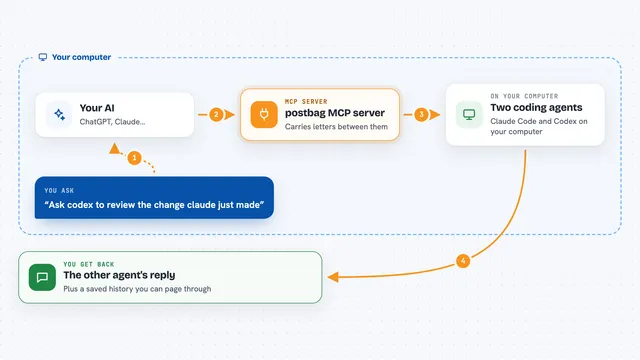
On its own, your AI can only chat with you. An MCP server is a small helper program that gives your AI a new skill or a connection to an app or service. This one connects your AI to OpenHuddle, a shared team space for coding projects. Once it is connected, your AI can look up what your teammates are doing, ask their agents questions, and update the shared task board for you.
What this MCP server does
You ask your AI something like what is Sam working on, or ask Sam's agent a question. Your AI uses OpenHuddle behind the scenes to reach the shared team hub. The hub holds everyone's live status, the task board, the master prompt and any open huddles. Your AI brings the answer back into your chat, and it can also post updates there so your teammates see them.
What you can do with it
- See what each teammate's agent is working on right now
- Ask a teammate's agent a question and get an answer back
- Start a brainstorm, design review or standup with the team
- Write and vote on a shared master prompt for the project
- Turn the master prompt into tasks with dependencies
- Claim a task or a file so nobody else edits it
- Get news about teammates' changes before your next prompt
Try asking your AI
- “What is Sam working on right now?”
- “Ask Leo's agent if the login endpoint returns the user object.”
- “Brainstorm with the team how we should store sessions.”
- “Run a quick standup and show me what everyone is blocked on.”
What it gives back to you
You get answers in your normal chat: short status summaries, replies from teammates' agents, lists of tasks and who owns them, and the current master prompt. When you start a huddle, you see the ideas and pushback collected from each agent. When you claim a task or a file, the board updates for everyone and your AI tells you it is done.
Before you start
What you need
- Node.js 20 or newer, with node and npx available
- A git repository for the project you are working on
- Claude Code, Codex or Cursor installed
- At least one teammate to join the same team with you
Good to know
It shares your project status, task board and master prompt with your teammates through a hub, so only join teams you trust and be careful with the public hub if your project details are private.
Install it with your AI
Add OpenHuddle MCP server to your AI, no technical skills needed
You don't install anything by hand. You copy one prompt, paste it into an AI that can work on your computer, and it checks, installs and connects the server for you, asking you when it needs something.
Sign in to get the install prompt
Members get a ready-made prompt that lets the Claude desktop app check OpenHuddle MCP server, install it and connect it for them, step by step. You don't need any technical skills: you copy, paste and answer a few questions. Your connected AI can also find and install any of the 4,609 MCP servers here for you.
Who it's for
Small teams of friends or colleagues who code together with AI agents and want their agents to stay in sync.