MCP server · Chat · official
plori MCP server
by plori-ai · official
Let your AI create and run cloud agents that have their own disk, tools and memory.
plori is a service that gives you cloud AI agents. Each agent gets its own little computer in the cloud with a real disk, real command line tools, and memory of past conversations. This MCP server is the bridge that lets the AI you already chat with create those agents, send them tasks, and check on them for you.
What is an MCP server? The 30-second version
On its own, your AI can only chat. It cannot reach out to other apps or services by itself. An MCP server is a small helper that gives your AI a new skill or a connection, and here it connects your AI to plori. Once connected, your AI can talk to plori for you, so when you ask it to create an agent or check your credits, it can actually do that instead of just explaining how.
What this MCP server does
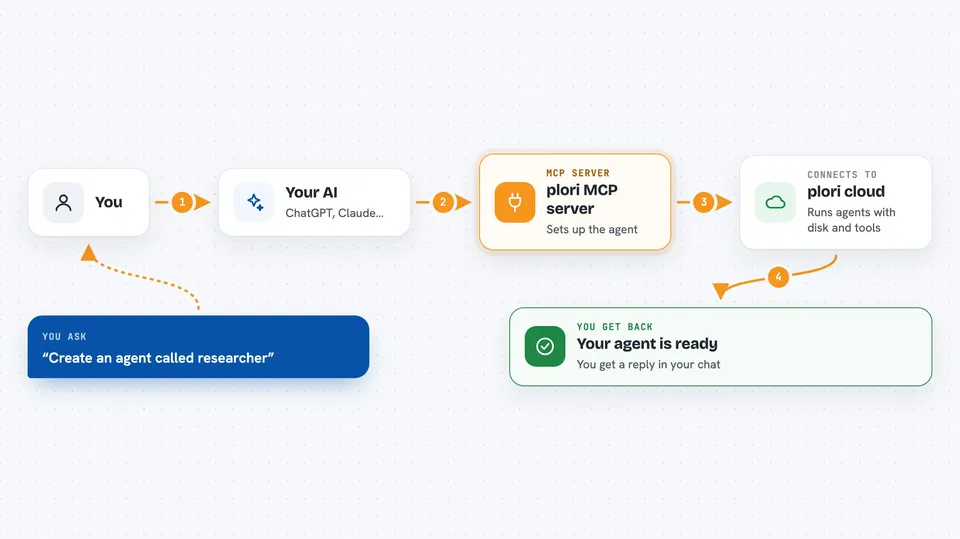
You ask your AI something like create an agent called researcher, and your AI passes that request to this helper. The helper talks to plori over the internet and plori sets up a cloud agent with its own disk and tools. When you ask your AI to send a task to that agent, the helper forwards the message, waits for the reply, and brings the answer back into your chat. You can also ask it to list your agents, check your credits, or see which runs are waiting for your approval.
 Click to zoom
What you can do with it
- Create a new cloud agent with its own disk and memory
- Send a task to an agent and get the reply back in your chat
- List all your agents and see which ones are busy right now
- Check your credit balance and how much you have spent
- See runs that are paused waiting for your approval or answer
- Approve, deny or answer a paused run so it can continue
- Schedule an agent to run later, after a delay or at a set time
Try asking your AI
- “List my plori agents and tell me how many credits I have left.”
- “Create an agent called weekly-report and send it a task to summarise this week's notes.”
- “Which of my agents are waiting for my approval right now?”
- “Schedule the researcher agent to run tomorrow at 9am with the message check the news.”
What it gives back to you
You get answers written back into your chat, in plain language. Lists come back as short summaries, like your agents with their names and status, or your credit balance. When you send a task, the reply from the agent appears in the chat once it finishes. If a run is still going, you get a run id and can ask again later for the result.
Before you start
What you need
- A plori account (sign up at plori.ai)
- An MCP client like Claude Code, Cursor, VS Code, Codex CLI or Cline
- Credits on your plori account, since creating and running agents costs credits
Good to know
Creating and running agents spends plori credits from your account, and deleting an agent wipes its disk for good, so check before you confirm.
Install it with your AI
Add plori MCP server to your AI, no technical skills needed
You don't install anything by hand. You copy one prompt, paste it into an AI that can work on your computer, and it checks, installs and connects the server for you, asking you when it needs something.
Sign in to get the install prompt
Members get a ready-made prompt that lets the Claude desktop app check plori MCP server, install it and connect it for them, step by step. You don't need any technical skills: you copy, paste and answer a few questions. Your connected AI can also find and install any of the 4,361 MCP servers here for you.
Who it's for
People who want AI helpers that can actually do work in the cloud, like writers, researchers, analysts and small teams who already use an AI chat tool.