MCP server · Research
Kaggle MCP server
Lets your AI look up Kaggle competitions, leaderboards, models, datasets and kernels for you.

This is a small helper that connects your AI assistant to Kaggle, the website where data scientists share competitions, datasets and notebooks. Once it is set up, you can ask your AI about Kaggle things in plain English instead of clicking around the site. It is handy if you follow data science competitions or want to find datasets without hunting through pages.
What is an MCP server? The 30-second version
On its own, your AI can only chat with you using what it already knows. An MCP server is a small helper program that gives your AI a new skill, in this case a connection to Kaggle. When you ask a question, your AI passes it to this helper, the helper talks to Kaggle, and the answer comes back into your chat. You do not need to understand how it works, you just need to set it up once.
What this MCP server does
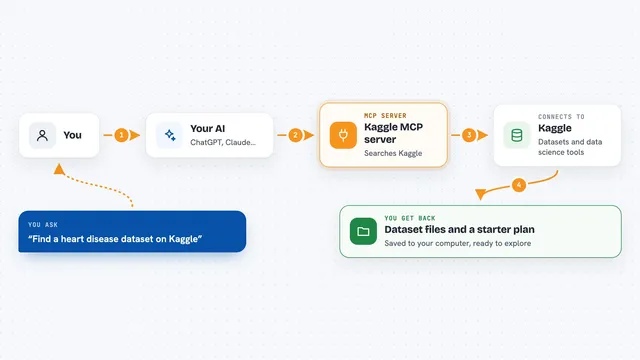
You ask your AI something about Kaggle, like which competitions are open right now. The AI sends that request to this helper program running on your computer. The helper uses your Kaggle account details to ask Kaggle for the information. Kaggle sends the data back, and the helper hands it to your AI. Your AI then shows it to you in the chat as a list or a short answer.
 Click to zoom
What you can do with it
- List the Kaggle competitions that are currently available
- Look up leaderboard standings for a competition
- Find datasets on Kaggle by topic or name
- Browse models and kernels other people have shared
- Ask follow-up questions about a competition in plain English
Try asking your AI
- “Show me the Kaggle competitions that are open right now”
- “What datasets does Kaggle have about air quality?”
- “Who is at the top of the leaderboard for the Titanic competition?”
- “Find popular kernels about image classification on Kaggle”
What it gives back to you
You get back lists and short summaries in the chat, like a list of competition names with their deadlines, or a set of dataset titles with short descriptions. Your AI can also answer follow-up questions using that information. It does not download files to your computer by itself, it just brings the details into the conversation.
Before you start
What you need
- Python 3.10 or newer installed on your computer
- A free Kaggle account
- Your Kaggle API token file (kaggle.json), which Kaggle gives you from your account settings
- The Claude desktop app or another app that supports MCP
Good to know
Your kaggle.json file is like a password for your Kaggle account, so keep it private and never share or upload it.
Install it with your AI
Add Kaggle MCP server to your AI, no technical skills needed
You don't install anything by hand. You copy one prompt, paste it into an AI that can work on your computer, and it checks, installs and connects the server for you, asking you when it needs something.
Sign in to get the install prompt
Members get a ready-made prompt that lets the Claude desktop app check Kaggle MCP server, install it and connect it for them, step by step. You don't need any technical skills: you copy, paste and answer a few questions. Your connected AI can also find and install any of the 4,361 MCP servers here for you.
Who it's for
People who follow Kaggle competitions, students learning data science, and analysts who want to find datasets or check leaderboards without browsing the site by hand.