MCP server · Analytics · official
Dingo data quality MCP server
by DataEval · official
Check your datasets and AI answers for quality problems, with rules and AI review.
Dingo is a free tool from a company called DataEval that checks how good your data is. It can look at text, tables, and AI answers and tell you what looks wrong or low quality. It is handy if you work with data or AI training sets and want a quick health check without writing code.
What is an MCP server? The 30-second version
On its own, your AI can only chat with you. An MCP server is a small helper program that gives your AI a new skill. This helper connects your AI to Dingo, so when you ask about your data, your AI can actually run Dingo's checks and bring back the results. You do not need to know how it works inside; you just ask in plain words.
What this MCP server does
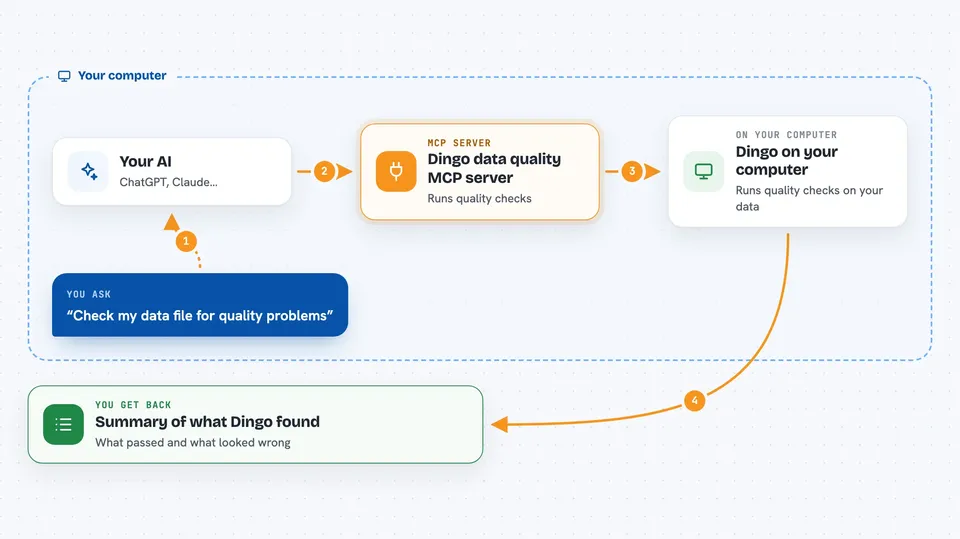
You ask your AI something like check this dataset for problems. Your AI passes that request to the Dingo helper running on your computer. The helper runs Dingo's quality checks, either fast rule-based ones or slower AI-based ones, on your data. Then it sends the findings back, and your AI explains them to you in the chat. You can also ask it to list which rules and prompts Dingo has available.
 Click to zoom
What you can do with it
- Run rule-based quality checks on a dataset
- Run AI-based quality checks on text or answers
- List the built-in rules Dingo offers
- List the built-in prompts Dingo uses
- Check AI answers for made-up facts
- Check text for odd characters or formatting problems
Try asking your AI
- “Run Dingo's rules on my file data.jsonl and tell me what looks bad”
- “Which quality rules does Dingo have for text?”
- “Check this AI answer for hallucinations using Dingo”
- “Use Dingo to score the quality of this training sample”
What it gives back to you
You get back a summary of what Dingo found: which checks ran, what passed, and what looked wrong. For each problem, you usually see the item, the rule or model that flagged it, and a short reason. Your AI then reads that and explains it in normal words. If you asked for a list of rules or prompts, you get that list instead.
Before you start
What you need
- Python installed on your computer
- The dingo-python package installed (pip install dingo-python)
- An API key from an AI provider if you want the AI-based checks (a kind of password for apps; the provider gives you one)
Good to know
The AI-based checks send your data to the AI provider you configured, so do not run them on private or sensitive data unless that is allowed.
Install it with your AI
Add Dingo data quality MCP server to your AI, no technical skills needed
You don't install anything by hand. You copy one prompt, paste it into an AI that can work on your computer, and it checks, installs and connects the server for you, asking you when it needs something.
Sign in to get the install prompt
Members get a ready-made prompt that lets the Claude desktop app check Dingo data quality MCP server, install it and connect it for them, step by step. You don't need any technical skills: you copy, paste and answer a few questions. Your connected AI can also find and install any of the 4,361 MCP servers here for you.
Who it's for
People who work with datasets or AI training data, like data analysts, data engineers, and AI researchers.