
MCP server · Finance and crypto
Bridge Metrics MCP server
by kukapay
Lets your AI look up live cross-chain bridge volumes, chains, tokens, and transactions.
This is a small helper that connects your AI to public data about crypto bridges, the tools that move coins between blockchains. It pulls numbers from DeFiLlama, a well-known public data site, so your AI can answer questions about bridge activity. It is handy if you follow crypto markets or write reports about them, even if you are not a developer.
What is an MCP server? The 30-second version
On its own, your AI can only chat with you. An MCP server is a small helper program that gives your AI a new skill or a connection to an outside service. This one connects your AI to DeFiLlama's bridge data, so when you ask about bridge volumes or chains, the AI can go look up the real numbers and bring them back. You do not need to know how it works under the hood.
What this MCP server does
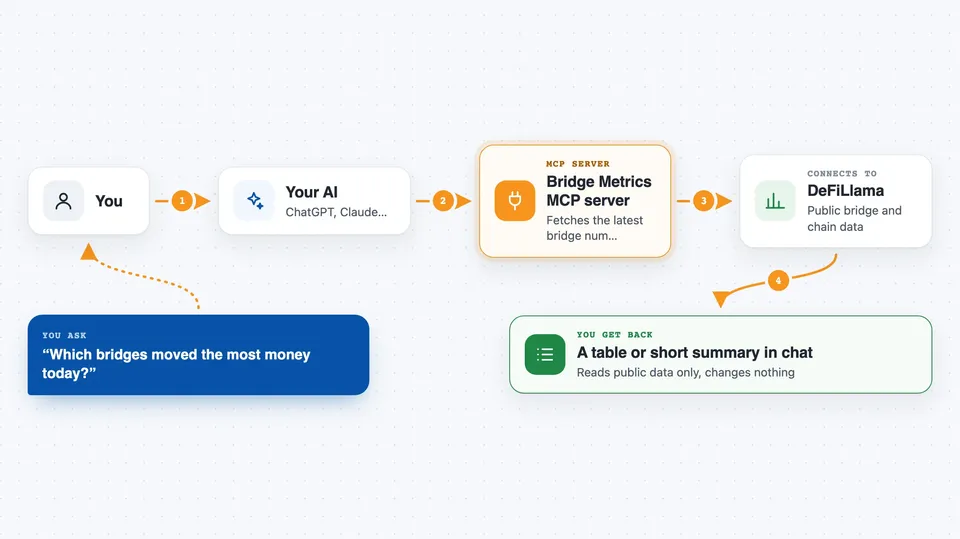
You ask your AI a question, like which bridges moved the most money today. The AI passes that request to this helper. The helper talks to DeFiLlama, grabs the latest bridge numbers, and hands them back. Your AI then turns those numbers into a table or a short summary in the chat. You get an answer without opening a single website.
 Click to zoom
What you can do with it
- List all blockchains tracked by DeFiLlama, sorted by total value locked
- List bridges sorted by their last 24 hours of volume
- Get historical daily volumes for a chain or a specific bridge
- See a 24-hour token breakdown for a bridge, with deposit and withdrawal amounts
- Look up recent transactions for a bridge, with amounts and USD values
- Ask your AI to analyze a bridge's volume trend
- Compare two bridges on a metric like weekly volume
Try asking your AI
- “List all chains on DeFiLlama sorted by TVL”
- “Show me the top bridges by 24-hour volume, with their supported chains”
- “Get historical volumes for the Ethereum chain over the last week”
- “Compare the Polygon and Arbitrum bridges by weekly volume”
What it gives back to you
You get tables and short written summaries right in the chat. The tables show things like chain names, bridge names, dates, deposit and withdrawal amounts in dollars, transaction counts, and token symbols. For analysis prompts, your AI adds a few bullet points of insight on top of the numbers. Nothing is changed anywhere; it only reads public data.
Before you start
What you need
- Python 3.10 or newer
- The uv tool for Python (the README recommends it)
- The Claude desktop app if you want to add it there
Good to know
It only reads public data, so nothing you own is changed, but crypto numbers move fast and the figures are only as fresh as DeFiLlama's latest update.
Install it with your AI
Add Bridge Metrics MCP server to your AI, no technical skills needed
You don't install anything by hand. You copy one prompt, paste it into an AI that can work on your computer, and it checks, installs and connects the server for you, asking you when it needs something.
Sign in to get the install prompt
Members get a ready-made prompt that lets the Claude desktop app check Bridge Metrics MCP server, install it and connect it for them, step by step. You don't need any technical skills: you copy, paste and answer a few questions. Your connected AI can also find and install any of the 4,609 MCP servers here for you.
Who it's for
Crypto curious office workers, analysts, and writers who need quick bridge numbers without digging through dashboards.



