
MCP server · Finance and crypto
Crypto Indicators MCP server
by kukapay
Lets your AI calculate crypto technical indicators and buy/sell/hold signals for coins like BTC and ETH.
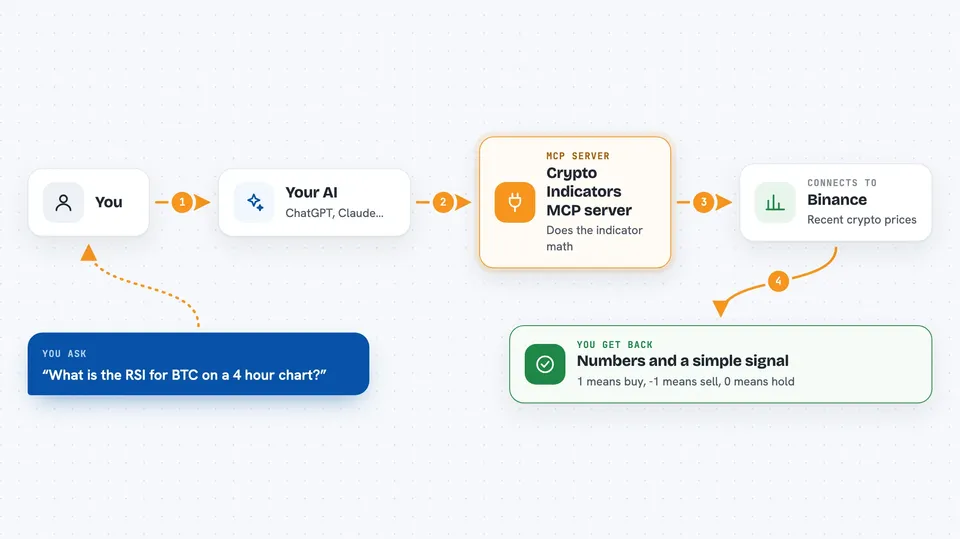
This is a helper for your AI that does cryptocurrency technical analysis. It can work out things like RSI, MACD, Bollinger Bands and many other indicators, and turn them into simple buy, sell or hold signals. It is handy if you follow crypto prices and want quick numbers without opening a charting site.
What is an MCP server? The 30-second version
On its own, your AI can only chat with you. An MCP server is a small helper program that gives your AI a new skill or a connection to another service. This one connects your AI to crypto market data and to a big library of technical analysis math. So when you ask about a coin, the AI uses this helper to fetch prices and run the calculations for you.
What this MCP server does
You ask your AI something like the RSI for BTC on a 4-hour chart. The AI passes that request to this helper. The helper pulls recent price data from an exchange (Binance by default) and runs the indicator math. Then it sends the numbers back, and your AI shows them to you in the chat. For strategies, it also gives a simple signal: 1 means buy, -1 means sell, 0 means hold.
 Click to zoom
What you can do with it
- Calculate over 50 technical indicators like RSI, MACD, Bollinger Bands and ATR
- Get buy, sell or hold signals from matching trading strategies
- Check trend, momentum, volatility and volume indicators for a coin
- Pick the timeframe you want, such as 1 hour or 4 hours
- Choose how many past data points to use
- Ask about pairs like BTC/USDT or ETH/USDT
Try asking your AI
- “Calculate the MACD for BTC/USDT on a 1-hour timeframe with fast period 12, slow period 26, signal period 9, and fetch 100 data points”
- “Give me the RSI strategy signals for ETH/USDT on a 4-hour timeframe with a period of 14 and 50 data points”
- “What is the Bollinger Bands reading for BTC/USDT on the daily chart”
- “Show me the Aroon strategy signals for SOL/USDT on a 1-hour timeframe”
What it gives back to you
You get numbers back in the chat, usually as a list of values for each point in time. For example, MACD comes back as the MACD line, the signal line and the histogram. Strategies come back as a short list of signals where 1 is buy, -1 is sell and 0 is hold. Your AI can then explain what those numbers mean in plain words.
Before you start
What you need
- Node.js version 18 or newer installed on your computer
- npm version 8 or newer
- The files from the project downloaded to your computer
- A Claude Desktop or other MCP client set up to run it
Good to know
These are just math-based numbers, not financial advice, so treat the buy and sell signals as information, not instructions.
Install it with your AI
Add Crypto Indicators MCP server to your AI, no technical skills needed
You don't install anything by hand. You copy one prompt, paste it into an AI that can work on your computer, and it checks, installs and connects the server for you, asking you when it needs something.
Sign in to get the install prompt
Members get a ready-made prompt that lets the Claude desktop app check Crypto Indicators MCP server, install it and connect it for them, step by step. You don't need any technical skills: you copy, paste and answer a few questions. Your connected AI can also find and install any of the 4,361 MCP servers here for you.
Who it's for
People who follow crypto markets and want quick indicator numbers or signals without doing the math themselves.





