
MCP server · Finance and crypto
Crypto Liquidations MCP server
by kukapay
Lets your AI watch Binance and show you the latest crypto liquidation events in a simple table.
This is a small helper that connects your AI to Binance, a large crypto exchange, so it can follow liquidation events as they happen. A liquidation is when a trader's borrowed position gets closed by force because the price moved against them, and big ones often shake the market. It is handy if you follow crypto prices and want a quick, plain view of what just got wiped out.
What is an MCP server? The 30-second version
On its own, your AI can only chat with you using what it already knows. An MCP server is a small helper program that gives your AI a new skill or a connection to an app or service. This helper connects your AI to Binance, so it can look up recent liquidation events for you when you ask. You do not need to understand how it works inside; you just ask a question and the AI uses this helper behind the scenes.
What this MCP server does
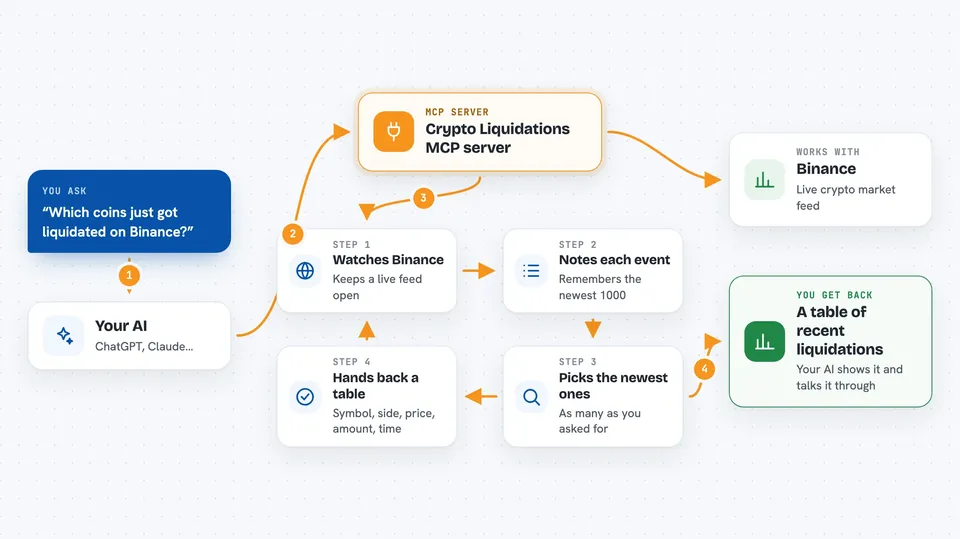
You ask your AI something like which coins just got liquidated. The AI passes that request to this helper. The helper keeps a live feed open to Binance and remembers the most recent liquidation events, up to a thousand of them. When you ask, it picks the newest ones and hands them back as a neat table. Your AI then shows you that table in the chat, or uses it to talk about what is going on in the market.
 Click to zoom
What you can do with it
- See the most recent crypto liquidation events on Binance
- Choose how many events to show, up to 1000
- Check which trading pairs had buy or sell liquidations
- Look at the price, quantity and time of each event
- Ask your AI to analyze liquidation trends across all pairs
- Spot moments of high market activity quickly
Try asking your AI
- “Show me the 5 most recent liquidation events from Binance.”
- “Which coins had the biggest liquidations in the last few minutes?”
- “Give me a table of the latest 20 liquidations.”
- “Analyze the recent liquidation trends across all trading pairs.”
What it gives back to you
You get a Markdown table with columns for Symbol, Side (BUY or SELL), Price, Quantity and Time. The time is shown as HH:MM:SS. If you ask for analysis, your AI will talk through the trends using that table as its source. Nothing is saved to disk, so the table only reflects what the helper has seen recently.
Before you start
What you need
- Python 3.10 or newer
- The uv package manager
- An internet connection so it can reach Binance
- An MCP client such as the Claude desktop app
Good to know
This is market information, not financial advice, and the helper only keeps the last 1000 events in memory, so older ones are gone.
Install it with your AI
Add Crypto Liquidations MCP server to your AI, no technical skills needed
You don't install anything by hand. You copy one prompt, paste it into an AI that can work on your computer, and it checks, installs and connects the server for you, asking you when it needs something.
Sign in to get the install prompt
Members get a ready-made prompt that lets the Claude desktop app check Crypto Liquidations MCP server, install it and connect it for them, step by step. You don't need any technical skills: you copy, paste and answer a few questions. Your connected AI can also find and install any of the 4,609 MCP servers here for you.
Who it's for
People who follow crypto markets and want a quick, plain view of recent liquidations, without opening charts or exchange pages.



