
MCP server · Finance and crypto
DEX Pools MCP server
by kukapay
Lets your AI look up live crypto trading pool data from GeckoTerminal and turn it into simple tables.
This is a small helper that connects your AI assistant to live data about crypto trading pools. A pool is where people swap one crypto token for another on a trading site. If you follow crypto markets or write about them, this saves you a lot of copy and paste.
What is an MCP server? The 30-second version
On its own, your AI can only chat with you. An MCP server is a small helper program that gives your AI a new skill or a connection to an app. This one connects your AI to GeckoTerminal, a site that tracks crypto trading pools. Once it is set up, you can just ask your AI a question and it will go and look up the numbers for you.
What this MCP server does
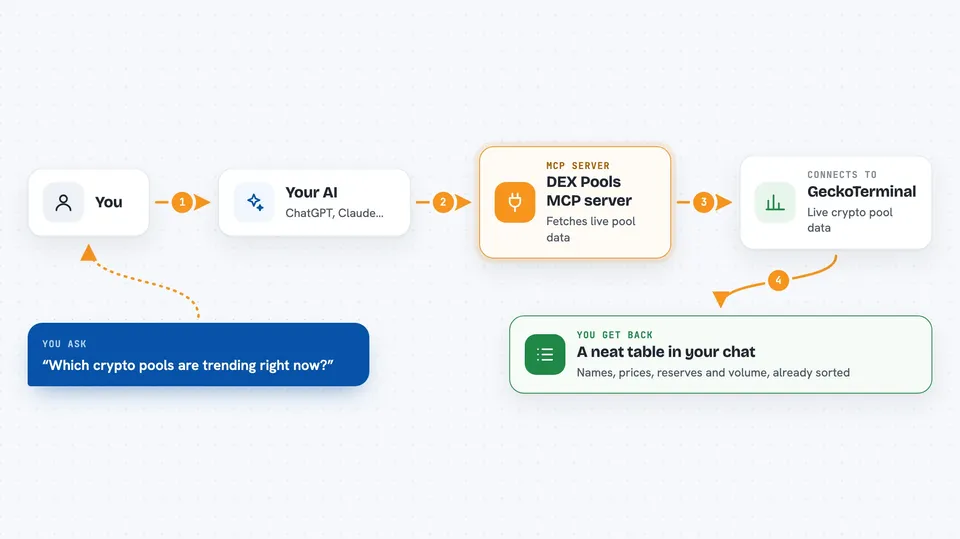
You ask your AI something like which pools are trending right now. Your AI passes that request to this helper program. The helper talks to GeckoTerminal and asks for the data. Then it hands the results back to your AI as a neat table with names, prices, reserves and trading volume. You see the table right in your chat window.
 Click to zoom
What you can do with it
- See which blockchain networks are supported
- List the trading sites available on a network
- Find the newest pools that just appeared
- Check which pools are trending right now
- See the busiest pools on a network or trading site
- Search for a pool by token name or symbol
Try asking your AI
- “Show me the trending pools on Ethereum in the last 24 hours”
- “What new pools appeared across all networks today”
- “List the top pools on SushiSwap sorted by trading volume”
- “Search for WETH pools on Ethereum”
What it gives back to you
You get a table in the chat with columns like the trading site, network, pool name, price, reserve in US dollars, 24 hour volume and the pool address. It is plain text you can read or copy into a spreadsheet. If you ask for trending or top pools, the table is already sorted for you.
Before you start
What you need
- Python 3.10 or newer
- uv, a tool for running Python programs (the README shows how to install it)
- A free CoinGecko Demo API key from coingecko.com (an API key is like a password that lets an app ask for data)
Good to know
This only reads public pool data, but crypto numbers move fast, so double check anything important before acting on it.
Install it with your AI
Add DEX Pools MCP server to your AI, no technical skills needed
You don't install anything by hand. You copy one prompt, paste it into an AI that can work on your computer, and it checks, installs and connects the server for you, asking you when it needs something.
Sign in to get the install prompt
Members get a ready-made prompt that lets the Claude desktop app check DEX Pools MCP server, install it and connect it for them, step by step. You don't need any technical skills: you copy, paste and answer a few questions. Your connected AI can also find and install any of the 4,609 MCP servers here for you.
Who it's for
Crypto traders, analysts and writers who want quick pool numbers without opening a browser.



