
MCP server · Finance and crypto
DexScreener Trending MCP server
by kukapay
Your AI can look up the hottest trending crypto tokens on BSC and Solana right now.
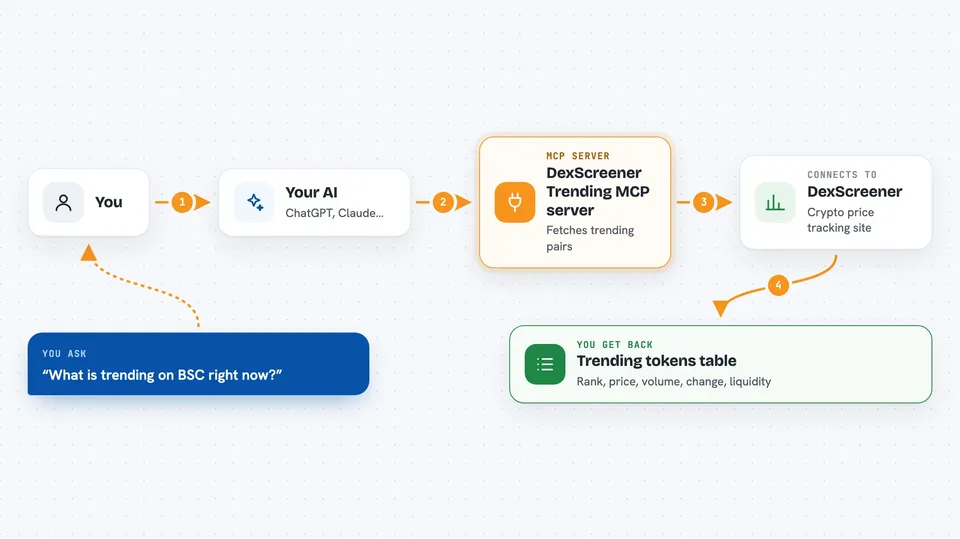
This is a small helper that connects your AI to DexScreener, a site that tracks crypto trading pairs. Once it is set up, you can just ask your AI what is trending and it will fetch a live list for you. It is handy if you follow crypto markets and want a quick snapshot without opening a browser.
What is an MCP server? The 30-second version
On its own, your AI can only chat with you using what it already learned. An MCP server is a small helper program that gives your AI a new skill or a connection to an app or service. This one connects your AI to DexScreener, so it can look up trending tokens for you when you ask. You do not need to understand how it works inside; you just ask a question and the helper does the fetching.
What this MCP server does
You ask your AI something like what is trending on BSC right now. The AI passes that request to this helper program. The helper talks to DexScreener and pulls back the current top trending trading pairs. Then the AI shows you the results in your chat, usually as a neat table. It also keeps a structured version of the data in the background in case you want to do more with it.
 Click to zoom
What you can do with it
- See the top trending tokens on BSC right now
- Check the hottest Solana pairs today
- Limit the list to a number you choose, like top 5 or top 10
- See prices, 24 hour volume, price change, liquidity, and market cap for each pair
- Use a ready-made analysis template on any token you pick
Try asking your AI
- “Show me the top 10 trending tokens on BSC right now”
- “What are the hottest Solana pairs today? Limit to 5”
- “List top 8 trending pairs on solana with high volume”
- “Analyze the top trending token on BSC”
What it gives back to you
You get a list of trending trading pairs, shown as a table in the chat with rank, name, symbol, price, 24 hour volume, 24 hour change, liquidity, market cap, and boosts. Behind the scenes it also returns the same data in a structured format. If you ask for a specific number, it will show that many. The table updates each time you ask, so you always see the current picture.
Before you start
What you need
- Node.js installed on your computer
- The project files downloaded from GitHub
- An MCP client like Claude Desktop to connect it to
Good to know
This only reads public data from DexScreener, so it does not touch your money or accounts, but crypto prices move fast and the list is just a snapshot, not financial advice.
Install it with your AI
Add DexScreener Trending MCP server to your AI, no technical skills needed
You don't install anything by hand. You copy one prompt, paste it into an AI that can work on your computer, and it checks, installs and connects the server for you, asking you when it needs something.
Sign in to get the install prompt
Members get a ready-made prompt that lets the Claude desktop app check DexScreener Trending MCP server, install it and connect it for them, step by step. You don't need any technical skills: you copy, paste and answer a few questions. Your connected AI can also find and install any of the 4,609 MCP servers here for you.
Who it's for
Crypto traders, investors, and anyone who follows BSC or Solana tokens and wants quick trending lists without leaving their chat.



