
MCP server · Finance and crypto
Funding Rates MCP server
by kukapay
Ask your AI to compare crypto funding rates across Binance, OKX, Bybit and more, in one table.
This is a small helper that lets your AI look up funding rates for crypto trading pairs on several big exchanges at once. Funding rates are the small fees traders pay each other on certain crypto trades, and they differ from exchange to exchange. If you follow crypto markets even a little, this saves you from opening six websites and writing numbers down.
What is an MCP server? The 30-second version
On its own, your AI can only chat with you. An MCP server is a small helper program that gives your AI one new skill. This helper connects your AI to live funding rate data from crypto exchanges like Binance, OKX, Bybit, Bitget, Gate and CoinEx. Once it is connected, you just ask in plain words and the AI fetches the numbers for you.
What this MCP server does
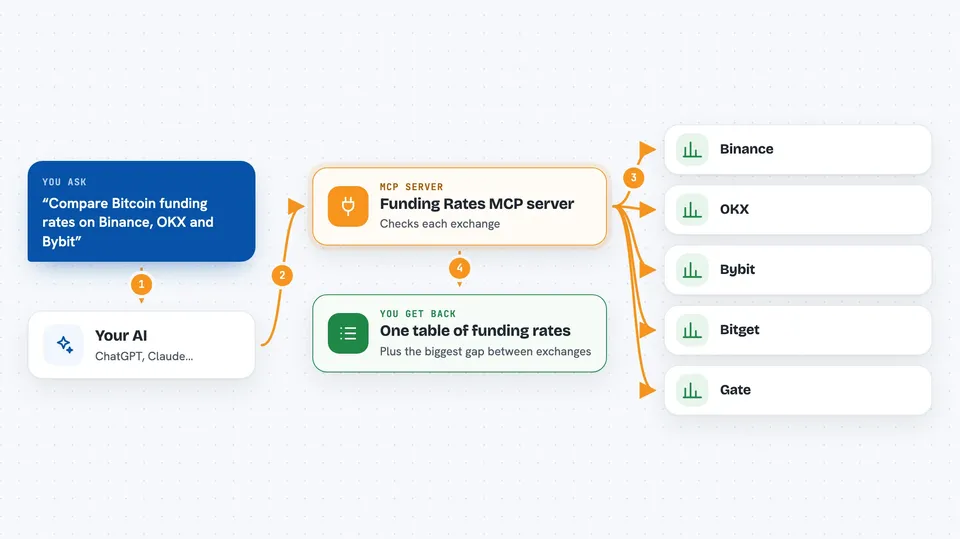
You ask your AI something like compare funding rates for Bitcoin and Ethereum across all exchanges. The AI passes your request to this helper. The helper then contacts each exchange and collects the current funding rate for each trading pair you named. It lines everything up in a table with one row per coin and one column per exchange. It also adds a Divergence column that shows the biggest gap between exchanges for that coin, which is handy if you are curious about arbitrage.
 Click to zoom
What you can do with it
- Compare funding rates for one coin across all supported exchanges
- Compare funding rates for several coins at once in a single table
- Limit the comparison to just the exchanges you care about
- Spot the biggest funding rate gap for each coin via the Divergence column
- Get a quick snapshot before you open your trading app
Try asking your AI
- “Compare funding rates for BTC/USDT:USDT and ETH/USDT:USDT across all exchanges.”
- “Compare funding rates for SOL/USDT:USDT on Binance, OKX, and Bybit.”
- “Show me the funding rates for BTC/USDT:USDT, ETH/USDT:USDT and SOL/USDT:USDT on Bitget and Gate.”
- “What is the funding rate divergence for ETH/USDT:USDT right now?”
What it gives back to you
You get back a small table in the chat. Each row is a trading pair like BTC/USDT:USDT, each column is an exchange, and the cells show the current funding rate as a percentage. There is also a Divergence column showing the largest difference between exchanges for that pair. Nothing is changed anywhere; it is just a read-only snapshot.
Before you start
What you need
- Python 3.10 or newer installed on your computer
- The uv tool installed (a small program that manages Python packages)
- Git installed, to download the project once
- Claude Desktop if you want to use it interactively (optional)
Good to know
The numbers are live market data and can change within seconds, so treat them as a snapshot and not as trading advice.
Install it with your AI
Add Funding Rates MCP server to your AI, no technical skills needed
You don't install anything by hand. You copy one prompt, paste it into an AI that can work on your computer, and it checks, installs and connects the server for you, asking you when it needs something.
Sign in to get the install prompt
Members get a ready-made prompt that lets the Claude desktop app check Funding Rates MCP server, install it and connect it for them, step by step. You don't need any technical skills: you copy, paste and answer a few questions. Your connected AI can also find and install any of the 4,609 MCP servers here for you.
Who it's for
Crypto traders and anyone curious about funding rates who wants a quick comparison without opening six exchange websites.



