
MCP server · Finance and crypto
Hyperliquid Info MCP server
by kukapay
Let your AI look up live Hyperliquid market prices and your own positions, orders, trades and funding.
This is a small helper that connects your AI assistant to Hyperliquid, a trading platform for crypto perpetuals. Once it is set up, you can just ask questions in normal words instead of clicking through charts and account pages. It is handy for anyone who trades on Hyperliquid or keeps an eye on those markets.
What is an MCP server? The 30-second version
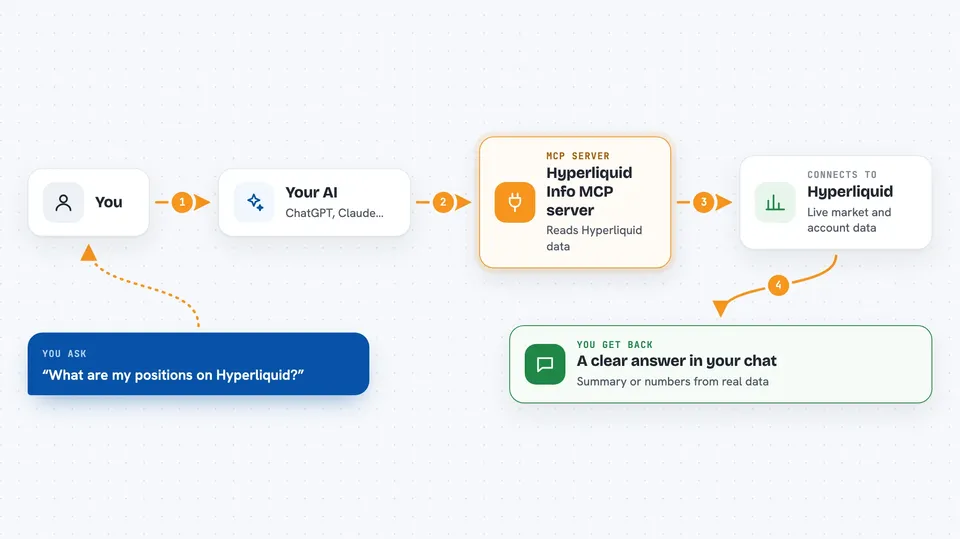
On its own, your AI can only chat with you. An MCP server is a small helper program that gives your AI one extra skill, in this case a connection to Hyperliquid. When you ask something like what your positions look like, the AI passes your question to this helper, and the helper fetches the answer from Hyperliquid. Then the AI writes it back to you in plain language.
What this MCP server does
You ask your AI a question about Hyperliquid, for example about your account or about a coin's price. The AI uses this helper, which talks to Hyperliquid's public data service. The helper brings back the numbers, such as your positions, your open orders, your recent trades or the current prices. The AI then turns that into a short answer or summary you can read in the chat. It only reads information, it does not place or cancel anything for you.
 Click to zoom
What you can do with it
- Check your positions, margin and withdrawable balance
- List your open orders and look up one order by its ID
- Review your recent trades and funding payments
- See the fee rates that apply to your account
- Get mid prices for all trading pairs at once
- Pull candlestick data for a coin over a time range
- Look up which perpetual and spot markets exist
Try asking your AI
- “Show me the current state of my Hyperliquid account 0xYourAddress, including positions and margin”
- “Analyze my Hyperliquid trading activity for account 0xYourAddress and flag anything risky”
- “Get the 1 minute candlestick data for ETH from January 1 to January 2, 2025”
- “What are the mid prices for all trading pairs on Hyperliquid right now”
What it gives back to you
You get back a written answer in the chat, built from real data from Hyperliquid. It might be a short summary of your positions with your profit or loss, a list of your open orders, a table of recent trades, or a set of price points for a coin. The AI usually reformats the raw numbers into something easier to read. It can also give you the plain figures if you ask for details.
Before you start
What you need
- Python 3.10 or newer
- uv or pip to install the packages (free tools that fetch code for you)
- Your Hyperliquid account address (the public 0x... address) if you want info about your own account
- Claude Desktop or another app that supports MCP servers
Good to know
It can only read data, so it cannot place or cancel trades, and the market information it brings back is not financial advice.
Install it with your AI
Add Hyperliquid Info MCP server to your AI, no technical skills needed
You don't install anything by hand. You copy one prompt, paste it into an AI that can work on your computer, and it checks, installs and connects the server for you, asking you when it needs something.
Sign in to get the install prompt
Members get a ready-made prompt that lets the Claude desktop app check Hyperliquid Info MCP server, install it and connect it for them, step by step. You don't need any technical skills: you copy, paste and answer a few questions. Your connected AI can also find and install any of the 4,609 MCP servers here for you.
Who it's for
Hyperliquid traders, crypto analysts and anyone building dashboards or bots who wants to ask questions about those markets in plain words.



